Minecraft version
Back to mods 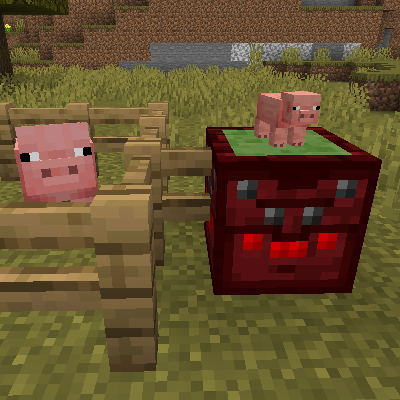
CurseForge · Minecraft mod
Entity Detectors
Adds blocks that emit a redstone signal while players or mobs are near
Choose a version Pick your version below, then grab the matching file.
Quick answer
Which Entity Detectors release should I use?
Latest stable file entitydetectors-1.21.1-4.0.0.0.jar
Game version 1.21.1
Loader NeoForge
Entity Detectors entitydetectors-1.21.1-4.0.0.0.jar targets 1.21.1 with NeoForge. The project page does not say whether this file belongs on the client, dedicated server, or both. No extra mods listed for this file.
Where it goes
Is Entity Detectors required on the client, server, or both?
The project page does not say whether this file belongs on the client, dedicated server, or both.
Client Source doesn’t say
Dedicated server Source doesn’t say
Loader for this release NeoForge
Required install it here Optional supported, not mandatory Not supported do not install here Source doesn’t say do not assume
The source does not explicitly classify this release as client-only or server-only.
What else does Entity Detectors entitydetectors-1.21.1-4.0.0.0.jar need?
entitydetectors-1.21.1-4.0.0.0.jar. Change the file and its required mods may change too.
This file does not list any required mods. Do not add a library just because a different file uses it.
This file does not list any required or optional mods.
Before you install it
Add Entity Detectors without breaking your instance.
Built for Entity Detectors entitydetectors-1.21.1-4.0.0.0.jar. Pick another file and the loader, install side or required mods may change.
- 01
Stick to this file
Use entitydetectors-1.21.1-4.0.0.0.jar. It targets 1.21.1 with NeoForge; another release may have different loader, side or dependency requirements.
- 02
Bring the mods it needs
This file does not list any required mods. Do not add a library just because a different file uses it.
- 03
Put it on the correct side
The project page does not say whether this file belongs on the client, dedicated server, or both.
- 04
Pick the file you checked
Use the “Get this file” button beside entitydetectors-1.21.1-4.0.0.0.jar. It opens that exact file at the source.
About this project
What does Entity Detectors add?
This mod adds two blocks.
The first block emits a redstone signal while players are near; the other block emits a redstone signal while mobs are near.
The detection range of either block can be set to a 2-, 4-, 8-, or 16- block spherical radius; this range can by cycled by activating the blocks.
The mob detector can also be set to only detect one type of entity. This can be done by using a slimeball on an entity (either shift-right-clicking the mob or attacking it with the slimeball) to obtain an Imprinted Slimeball, then using the imprint on the mob detector. A filtered mob detector can be reset to detect all entities by using a regular slimeball on it, or breaking the block.
The blocks check for entities at a default rate of once every 10 ticks; this can be changed in the server config.
See images for recipes
Project description from CurseForge.
Pick your setup
Entity Detectors by Minecraft version and loader
Choose the version and loader you play, then open the matching release.
Minecraft version
1.20.1
2 loader buildsMinecraft version
1.19.2
1 loader buildMinecraft version
1.16.5
1 loader buildMinecraft version
1.16.4
1 loader buildMinecraft version
1.16.3
1 loader buildMinecraft version
1.15.2
1 loader buildMinecraft version
1.15.1
1 loader buildCheck the dependencies, then try the file in a copied instance before changing a world you care about.
Recent files
Entity Detectors versions and loaders
entitydetectors-1.21.1-4.0.0.0.jar
3 Nov 2024
Client Source doesn’t say Server Source doesn’t say Dependencies No extras listed Listed on Release listing
Check the 1.21.1 · NeoForge setup NeoForge1.21.1 release
entitydetectors-1.20.1-3.0.0.0.jar
19 Jul 2023
Client Source doesn’t say Server Source doesn’t say Dependencies No extras listed Listed on Release listing
Check the 1.20.1 · NeoForge setup NeoForge1.20.1Forge release
entitydetectors-1.19.2-2.0.0.0.jar
6 Aug 2022
Client Source doesn’t say Server Source doesn’t say Dependencies No extras listed Listed on Release listing
Check the 1.19.2 · Forge setup 1.19.2Forge release
entitydetectors-1.16.4-1.1.0.1.jar
23 Nov 2020
Client Source doesn’t say Server Source doesn’t say Dependencies No extras listed Listed on Release listing
Check the 1.16.5 · Forge setup 1.16.5Forge1.16.4 release
entitydetectors-1.16.3-1.1.0.0.jar
26 Sept 2020
Client Source doesn’t say Server Source doesn’t say Dependencies No extras listed Listed on Release listing
Check the 1.16.3 setup 1.16.3 release
entitydetectors-1.5.2-1.0.0.jar
24 Jan 2020
Client Source doesn’t say Server Source doesn’t say Dependencies No extras listed Listed on Release listing
Check the 1.15.2 setup 1.15.2 release
entitydetectors-1.0.0.jar
1 Jan 2020
Client Source doesn’t say Server Source doesn’t say Dependencies No extras listed Listed on Release listing
Check the 1.15.1 setup 1.15.1 release
Looking for an older file? The official CurseForge project page is in Resources.
 mod
mod CurseForge + Modrinth · Minecraft
I See My Armored Hand
Render your armor in first-person view for a more immersive Minecraft experience! Supports trims, colors, and enchantments.
 mod
mod CurseForge + Modrinth · Minecraft
Alchemical Power
This mod provides a simple but powerful alchemy. And food.
 mod
mod CurseForge + Modrinth · Minecraft
NovoAtlas
A data-driven image based world generator for Minecraft.