Minecraft version
Back to mods 
CurseForge · Minecraft mod
Grinder
Get more bang from your buck!
Choose a version Pick your version below, then grab the matching file.
Quick answer
Which Grinder release should I use?
Latest stable file grinder-1.16.4-0.0.2.7.jar
Game version 1.16.5, 1.16.4
Loader Forge
grinder-1.16.4-0.0.2.7.jar targets 1.16.5, 1.16.4 with Forge. The project page does not say whether this file belongs on the client, dedicated server, or both. No extra mods listed for this file.
Where it goes
Is Grinder required on the client, server, or both?
The project page does not say whether this file belongs on the client, dedicated server, or both.
Client Source doesn’t say
Dedicated server Source doesn’t say
Loader for this release Forge
Required install it here Optional supported, not mandatory Not supported do not install here Source doesn’t say do not assume
The source does not explicitly classify this release as client-only or server-only.
What else does grinder-1.16.4-0.0.2.7.jar need?
grinder-1.16.4-0.0.2.7.jar. Change the file and its required mods may change too.
This file does not list any required mods. Do not add a library just because a different file uses it.
This file does not list any required or optional mods.
Before you install it
Add Grinder without breaking your instance.
Built for grinder-1.16.4-0.0.2.7.jar. Pick another file and the loader, install side or required mods may change.
- 01
Stick to this file
Use grinder-1.16.4-0.0.2.7.jar. It targets 1.16.5, 1.16.4 with Forge; another release may have different loader, side or dependency requirements.
- 02
Bring the mods it needs
This file does not list any required mods. Do not add a library just because a different file uses it.
- 03
Put it on the correct side
The project page does not say whether this file belongs on the client, dedicated server, or both.
- 04
Pick the file you checked
Use the “Get this file” button beside grinder-1.16.4-0.0.2.7.jar. It opens that exact file at the source.
About this project
What does Grinder add?
Grindr is a simple, modular and configurable grindstone powered by furnace fuel to produce dust from ores.
Usage
In order to use the grinder, you will need to craft a grinder:
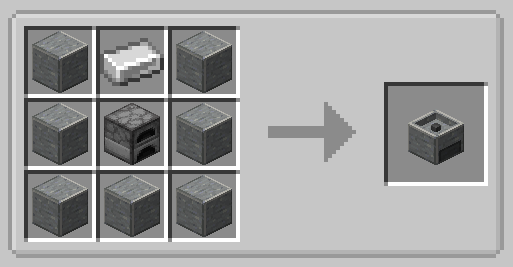
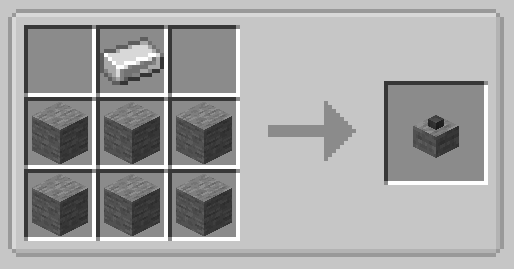
You will also need a grindstone to attach to it. The cheapest of these to create is a stone grindstone:
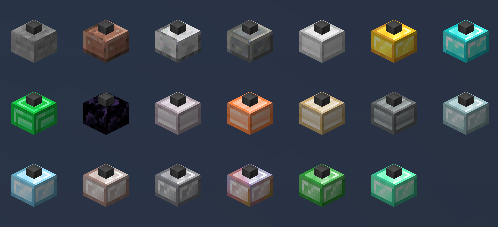
There are a variety of other grindstones:
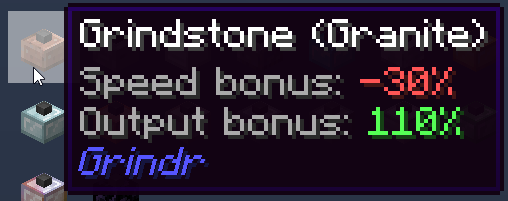
Each grindstone type has associated stats (see the Grindstones configuration section below) which are displayed in the tooltip. 100% of either speed or result means that it will take the default time and produce the default output amount. A modifier with a negative will take longer to process (or have a chance not to produce anything), while a modifier with a positive value will process faster and have a chance to produce more.
Once you have placed the grinder, simply right-click it with the grindstone in hand to attach it.
You can detach grindstones by sneak-right-clicking with an empty hand.
The grinder will not function without a grindstone, although any furnace fuel in the process of being burned will still tick down.
Sides for automation are identical to a furnace, blast furnace, smoker, etc.
JEI integration is available by default, if JEI is installed.
Configuration
Data Packs
It can be configured with data packsusing an ore tag or other ingredient. It also introduces a serializer for furnace recipes that allows specifying the output as the first item of a tag. By default, all of these recipes use the Forge conditional wrapper to ensure that the input or output tag aren't empty.
Hiding Dusts
By default, the mod comes with the following dusts linked to their associated tags: iron, gold, silver, tin, copper, nickel, lead, aluminum, zinc, platinum, mercury/quicksilver, uranium, bismuth and neptunium.
However, the recipes for creating these (and for smelting them into their resulting ingots) are locked behind Forge conditionals that ensure the relevant "forge:ores/tin", etc, tags contain items.
You can hide unused dusts in your pack in the dust_settings section of the common configuration file.
Hiding Grindstones
Currently it is not possible to hide the non-vanilla grindstones, although the recipes for these are conditional.
Grindstones
By default (and currently not extensible), there are 9 grindstones, four of them for each of the stone types (stone, diorite, granite and andesite), iron, gold, diamond, obsidian and emerald. Each type of grindstone gives a bonus (positive or negative) to processing speed and output. These can be configured in the common configuration file under the grindstone_settings section.
In addition to the default grindstones, there are 10 additional grindstones for each of the types of ores that can be processed: aluminum, copper, nickel, lead, silver, platinum, mercury (or quicksilver), zinc, bismuth, uranium and neptunium. These have default configurations that can be modified in the same way as the defaults. The recipes for them are conditional based on the ore-tag associated with them not being empty, although they will show up in creative tabs and JEI.
result_modifier should be a positive floating-point number above 1 if you wish to retain the guaranteed output. For example, 1.4 will be equivalent to 140% output -- a guaranteed dust and then a 40% chance to get a second dust. In contrast, 0.5 means that there's only a 50% chance per ore processed that a dust will be produced.
speed_modifier should be a positive floating-point number below 1 if you wish to increase the speed (or decrease the time it takes) of ore processing. For example, 0.7 will be equivalent to 70%, or a 30% reduction in the processing time. You can also use a floating-point number above 1 to make processing take longer. For example, 1.5 will be a 150% modification: the base processing time plus half again.
Defaults
All of the stone types have the same values by default; iron has no speed modifier but a significantly higher output (70% increase). Gold has a higher output than stone, but lower than iron; however, it has a 50% modifier to speed, meaning it processes ores in half the time.
Diamond is a guaranteed doubling with a 70% modifier to processing speed; emerald is a 250% bonus to output, but operates at default speed with no modifier.
Modified
An example of a modified diamond grindstone, away from its defaults:
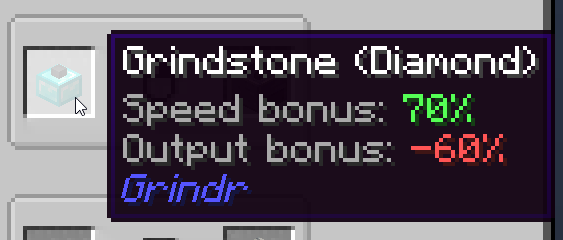
Instructions
There is also an instructional HUD which is disabled by default.
CraftTweaker Integration
Now, instead of using datapacks, you can use CraftTweaker to add additional recipes! Example:
mods.grinder.Grinder.addRecipe(new mods.grindr.RecipeBuilder("test_recipe").input(<item:minecraft:soul_sand>).output(<tag:minecraft:planks>));
Tags can be used for both input and output. For outputs, the first item in the tag will be selected as the output item.
You can also specify .staticOutput() within the builder to signify that the output quantity should not be varied by the quality of the grindstone.
Recipes cannot be removed at this time.
Credits
This mod uses the Registrate Library by tterrag.
Patreon & Discord
You can support me on Patreon!
All support for this mod is available on my Discord. Youcan also keep up with what I'm doing and get notifications streams!
For all other support, please hit "Issues" at the top of this page.
Project description from CurseForge.
Pick your setup
Grinder by Minecraft version and loader
Choose the version and loader you play, then open the matching release.
Minecraft version
1.16.4
1 loader buildMinecraft version
1.15.2
1 loader buildMinecraft version
1.14.4
1 loader buildCheck the dependencies, then try the file in a copied instance before changing a world you care about.
Recent files
Grinder versions and loaders
grinder-1.16.4-0.0.2.7.jar
2 Feb 2021
Client Source doesn’t say Server Source doesn’t say Dependencies No extras listed Listed on Release listing
Check the 1.16.5 · Forge setup 1.16.5Forge1.16.4 release
grindr-1.15.2-0.0.1.6.jar
6 Aug 2020
Client Source doesn’t say Server Source doesn’t say Dependencies No extras listed Listed on Release listing
Check the 1.15.2 · Forge setup 1.15.2Forge release
grindr-1.15.2-0.0.1.5.jar
22 Apr 2020
Client Source doesn’t say Server Source doesn’t say Dependencies No extras listed Listed on Release listing
Check the 1.15.2 · Forge setup 1.15.2Forge release
grindr-1.14.4-0.0.0.14.jar
22 Apr 2020
Client Source doesn’t say Server Source doesn’t say Dependencies No extras listed Listed on Release listing
Check the 1.14.4 · Forge setup 1.14.4Forge release
grindr-1.15.2-0.0.1.4.jar
25 Mar 2020
Client Source doesn’t say Server Source doesn’t say Dependencies No extras listed Listed on Release listing
Check the 1.15.2 · Forge setup 1.15.2Forge release
grindr-1.14.4-0.0.0.13.jar
23 Mar 2020
Client Source doesn’t say Server Source doesn’t say Dependencies No extras listed Listed on Release listing
Check the 1.14.4 · Forge setup 1.14.4Forge release
grindr-1.15.2-0.0.1.3.jar
23 Mar 2020
Client Source doesn’t say Server Source doesn’t say Dependencies No extras listed Listed on Release listing
Check the 1.15.2 · Forge setup 1.15.2Forge release
grindr-1.15.2-0.0.1.2.jar
20 Mar 2020
Client Source doesn’t say Server Source doesn’t say Dependencies No extras listed Listed on Release listing
Check the 1.15.2 · Forge setup 1.15.2Forge release
grindr-1.14.4-0.0.0.12.jar
20 Mar 2020
Client Source doesn’t say Server Source doesn’t say Dependencies No extras listed Listed on Release listing
Check the 1.14.4 · Forge setup 1.14.4Forge release
grindr-1.14.4-0.0.0.11.jar
19 Mar 2020
Client Source doesn’t say Server Source doesn’t say Dependencies No extras listed Listed on Release listing
Check the 1.14.4 · Forge setup 1.14.4Forge beta
grindr-1.15.2-0.0.1.1.jar
19 Mar 2020
Client Source doesn’t say Server Source doesn’t say Dependencies No extras listed Listed on Release listing
Check the 1.15.2 · Forge setup 1.15.2Forge beta
grindr-1.14.4-0.0.0.10.jar
16 Mar 2020
Client Source doesn’t say Server Source doesn’t say Dependencies No extras listed Listed on Release listing
Check the 1.14.4 · Forge setup 1.14.4Forge beta
Looking for an older file? The official CurseForge project page is in Resources.