Minecraft version
Back to mods 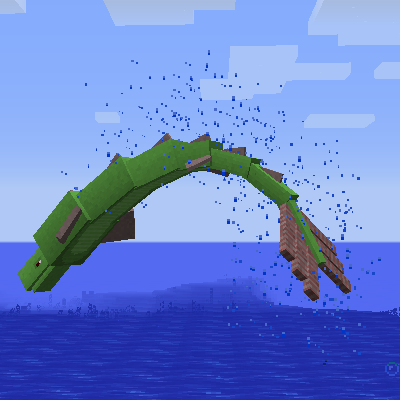
CurseForge · Minecraft mod
Abyssal Depths
Beware the abyss
Choose a version Pick your version below, then grab the matching file.
Quick answer
Which Abyssal Depths release should I use?
Latest stable file AbyssalDepths-1.16.5-1.0.1.jar
Game version 1.16.3, 1.16.5, 1.16.4
Loader Not required
Abyssal Depths AbyssalDepths-1.16.5-1.0.1.jar targets 1.16.3, 1.16.5, 1.16.4. The project page does not say whether this file belongs on the client, dedicated server, or both. No extra mods listed for this file.
Where it goes
Is Abyssal Depths required on the client, server, or both?
The project page does not say whether this file belongs on the client, dedicated server, or both.
Client Source doesn’t say
Dedicated server Source doesn’t say
Loader for this release No loader listed
Required install it here Optional supported, not mandatory Not supported do not install here Source doesn’t say do not assume
The source does not explicitly classify this release as client-only or server-only.
What else does Abyssal Depths AbyssalDepths-1.16.5-1.0.1.jar need?
AbyssalDepths-1.16.5-1.0.1.jar. Change the file and its required mods may change too.
This file does not list any required mods. Do not add a library just because a different file uses it.
This file does not list any required or optional mods.
Before you install it
Add Abyssal Depths without breaking your instance.
Built for Abyssal Depths AbyssalDepths-1.16.5-1.0.1.jar. Pick another file and the loader, install side or required mods may change.
- 01
Stick to this file
Use AbyssalDepths-1.16.5-1.0.1.jar. It targets 1.16.3, 1.16.5, 1.16.4; another release may have different loader, side or dependency requirements.
- 02
Bring the mods it needs
This file does not list any required mods. Do not add a library just because a different file uses it.
- 03
Put it on the correct side
The project page does not say whether this file belongs on the client, dedicated server, or both.
- 04
Pick the file you checked
Use the “Get this file” button beside AbyssalDepths-1.16.5-1.0.1.jar. It opens that exact file at the source.
About this project
What does Abyssal Depths add?
Abyssal Depths is a port of the mod Aquatic Abyss
This mod adds sea life to the (pre-1.13) barren oceans of Minecraft, some based on real animals and others on mythical ones, and adds seaweed and rock formations. These features will liven the oceans for a much more interesting underwater experience.
Note that I am not the original creator; all credits for the content made goes to shcott21/thehippomaster21
Credit for the mod's name goes to mothmankai
Below are links to the CurseForge page of the original as well as the Minecraft Fourm page. The fourm page contains most of the information you will need to know about this mod, but make sure to read the changelog of the versions released here to see any changes I make.
CurseForge:
Minecraft Fourm:
Project description from CurseForge.
Pick your setup
Abyssal Depths by Minecraft version and loader
Choose the version and loader you play, then open the matching release.
Minecraft version
1.16.4
1 loader buildMinecraft version
1.16.3
1 loader buildMinecraft version
1.15.2
1 loader buildMinecraft version
1.12.2
1 loader buildCheck the dependencies, then try the file in a copied instance before changing a world you care about.
Recent files
Abyssal Depths versions and loaders
AbyssalDepths-1.16.5-1.0.1.jar
16 Mar 2021
Client Source doesn’t say Server Source doesn’t say Dependencies No extras listed Listed on Release listing
Check the 1.16.5 setup 1.16.31.16.51.16.4 release
AbyssalDepths-1.16.5-1.0.0.jar
15 Mar 2021
Client Source doesn’t say Server Source doesn’t say Dependencies No extras listed Listed on Release listing
Check the 1.16.5 setup 1.16.31.16.51.16.4 release
AbyssalDepths-1.12.2-0.3.2.jar
26 Feb 2021
Client Source doesn’t say Server Source doesn’t say Dependencies No extras listed Listed on Release listing
Check the 1.12.2 setup 1.12.2 beta
AbyssalDepths-1.15.2-0.5.0.jar
12 Feb 2021
Client Source doesn’t say Server Source doesn’t say Dependencies No extras listed Listed on Release listing
Check the 1.15.2 setup 1.15.2 beta
AbyssalDepths-1.12.2-0.3.1.jar
16 Apr 2020
Client Source doesn’t say Server Source doesn’t say Dependencies No extras listed Listed on Release listing
Check the 1.12.2 setup 1.12.2 beta
Looking for an older file? The official CurseForge project page is in Resources.
 mod
mod CurseForge + Modrinth · Minecraft
NuclearCraft: Neoteric
This is a re-creation of old but gold NuclearCraft on a modern MC version
 mod
mod CurseForge + Modrinth · Minecraft
VillagerExplorer
Villager Explorer is a client-side Minecraft mod that lets you view detailed information about villagers in a beautiful, interactive GUI.
 mod
mod CurseForge · Minecraft
Minks And Misfits
Adds some strange and unique mobs to minecraft!