Minecraft version
Back to mods 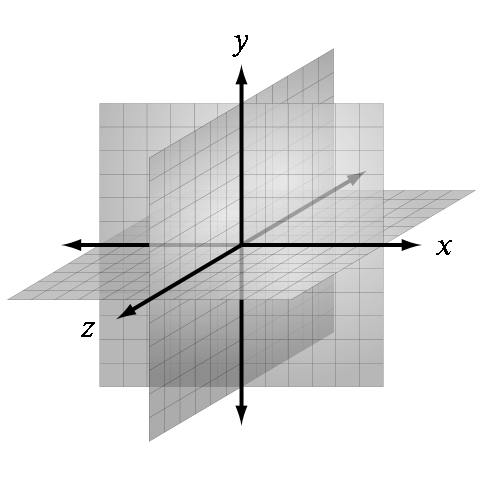
CurseForge · Minecraft mod
/math
Adds mathematical commands for in-game computations
Choose a version Pick your version below, then grab the matching file.
Quick answer
Which /math release matches 1.15.2?
beta file math-1.15.2-0.0.2.jar
Game version 1.15, 1.15.2
Loader Forge
/math math-1.15.2-0.0.2.jar targets 1.15, 1.15.2 with Forge. The project page does not say whether this file belongs on the client, dedicated server, or both. No extra mods listed for this file.
Where it goes
Is /math required on the client, server, or both?
The project page does not say whether this file belongs on the client, dedicated server, or both.
Client Source doesn’t say
Dedicated server Source doesn’t say
Loader for this release Forge
Required install it here Optional supported, not mandatory Not supported do not install here Source doesn’t say do not assume
The source does not explicitly classify this release as client-only or server-only.
What else does /math math-1.15.2-0.0.2.jar need?
math-1.15.2-0.0.2.jar on 1.15.2. Every mod below is checked against that same setup.
This file does not list any required mods. Do not add a library just because a different file uses it.
This file does not list any required or optional mods.
Before you install it
Add /math without breaking your instance.
Built for /math math-1.15.2-0.0.2.jar on 1.15.2. Pick another file and the loader, install side or required mods may change.
- 01
Stick to this file
Use math-1.15.2-0.0.2.jar. It targets 1.15, 1.15.2 with Forge; another release may have different loader, side or dependency requirements.
- 02
Bring the mods it needs
This file does not list any required mods. Do not add a library just because a different file uses it.
- 03
Put it on the correct side
The project page does not say whether this file belongs on the client, dedicated server, or both.
- 04
Pick the file you checked
Use the “Get this file” button beside math-1.15.2-0.0.2.jar. It opens that exact file at the source.
About this project
What does /math add?
Math (/math) adds a simple command to the game that allows the user to do calculations in the chat. The computations range from basic arithmetic to differentiation and integration.
Supported commands:
Basic:
add(num1, num2) => Adds two doubles
subtract(num1, num2) => Subtracts two doubles
multiply(num1, num2) => Multiplies two doubles
divide(num1, num2) => Divides two doubles
remainder(num1, num2) => Finds the remainder when num1 is divided by num2
random(min, max) => Generates a random number between min and max
sqrt(num) => Finds the square root of a double
nthRt(num) => Finds the nth root of a double (i.e. 5th root)
pow(num1, num2) => Returns num1 raised to num2
log10(num) => Evaluates log10 of the specified double
ln(num) => Evaluates the natural log of the specified double
exp(num) => Raises num to Euler's number (e)
zeros(a, b, c) => Shows the x-intercepts of a polynomial
Trigonometry:
sin(num) => Returns the trigonometric sin of a radian angle
cos(num) => Returns the trigonometric cosine of a radian angle
tan(num) => Returns the trigonometric tangent of a radian angle
asin(num) => Returns the arc sin of a double in radians
acos(num) => Returns the arc cosine of a double in radians
atan(num) => Returns the arc tangent of a double in radians
sind(num) => Returns the trigonometric sin of an angle in degrees
cosd(num) => Returns the trigonometric cosine of an angle in degrees
tand(num) => Returns the trigonometric tangent of an angle in degrees
asind(num) => Returns the arc sin of a double in degrees
acosd(num) => Returns the arc cosine of a double in degrees
atand(num) => Returns the arc tangent of a double in degrees
Calculus:
derive(coeff, var, pow) => Returns the derivative of a term
integrate(coeff, var, pow) => Returns the integral of a term
Vectors in 2D and 3D:
addVector3d(x1, y1, z1, x2, y2, z2) => Adds two 3D vectors
subtractVector3d(x1, y1, z1, x2, y2, z2) => Subtracts two 3D vectors
dotProduct3d(x1, y1, z1, x2, y2, z2) => Finds the dot product of two 3D vectors
crossProduct3d(x1, y1, z1, x2, y2, z2) => Finds the cross product of two 3D vectors
lengthVector3d(x, y, z) => Returns the length of a 3D vector
addVector2d(x1, y1, x2, y2) => Adds two 2D vectors
subtractVector2d(x1, y1, x2, y2) => Subtracts two 2D vectors
dotProduct2d(x1, y1, x2, y2) => Finds the dot product of two 2D vectors
crossProduct2d(x1, y1, x2, y2) => Finds the cross product of two 2D vectors
lengthVector2d(x, y) => Returns the length of a 2D vector
distance3d(x1, y1, z1, x2, y2, z2) => Returns the distance between two 3D coordinates
distance2d(x1, y1, x2, y2) => Returns the distance between two 2D coordinates
Important note: Minecraft's coordinate system uses a typical coordinate system seen in 3D graphics where the y-axis represents the vertical height. In mathematics, it is common for the z-axis to be used instead to represent the vertical dimension.
Project description from CurseForge.
Pick your setup
/math by Minecraft version and loader
Choose the version and loader you play, then open the matching release.
Minecraft version
1.15
1 loader buildMinecraft version
1.14.4
1 loader buildMinecraft version
1.14
1 loader buildCheck the dependencies, then try the file in a copied instance before changing a world you care about.
Recent files
/math versions and loaders
math-1.15.2-0.0.2.jar
4 Feb 2020
Client Source doesn’t say Server Source doesn’t say Dependencies No extras listed Listed on Release listing
Check the 1.15.2 · Forge setup 1.151.15.2Forge beta
math-1.15.2-0.0.1.jar
1 Feb 2020
Client Source doesn’t say Server Source doesn’t say Dependencies No extras listed Listed on Release listing
Check the 1.15.2 · Forge setup 1.151.15.2Forge beta
Looking for an older file? The official CurseForge project page is in Resources.
 mod
CurseForge + Modrinth · Minecraft
MineMenu
Mine Menu - Radial menu, 'nuff said
 mod
CurseForge · Minecraft
AppleStats :timmer+ AppleSkin+ Jade +GUI Clock+Coordinates+Horse Stat
HUD:A lightweight Jade alternative ,effect timmer ,Target Info,Saturation and Coordinates Monitor ,Waila,HWYLA,show Horse speed and jump stats,death location,Death Finder
 mod
CurseForge · Minecraft
Narcissus Farewell (水仙辞)
Teleport requests, homes, public waypoints and death returns, with configurable costs, safety checks and optional map integrations.