Minecraft version
Back to mods 
CurseForge · Minecraft mod
Custom Window Title
Client-side mod to change window title (including special tokens) and window icon. Supports Forge & Fabric.
Choose a version Pick your version below, then grab the matching file.
Quick answer
Which Custom Window Title release should I use?
Latest stable file Release 1.4.3 for MC 1.21.9+
Game version 1.21.9, 1.21.10, 1.21.11
Loader Fabric, NeoForge
Custom Window Title Release 1.4.3 for MC 1.21.9+ targets 1.21.9, 1.21.10, 1.21.11 with Fabric, NeoForge. The project page does not say whether this file belongs on the client, dedicated server, or both. No extra mods listed for this file.
Where it goes
Is Custom Window Title required on the client, server, or both?
The project page does not say whether this file belongs on the client, dedicated server, or both.
Client Source doesn’t say
Dedicated server Source doesn’t say
Loader for this release Fabric, NeoForge
Required install it here Optional supported, not mandatory Not supported do not install here Source doesn’t say do not assume
The source does not explicitly classify this release as client-only or server-only.
What else does Custom Window Title Release 1.4.3 for MC 1.21.9+ need?
Release 1.4.3 for MC 1.21.9+. Change the file and its required mods may change too.
This file does not list any required mods. Do not add a library just because a different file uses it.
This file does not list any required or optional mods.
Before you install it
Add Custom Window Title without breaking your instance.
Built for Custom Window Title Release 1.4.3 for MC 1.21.9+. Pick another file and the loader, install side or required mods may change.
- 01
Stick to this file
Use Release 1.4.3 for MC 1.21.9+. It targets 1.21.9, 1.21.10, 1.21.11 with Fabric, NeoForge; another release may have different loader, side or dependency requirements.
- 02
Bring the mods it needs
This file does not list any required mods. Do not add a library just because a different file uses it.
- 03
Put it on the correct side
The project page does not say whether this file belongs on the client, dedicated server, or both.
- 04
Pick the file you checked
Use the “Get this file” button beside Release 1.4.3 for MC 1.21.9+. It opens that exact file at the source.
About this project
What does Custom Window Title add?
Installation
The mod supports NeoForge and Fabric (*) mod loaders. Follow either mod loader's installation guide, then download the mod file for your Minecraft version, and install it into the .minecraft/mods folder.
(*) Fabric API is not required.
Configuration
Run the game once to create the configuration file. By default, the window title will be set to Minecraft <version>. Unlike in vanilla 1.15.2 onwards, the title will not change when you enter a world/server.
To change the title or icon, navigate to the .minecraft/config folder, and open customwindowtitle-client.toml in a text editor. You will see the following entries:
title = 'Minecraft {mcversion}'
icon16 = ''
icon32 = ''
Only edit text inside quotes or apostrophes.
Changing the Title
You can use the following special tokens in the title configuration entry:
{mcversion}- current Minecraft version{modversion:mod_id}- version of installed mod with the identifiermod_id{username}- current username
If any of the tokens aren't working, search the game log for CustomWindowTitle and you should see the reason, otherwise please file an issue on the issue tracker with as many details as possible.
Changing the Icon
Minecraft 1.21+
This feature is only available in Custom Window Title 1.4.0 and newer.
Create a square PNG image whose dimensions are a power of two, such as 32x32 or 48x48. Put the PNG file into the .minecraft/config folder, either directly or into a subfolder.
The icon must be saved with transparency even if it doesn't use it, otherwise the icon may be corrupted or not appear at all. In Krita, for example, you must check Store alpha channel (transparency) when saving.
The icon configuration entry points to the PNG file relative to .minecraft/config.
For example, if you placed the icon into .minecraft/config/customwindowtitle/icon.png, then the configuration entry should look like this:
icon = 'customwindowtitle/icon.png'
Minecraft 1.20
This feature is not available in Minecraft 1.20.
Minecraft 1.19 and older
Instead of one icon configuration entry, there are two configuration entries icon16 and icon32 for icons with dimensions 16x16 and 32x32.
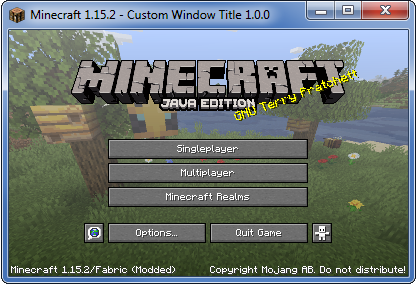
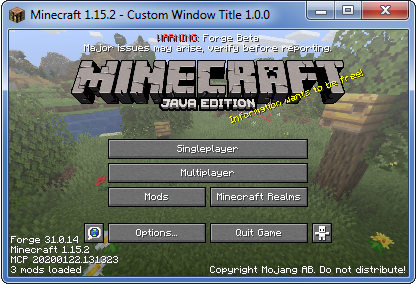
Screenshots
These screenshots were taken using the following example configuration:
title = "Minecraft {mcversion} - Custom Window Title {modversion:customwindowtitle}"
Project description from CurseForge.
Pick your setup
Custom Window Title by Minecraft version and loader
Choose the version and loader you play, then open the matching release.
Minecraft version
1.21.10
2 loader buildsMinecraft version
1.21.9
2 loader buildsMinecraft version
1.21.8
2 loader buildsMinecraft version
1.21.7
2 loader buildsMinecraft version
1.21.6
2 loader buildsMinecraft version
1.21.5
2 loader buildsMinecraft version
1.21.4
2 loader buildsMinecraft version
1.21.3
2 loader buildsMinecraft version
1.21.2
2 loader buildsMinecraft version
1.21.1
2 loader buildsMinecraft version
1.21
2 loader buildsShowing the newest 12 of 47 game versions. Older files are in the list below.
Check the dependencies, then try the file in a copied instance before changing a world you care about.
Recent files
Custom Window Title versions and loaders
Release 1.4.3 for MC 1.21.9+
CustomWindowTitle-1.21.9+v1.4.3.jar
12 Oct 2025
Client Source doesn’t say Server Source doesn’t say Dependencies No extras listed Listed on Release listing
Check the 1.21.11 · Fabric setup FabricNeoForge1.21.91.21.10 release
Release 1.4.2 for MC 1.21.6+
CustomWindowTitle-1.21.6+v1.4.2.jar
20 Jul 2025
Client Source doesn’t say Server Source doesn’t say Dependencies No extras listed Listed on Release listing
Check the 1.21.8 · Fabric setup Fabric1.21.8NeoForge1.21.7 release
Release 1.4.1 for MC 1.21+
CustomWindowTitle-1.21.4+v1.4.1.jar
7 Mar 2025
Client Source doesn’t say Server Source doesn’t say Dependencies No extras listed Listed on Release listing
Check the 1.21.5 · Fabric setup 1.211.21.5Fabric1.21.4 release
Release 1.4.0 for MC 1.21+
CustomWindowTitle-1.21+v1.4.0.jar
19 Oct 2024
Client Source doesn’t say Server Source doesn’t say Dependencies No extras listed Listed on Release listing
Check the 1.21.5 · Fabric setup 1.211.21.5Fabric1.21.4 release
Release 1.3.0 for MC 1.21+
CustomWindowTitle-1.21+v1.3.0.jar
3 Jul 2024
Client Source doesn’t say Server Source doesn’t say Dependencies No extras listed Listed on Release listing
Check the 1.21 · Fabric setup 1.21FabricNeoForge release
Release 1.2.0 for MC 1.20.2+ (NeoForge)
CustomWindowTitle-NeoForge-1.20.2+v1.2.0.jar
11 Dec 2023
Client Source doesn’t say Server Source doesn’t say Dependencies No extras listed Listed on Release listing
Check the 1.20.4 · NeoForge setup 1.20.2NeoForge1.20.31.20.4 release
Release 1.2.0 for MC 1.20+ (Forge)
CustomWindowTitle-Forge-1.20+v1.2.0.jar
13 Jun 2023
Client Source doesn’t say Server Source doesn’t say Dependencies No extras listed Listed on Release listing
Check the 1.20 · Forge setup Forge1.20 release
Release 1.2.0 for MC 1.20+ (Fabric)
CustomWindowTitle-Fabric-1.20+v1.2.0.jar
12 Jun 2023
Client Source doesn’t say Server Source doesn’t say Dependencies No extras listed Listed on Release listing
Check the 1.20.6 · Fabric setup 1.20.21.20.5Fabric1.20.3 release
Release 1.1.2 for MC 1.19.3+ (Fabric)
CustomWindowTitle-Fabric-1.19.3+v1.1.2.jar
6 Jan 2023
Client Source doesn’t say Server Source doesn’t say Dependencies No extras listed Listed on Release listing
Check the 1.19.3 · Fabric setup 1.19.3Fabric release
Release 1.1.2 for MC 1.19.3+ (Forge)
CustomWindowTitle-Forge-1.19.3+v1.1.2.jar
6 Jan 2023
Client Source doesn’t say Server Source doesn’t say Dependencies No extras listed Listed on Release listing
Check the 1.19.3 · Forge setup 1.19.3Forge release
Release 1.1.1 for MC 1.19 - 1.19.2 (Fabric)
CustomWindowTitle-Fabric-1.19+v1.1.1.jar
6 Jan 2023
Client Source doesn’t say Server Source doesn’t say Dependencies No extras listed Listed on Release listing
Check the 1.19.2 · Fabric setup Fabric1.19.21.19.11.19 release
Release 1.1.1 for MC 1.19 - 1.19.2 (Forge)
CustomWindowTitle-Forge-1.19+v1.1.1.jar
6 Jan 2023
Client Source doesn’t say Server Source doesn’t say Dependencies No extras listed Listed on Release listing
Check the 1.19.2 · Forge setup 1.19.2Forge1.19.11.19 release
Looking for an older file? The official CurseForge project page is in Resources.
 mod
mod CurseForge + Modrinth · Minecraft
Trinkets Updated
A modern data driven accessory mod. Updated fork of trinkets for 1.21.11 and beyond.
 mod
mod CurseForge · Minecraft
Unsafe Dimensions
Hides player nametags and suppresses death messages in specified dimensions
 mod
mod CurseForge · Minecraft
Tool Savior
Prevent player from using a tool that is about to break. Your items are saved and you can repair them later. Now your mind is free to go.