Back to mods
Packed Up (Backpacks) project artwork

CurseForge · Minecraft mod

Packed Up (Backpacks)

Packed Up allows you to pack up all your things into new amazing Backpacks!

Choose a version Pick your version below, then grab the matching file.

Quick answer

Which Packed Up (Backpacks) release matches 1.12.2 Forge?

Updated today
Best match for your filters 1.1.2-forge-mc1.12
Game version 1.12, 1.12.1, 1.12.2
Loader Forge

Packed Up (Backpacks) 1.1.2-forge-mc1.12 targets 1.12, 1.12.1, 1.12.2 with Forge. Installation on the client is optional. Installation on the dedicated server is optional. All 2 required mods have matching files.

Where it goes

Is Packed Up (Backpacks) required on the client, server, or both?

Installation on the client is optional. Installation on the dedicated server is optional.

Client Optional
Dedicated server Optional
Loader for this release Forge
Required install it here Optional supported, not mandatory Not supported do not install here Source doesn’t say do not assume

The source marks this as usable on both the client and server.

What else does Packed Up (Backpacks) 1.1.2-forge-mc1.12 need?

1.1.2-forge-mc1.12 on 1.12.2 Forge. Every mod below is checked against that same setup.

All 2 required mods have matching files

Install SuperMartijn642's Config Lib, SuperMartijn642's Core Lib first. We found matching files for this game-version and loader setup.

SuperMartijn642's Config Lib Needed by Packed Up (Backpacks) 1.1.2-forge-mc1.12
required
Matching file found Matched file: 1.1.8-forge-mc1.12
SuperMartijn642's Core Lib Needed by Packed Up (Backpacks) 1.1.2-forge-mc1.12
required
Matching file found Matched file: 1.1.26a-forge-mc1.12

We only count dependency files that match this setup. A file for another loader does not fill the gap.

Before you install it

Add Packed Up (Backpacks) without breaking your instance.

Built for Packed Up (Backpacks) 1.1.2-forge-mc1.12 on 1.12.2 Forge. Pick another file and the loader, install side or required mods may change.

  1. 01

    Stick to this file

    Use 1.1.2-forge-mc1.12. It targets 1.12, 1.12.1, 1.12.2 with Forge; another release may have different loader, side or dependency requirements.

  2. 02

    Bring the mods it needs

    Install SuperMartijn642's Config Lib, SuperMartijn642's Core Lib first. We found matching files for this game-version and loader setup.

  3. 03

    Put it on the correct side

    Installation on the client is optional. Installation on the dedicated server is optional.

  4. 04

    Pick the file you checked

    Use the “Get this file” button beside 1.1.2-forge-mc1.12. It opens that exact file at the source.

About this project
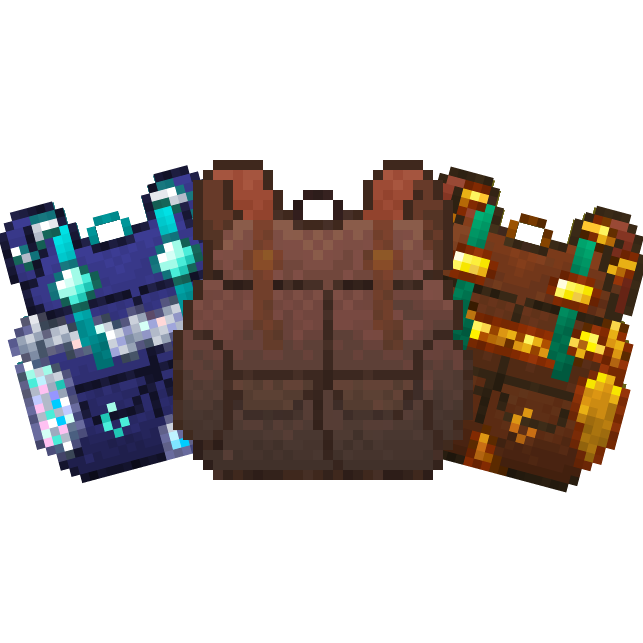
What does Packed Up (Backpacks) add?

Packed Up Banner

Packed Up allows you to solve your inventory problems, by giving you the ability to craft new amazing Backpacks! This will allow you to carry your things with you instead of having all those nasty chests around everywhere! It is also ideal for travelling and exploring dungeons! Backpacks can also be used with Baubles, Curios and Trinkets, and can be opened with a keybind!

Seperator

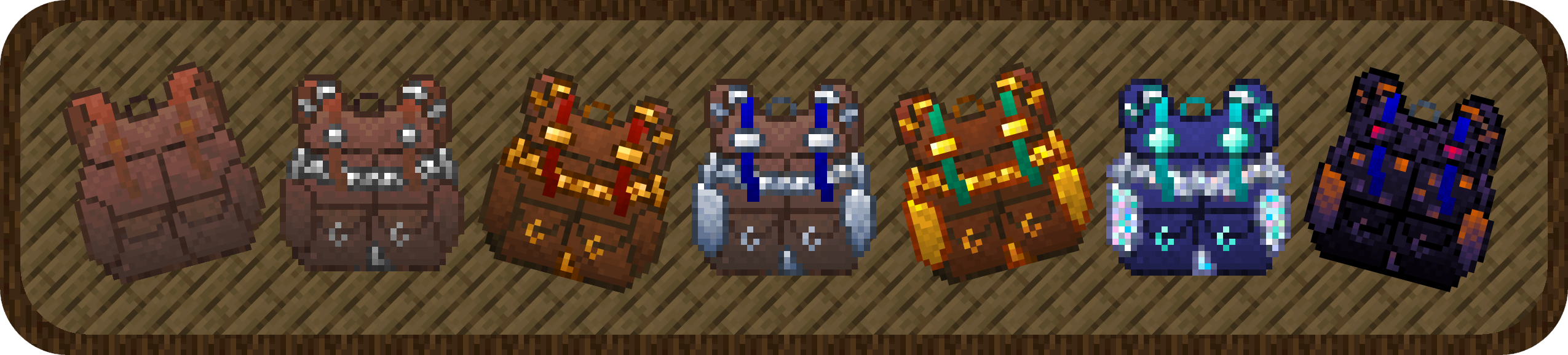
Backpacks:

Standard Backpack Standard Backpack

  • good for 3 rows of storage.
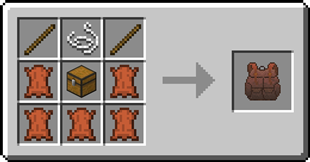
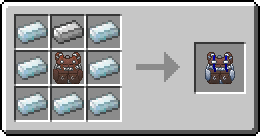
Recipe for the Standard Backpack

Iron Backpack Iron Backpack

- upgrade from the Standard Backpack

- 4 rows of storage
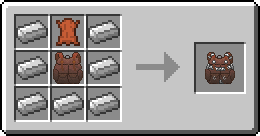
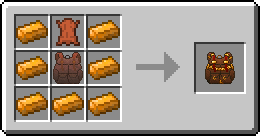
Recipe for the Iron Backpack

Copper Backpack Copper Backpack

  • upgrade from the Standard Backpack

  • 4 rows of storage

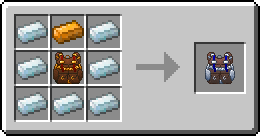
Recipe for the Copper Backpack

Golden Backpack Golden Backpack

  • upgrade from the Iron Backpack or Copper Backpack

  • 5 rows of storage

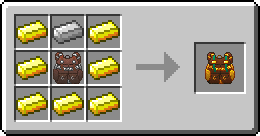
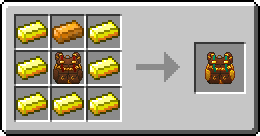
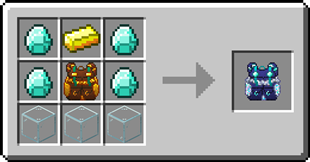
Recipe for the Golden BackpackRecipe for the Golden Backpack

Silver Backpack Silver Backpack

  • upgrade from the Iron Backpack or Copper Backpack

  • 5 rows of storage

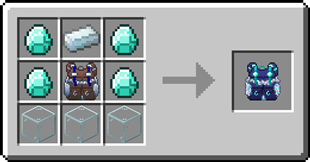
Recipe for the Silver BackpackRecipe for the Silver Backpack

Diamond Backpack Diamond Backpack

  • upgrade from the Golden Backpack or Silver Backpack

  • 7 rows of storage

Recipe for the Diamond BackpackRecipe for the Diamond Backpack

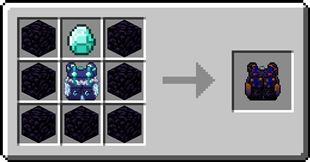
Obsidian Obsidian Backpack

  • upgrade from the Diamond Backpack

  • 8 rows of storage

Recipe for the Obsidian BackpackSeperator

Backpack Customization


Backpacks can have a custom name and custom icon. To customize a backpack, simply shift-right-click whilst holding it.
Backpack customizationSeperator

Opening a Backpack from inside a Backpack

1. Open a backpack by right-clicking it
2. Right-click on another backpack in the inventory
Seperator

FAQ

Does this mod add copper and silver ingots?

No, in order to craft the copper and silver backpacks you need a mod that adds copper and silver ingots.

Can I change the storage capacity each backpack has?

Yes, this can be changed in the config file

Can I use your mod in my modpack?

Yes, feel free to use my mod in your modpack
Seperator

Discord

For future content, upcoming mods, and discussion, feel free to join the SuperMartijn642 discord server!
SeperatorAll the available backpacks

Project description from CurseForge.

Pick your setup

Packed Up (Backpacks) by Minecraft version and loader

Choose the version and loader you play, then open the matching release.

129 available setups

Showing the newest 12 of 51 game versions. Older files are in the list below.

Check the dependencies, then try the file in a copied instance before changing a world you care about.

Recent files

Packed Up (Backpacks) versions and loaders

2 of 100 releases match
Clear filters

Looking for an older file? The official CurseForge project page is in Resources.