Minecraft version
Back to mods 
CurseForge · Minecraft mod
Get Off My Lawn
Keep people off your lawn with claims!
Choose a version Pick your version below, then grab the matching file.
Quick answer
Which Get Off My Lawn release should I use?
Latest stable file get-off-my-lawn-1.16.2-1.1.0.jar
Game version 1.16.2
Loader Fabric
Get Off My Lawn get-off-my-lawn-1.16.2-1.1.0.jar targets 1.16.2 with Fabric. The project page does not say whether this file belongs on the client, dedicated server, or both. No extra mods listed for this file.
Where it goes
Is Get Off My Lawn required on the client, server, or both?
The project page does not say whether this file belongs on the client, dedicated server, or both.
Client Source doesn’t say
Dedicated server Source doesn’t say
Loader for this release Fabric
Required install it here Optional supported, not mandatory Not supported do not install here Source doesn’t say do not assume
The source does not explicitly classify this release as client-only or server-only.
What else does Get Off My Lawn get-off-my-lawn-1.16.2-1.1.0.jar need?
get-off-my-lawn-1.16.2-1.1.0.jar. Change the file and its required mods may change too.
This file does not list any required mods. Do not add a library just because a different file uses it.
This file does not list any required or optional mods.
Before you install it
Add Get Off My Lawn without breaking your instance.
Built for Get Off My Lawn get-off-my-lawn-1.16.2-1.1.0.jar. Pick another file and the loader, install side or required mods may change.
- 01
Stick to this file
Use get-off-my-lawn-1.16.2-1.1.0.jar. It targets 1.16.2 with Fabric; another release may have different loader, side or dependency requirements.
- 02
Bring the mods it needs
This file does not list any required mods. Do not add a library just because a different file uses it.
- 03
Put it on the correct side
The project page does not say whether this file belongs on the client, dedicated server, or both.
- 04
Pick the file you checked
Use the “Get this file” button beside get-off-my-lawn-1.16.2-1.1.0.jar. It opens that exact file at the source.
About this project
What does Get Off My Lawn add?
Get Off My Lawn is a take on the popular concept of claims. It helps protect your stuff! It is built for Fabricon 1.15.2.
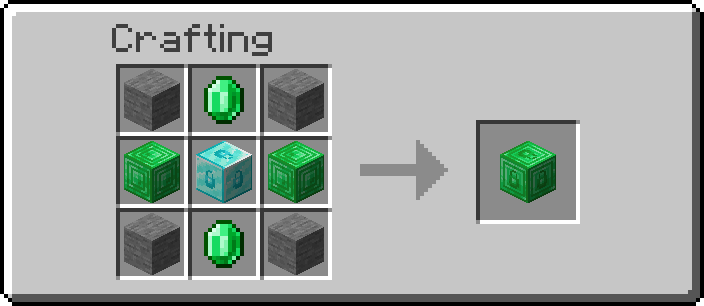
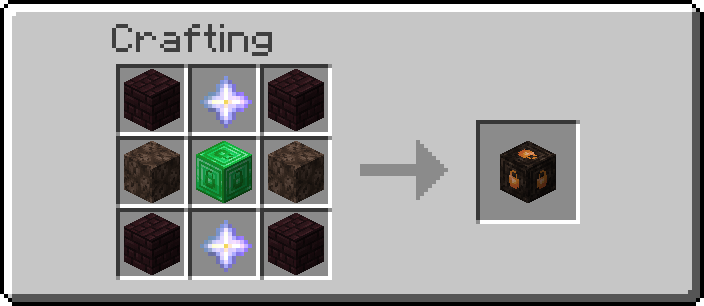
To get started, you'll have to craft a Claim Anchor. Each anchor has a different claim radius; after placing one, a box around it will be formed. This box is yours!
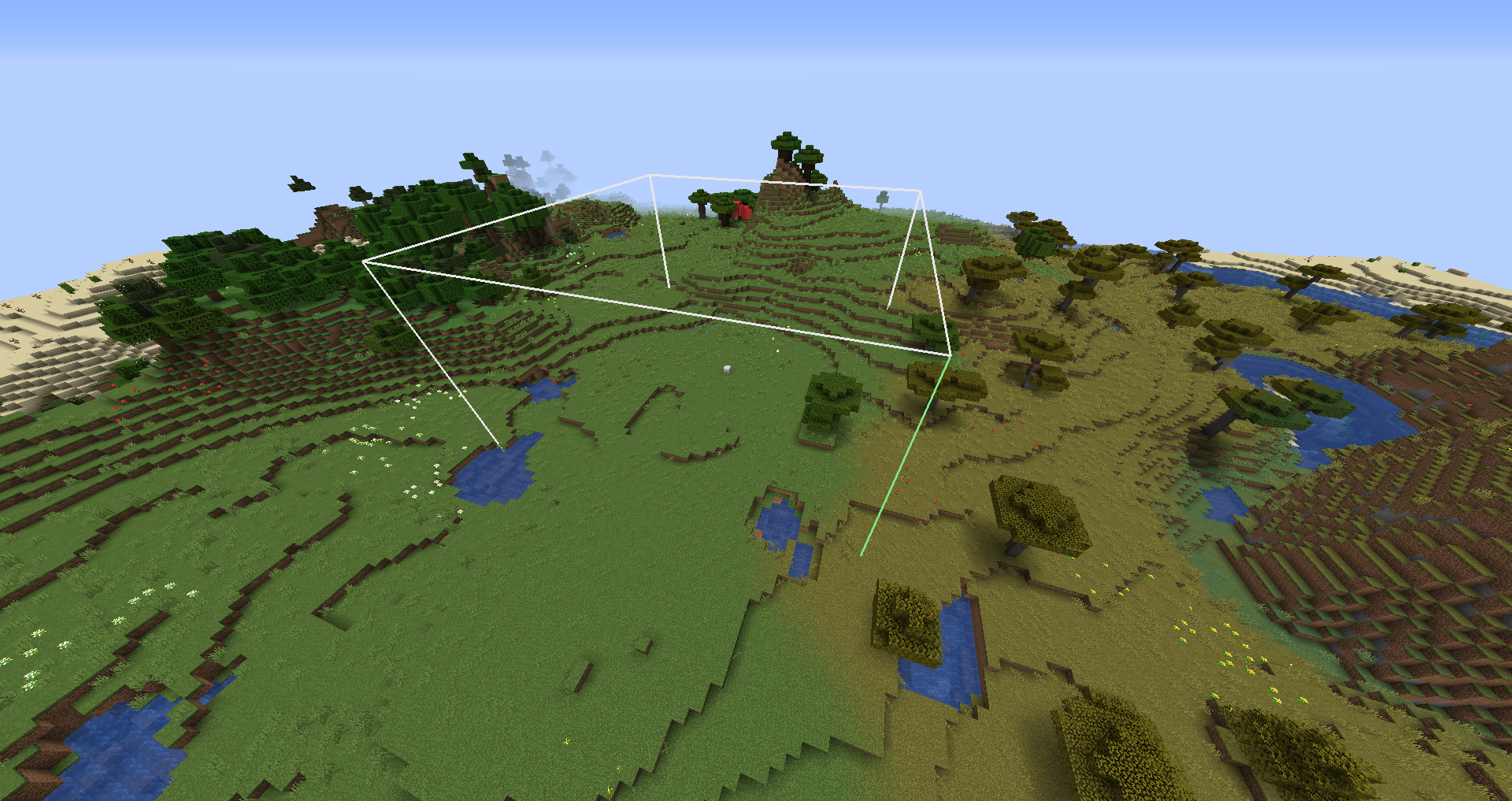
Makeshift, radius of 10
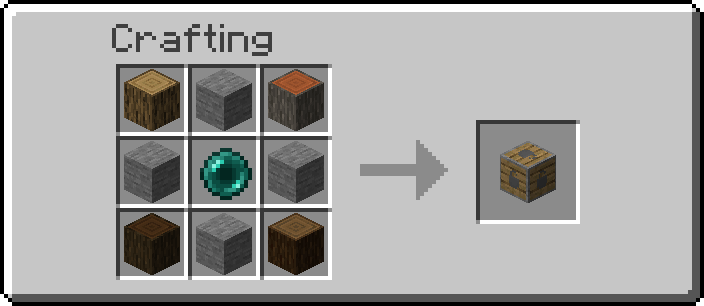
Reinforced, radius of 25
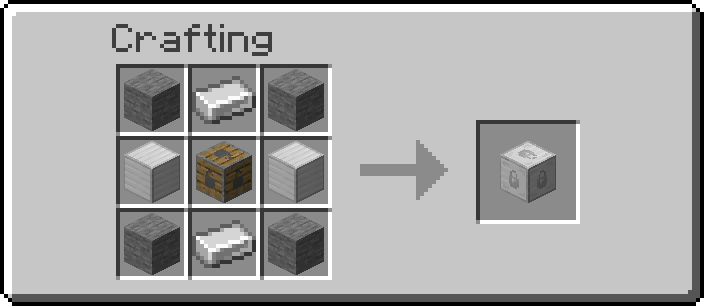
Glistening, radius of 50
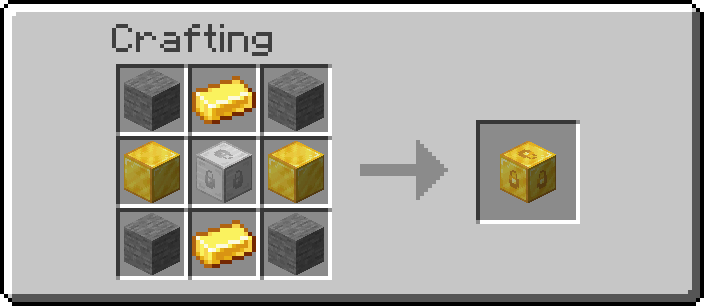
Crystal, radius of 75
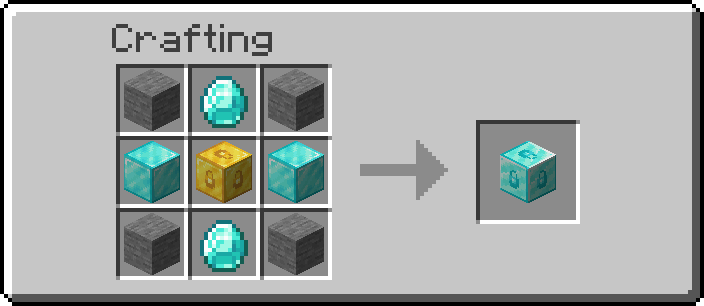
Emeradic, radius of 125
Withered, radius of 200
To see claim areas, you'll have to craft a Goggles of (Claim) Revealing:
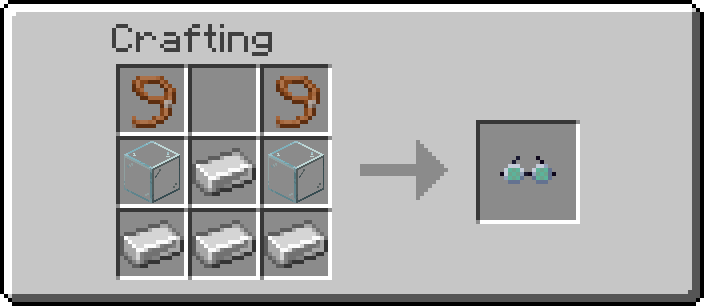
When this item equipped in the helmet slot, claim outlines become visible.
Upgrade Kits
GOML provides Upgrade Kits for upgrading from tier to tier, but they currently do not have recipes. This will be updated soon.
Commands
This mod provides several utility commands for QOL and server maintenance. To view them, type /goml help while in-game.
Protection Checks
*Get Off My Lawn* currently checks for claims when the following actions occur:
- Player block break
- Player block interaction
- Player entity damage
- Player entity interaction
- TNT explodes
If the player does not own the claim, they are not allowed to finish (/start) the action. In the case of explosions, no blocks break.
Project description from CurseForge.
Pick your setup
Get Off My Lawn by Minecraft version and loader
Choose the version and loader you play, then open the matching release.
Minecraft version
1.17
1 loader buildMinecraft version
1.16.5
1 loader buildMinecraft version
1.16.4
1 loader buildMinecraft version
1.16.3
1 loader buildMinecraft version
1.16.2
1 loader buildMinecraft version
1.15.2
1 loader buildCheck the dependencies, then try the file in a copied instance before changing a world you care about.
Recent files
Get Off My Lawn versions and loaders
get-off-my-lawn-1.17-1.4.0-beta.jar
18 Jun 2021
Client Source doesn’t say Server Source doesn’t say Dependencies No extras listed Listed on Release listing
Check the 1.17-Snapshot · Fabric setup 1.17Fabric1.17-Snapshot beta
get-off-my-lawn-1.16.5-1.3.4-beta.jar
7 Apr 2021
Client Source doesn’t say Server Source doesn’t say Dependencies No extras listed Listed on Release listing
Check the 1.16.5 · Fabric setup Fabric1.16.51.16.4 beta
get-off-my-lawn-1.16.4-1.3.3-beta.jar
27 Feb 2021
Client Source doesn’t say Server Source doesn’t say Dependencies No extras listed Listed on Release listing
Check the 1.16.5 · Fabric setup Fabric1.16.51.16.4 beta
get-off-my-lawn-1.16.4-1.3.2-beta.jar
18 Feb 2021
Client Source doesn’t say Server Source doesn’t say Dependencies No extras listed Listed on Release listing
Check the 1.16.5 · Fabric setup Fabric1.16.51.16.4 beta
get-off-my-lawn-1.16.4-1.3.1-beta.jar
18 Feb 2021
Client Source doesn’t say Server Source doesn’t say Dependencies No extras listed Listed on Release listing
Check the 1.16.5 · Fabric setup Fabric1.16.51.16.4 beta
get-off-my-lawn-1.16.2-1.2.3-beta.jar
4 Dec 2020
Client Source doesn’t say Server Source doesn’t say Dependencies No extras listed Listed on Release listing
Check the 1.16.4 · Fabric setup 1.16.3Fabric1.16.41.16.2 beta
get-off-my-lawn-1.16.2-1.2.2-beta.jar
19 Oct 2020
Client Source doesn’t say Server Source doesn’t say Dependencies No extras listed Listed on Release listing
Check the 1.16.2 · Fabric setup Fabric1.16.2 beta
get-off-my-lawn-1.16.2-1.2.1-beta.jar
27 Sept 2020
Client Source doesn’t say Server Source doesn’t say Dependencies No extras listed Listed on Release listing
Check the 1.16.2 · Fabric setup Fabric1.16.2 beta
get-off-my-lawn-1.16.2-1.2.0-beta.jar
24 Sept 2020
Client Source doesn’t say Server Source doesn’t say Dependencies No extras listed Listed on Release listing
Check the 1.16.2 · Fabric setup Fabric1.16.2 beta
get-off-my-lawn-1.16.2-1.1.0.jar
22 Aug 2020
Client Source doesn’t say Server Source doesn’t say Dependencies No extras listed Listed on Release listing
Check the 1.16.2 · Fabric setup Fabric1.16.2 release
get-off-my-lawn_1.15.2-1.0.0-beta.jar
4 Mar 2020
Client Source doesn’t say Server Source doesn’t say Dependencies No extras listed Listed on Release listing
Check the 1.15.2 · Fabric setup Fabric1.15.2 beta
Looking for an older file? The official CurseForge project page is in Resources.