
Minecraft version
Back to mods 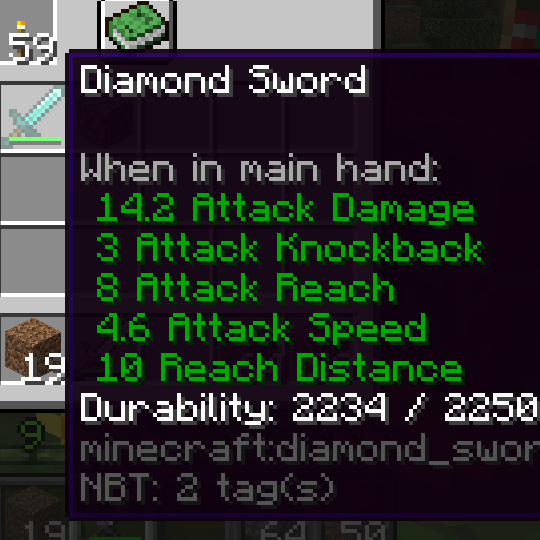
CurseForge · Minecraft mod
Material Master [Archived]
Allows you to change various properties of tools, weapons and armor.
Choose a version Pick your version below, then grab the matching file.
Quick answer
Which Material Master [Archived] release should I use?
Latest stable file MaterialMaster-v1.3.1-1.15.2.jar
Game version 1.15.2
Loader Forge
Material Master [Archived] MaterialMaster-v1.3.1-1.15.2.jar targets 1.15.2 with Forge. The project page does not say whether this file belongs on the client, dedicated server, or both. No extra mods listed for this file.
Where it goes
Is Material Master [Archived] required on the client, server, or both?
The project page does not say whether this file belongs on the client, dedicated server, or both.
Client Source doesn’t say
Dedicated server Source doesn’t say
Loader for this release Forge
Required install it here Optional supported, not mandatory Not supported do not install here Source doesn’t say do not assume
The source does not explicitly classify this release as client-only or server-only.
What else does Material Master [Archived] MaterialMaster-v1.3.1-1.15.2.jar need?
MaterialMaster-v1.3.1-1.15.2.jar. Change the file and its required mods may change too.
This file does not list any required mods. Do not add a library just because a different file uses it.
This file does not list any required or optional mods.
Before you install it
Add Material Master [Archived] without breaking your instance.
Built for Material Master [Archived] MaterialMaster-v1.3.1-1.15.2.jar. Pick another file and the loader, install side or required mods may change.
- 01
Stick to this file
Use MaterialMaster-v1.3.1-1.15.2.jar. It targets 1.15.2 with Forge; another release may have different loader, side or dependency requirements.
- 02
Bring the mods it needs
This file does not list any required mods. Do not add a library just because a different file uses it.
- 03
Put it on the correct side
The project page does not say whether this file belongs on the client, dedicated server, or both.
- 04
Pick the file you checked
Use the “Get this file” button beside MaterialMaster-v1.3.1-1.15.2.jar. It opens that exact file at the source.
About this project
What does Material Master [Archived] add?
Material Master is discontinued as of 2022-03-27.
Check out Property Modifier by IchHabeHunger54 instead.
You want to turn your diamond sword into a crazy overpowered weapon to one-shot even most powerful creatures such as the ender dragon? Or you simply don't want golden tools to be useless anymore...
Well, in either case this mod exactly for you. It allows changing everything about not just any tool or weapon, but about any item in general.





FEATURES
Modifiable properties have been split into two categories based on their technical implementation.
ATTRIBUTE STATS
Vanilla Minecraft has an attribute system built in which is used by a few items to achieve setting various properties such as attack damage and armor protection. Besides the ability to change already present attributes, this mod also makes many attributes available which aren't used on any item by default.
Attributes can be defined for any item, no matter what kind of item it is or what mod it comes from. Attributes will only apply when an item is held in the main hand with the exception of armor pieces which will apply their attributes when worn in the appropriate slot.
- Max Health: Amount of health when fully healed
- Knockback Resistance: Chance to not receive any knockback from an attack
- Movement Speed: Movement speed when walking on land
- Attack Damage: Amount of melee damage dealt when fighting
- Attack Knockback: How much knockback is dealt when hitting an entity
- Attack Speed: Speed at which the attack cooldown recharges
- Amor: Amount of armor protection
- Armor Toughness: Amount of armor toughness
- Luck: Luck property when using loot tables
- Swim Speed: Movement speed when swimming in of water
- Gravity: Vertical motion multiplier, mainly used when falling
- Reach Distance: Distance for interacting with blocks in the world
- Attack Reach: Number of blocks for interacting with entities (from Combat Test Snapshots)
Default values set for the player can also be changed within the config file. Note that each attribute has a hardcoded range associated with it.
Why is the value shown on an items tooltip different from the one you defined in the config? The base value is automatically added to it, that's a vanilla thing.
PROPERTY STATS
General item properties can also be modified.
- stack size
- durability
- dig speed
- harvest level
- enchantability
It's important to note that changing those properties is only possible in compliance with their usual restrictions, meaning e. g. stack size can't be increased for items with durability. It's also only possible to modify existing properties, meaning e. g. the enchantability property can only be changed for items that can actually be enchanted.
NOTES
Other cool mods that go rather well with this one: AttributeFix by Darkhax and Armor Toughness Bar by tfarecnim
For this mod to fully function it needs to be installed on both the client and server. It's rather important for the config to be the same on both the client and server for an optimal experience.
CREDITS
While mainly stemming from the need to easily manipulate various item stats this mod is also loosely based on the outdated Material Changer mod by Lellson8. Go check it out in case you're playing on a version of Minecraft prior to 1.14.
Implementing the annotation based discovery system was helped by the Quark mod made by Vazkii.
Project description from CurseForge.
Pick your setup
Material Master [Archived] by Minecraft version and loader
Choose the version and loader you play, then open the matching release.
Minecraft version
1.14.4
1 loader buildCheck the dependencies, then try the file in a copied instance before changing a world you care about.
Recent files
Material Master [Archived] versions and loaders
MaterialMaster-v1.3.1-1.15.2.jar
30 Sept 2020
Client Source doesn’t say Server Source doesn’t say Dependencies No extras listed Listed on Release listing
Check the 1.15.2 · Forge setup 1.15.2Forge release
MaterialMaster-v1.3.1-1.14.4.jar
30 Sept 2020
Client Source doesn’t say Server Source doesn’t say Dependencies No extras listed Listed on Release listing
Check the 1.14.4 · Forge setup 1.14.4Forge release
MaterialMaster-v1.3-1.15.2.jar
29 Sept 2020
Client Source doesn’t say Server Source doesn’t say Dependencies No extras listed Listed on Release listing
Check the 1.15.2 · Forge setup 1.15.2Forge release
MaterialMaster-v1.3-1.14.4.jar
28 Sept 2020
Client Source doesn’t say Server Source doesn’t say Dependencies No extras listed Listed on Release listing
Check the 1.14.4 · Forge setup 1.14.4Forge release
MaterialMaster-v1.2-1.15.2.jar
15 Apr 2020
Client Source doesn’t say Server Source doesn’t say Dependencies No extras listed Listed on Release listing
Check the 1.15.2 · Forge setup 1.15.2Forge release
MaterialMaster-v1.2-1.14.4.jar
14 Apr 2020
Client Source doesn’t say Server Source doesn’t say Dependencies No extras listed Listed on Release listing
Check the 1.14.4 · Forge setup 1.14.4Forge release
MaterialMaster-v1.1.3-1.15.2.jar
8 Apr 2020
Client Source doesn’t say Server Source doesn’t say Dependencies No extras listed Listed on Release listing
Check the 1.15.2 · Forge setup 1.15.2Forge release
MaterialMaster-v1.1.3-1.14.4.jar
8 Apr 2020
Client Source doesn’t say Server Source doesn’t say Dependencies No extras listed Listed on Release listing
Check the 1.14.4 · Forge setup 1.14.4Forge release
MaterialMaster-v1.1.2-1.15.2.jar
25 Mar 2020
Client Source doesn’t say Server Source doesn’t say Dependencies No extras listed Listed on Release listing
Check the 1.15.2 · Forge setup 1.15.2Forge release
MaterialMaster-v1.1.2-1.14.4.jar
25 Mar 2020
Client Source doesn’t say Server Source doesn’t say Dependencies No extras listed Listed on Release listing
Check the 1.14.4 · Forge setup 1.14.4Forge release
MaterialMaster-v1.1.1-1.15.2.jar
24 Mar 2020
Client Source doesn’t say Server Source doesn’t say Dependencies No extras listed Listed on Release listing
Check the 1.15.2 · Forge setup 1.15.2Forge release
MaterialMaster-v1.1.1-1.14.4.jar
23 Mar 2020
Client Source doesn’t say Server Source doesn’t say Dependencies No extras listed Listed on Release listing
Check the 1.14.4 · Forge setup 1.14.4Forge release
Looking for an older file? The official CurseForge project page is in Resources.
 mod
CurseForge · Minecraft
FrostedTweaks
The official companion mod for the FrostBound modpack. It applies pack-wide tweaks and adds Northstar gear, story items, and Christmas presents
 mod
CurseForge · Minecraft
Kranked Progression
A Mod that aims to change the survival progression to be more linear
 mod
CurseForge · Minecraft
World Wide Power Grid
A Compatibility project that allows Power Grid, Electro Energetics and their addons to function as one eco-system