Minecraft version
Back to mods ![Easy Emerald Tools & More [FABRIC] project artwork](https://media.forgecdn.net/avatars/263/939/637225100097112667.png)
CurseForge · Minecraft mod
Easy Emerald Tools & More [FABRIC]
Balanced gear of emerald, ruby, obsidian, amethyst, copper, and steel
Choose a version Pick your version below, then grab the matching file.
Quick answer
Which Easy Emerald Tools & More [FABRIC] release should I use?
Latest stable file EmeraldTools-Fabric-1.21.1-1.8.17.jar
Game version 1.21.1
Loader Fabric
Easy Emerald Tools & More [FABRIC] EmeraldTools-Fabric-1.21.1-1.8.17.jar targets 1.21.1 with Fabric. The project page does not say whether this file belongs on the client, dedicated server, or both. No extra mods listed for this file.
Where it goes
Is Easy Emerald Tools & More [FABRIC] required on the client, server, or both?
The project page does not say whether this file belongs on the client, dedicated server, or both.
Client Source doesn’t say
Dedicated server Source doesn’t say
Loader for this release Fabric
Required install it here Optional supported, not mandatory Not supported do not install here Source doesn’t say do not assume
The source does not explicitly classify this release as client-only or server-only.
What else does Easy Emerald Tools & More [FABRIC] EmeraldTools-Fabric-1.21.1-1.8.17.jar need?
EmeraldTools-Fabric-1.21.1-1.8.17.jar. Change the file and its required mods may change too.
This file does not list any required mods. Do not add a library just because a different file uses it.
This file does not list any required or optional mods.
Before you install it
Add Easy Emerald Tools & More [FABRIC] without breaking your instance.
Built for Easy Emerald Tools & More [FABRIC] EmeraldTools-Fabric-1.21.1-1.8.17.jar. Pick another file and the loader, install side or required mods may change.
- 01
Stick to this file
Use EmeraldTools-Fabric-1.21.1-1.8.17.jar. It targets 1.21.1 with Fabric; another release may have different loader, side or dependency requirements.
- 02
Bring the mods it needs
This file does not list any required mods. Do not add a library just because a different file uses it.
- 03
Put it on the correct side
The project page does not say whether this file belongs on the client, dedicated server, or both.
- 04
Pick the file you checked
Use the “Get this file” button beside EmeraldTools-Fabric-1.21.1-1.8.17.jar. It opens that exact file at the source.
About this project
What does Easy Emerald Tools & More [FABRIC] add?

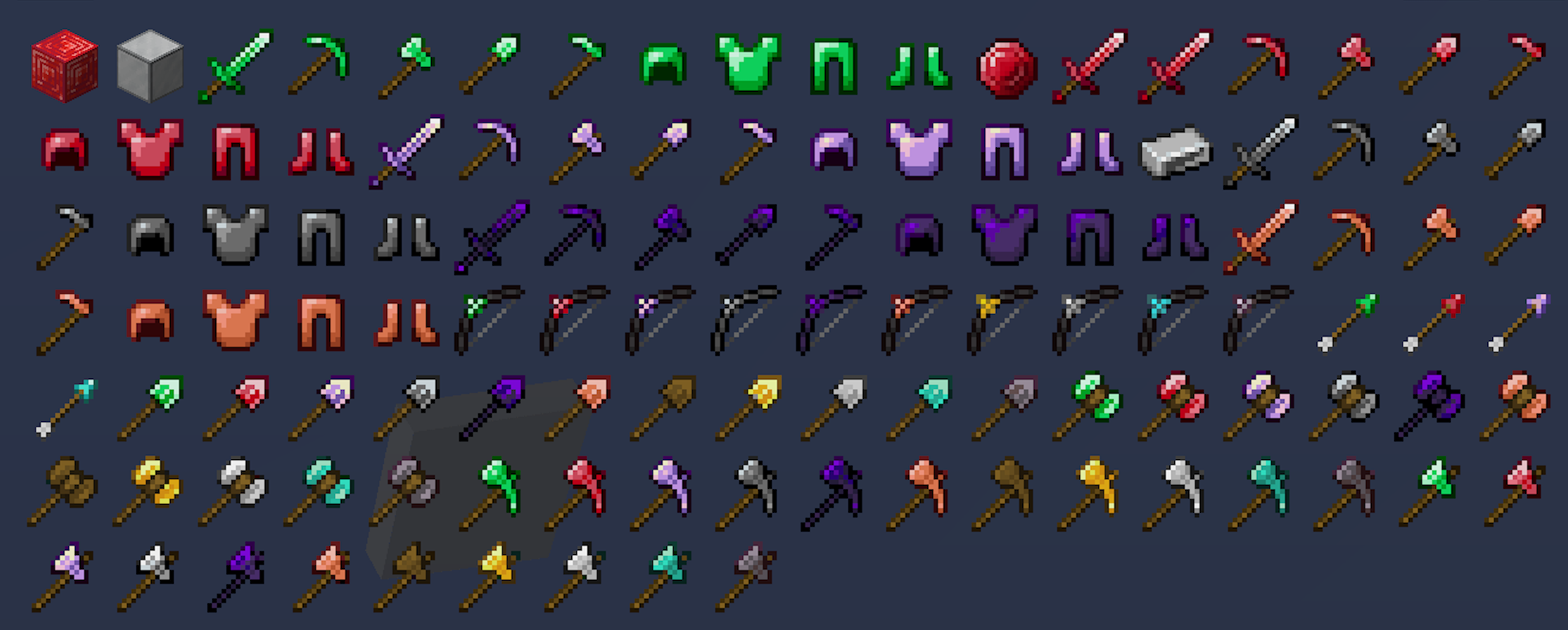
 Provides standard sets of armor, tools, and weapons that are between vanilla Iron and Diamond. No ores are added to you world generation, all materials are crafted from vanilla ingredients. Also provides sets of special tools to fell trees, 3x3 mining and 3x3 digging.


Materials: emerald, ruby, obsidian, copper, steel, and amethyst
Vanilla Style Tools: sword, pickaxe, axe, shovel, hoe, and bow
Excavator - a 3x3 shovel
Hammer - a 3x3 pickaxe
Paxel - combines an Axe, Shovel, & Pickaxe
TreeAxe - attempts to bring down an entire tree
Area tools for vanilla wood, iron, gold, diamond, and netherite
Gem Arrows - sturdy arrows with extra damage, piercing, and punch (diamond, emerald, ruby, and amethyst)
** Materials and tool values can be adjusted to your liking in the config
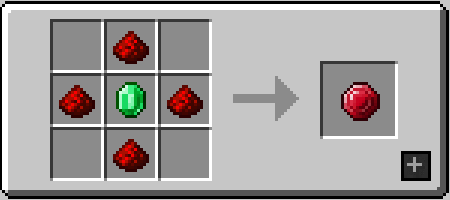
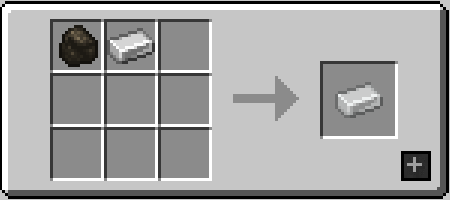
No new ores, all made from existing resources:
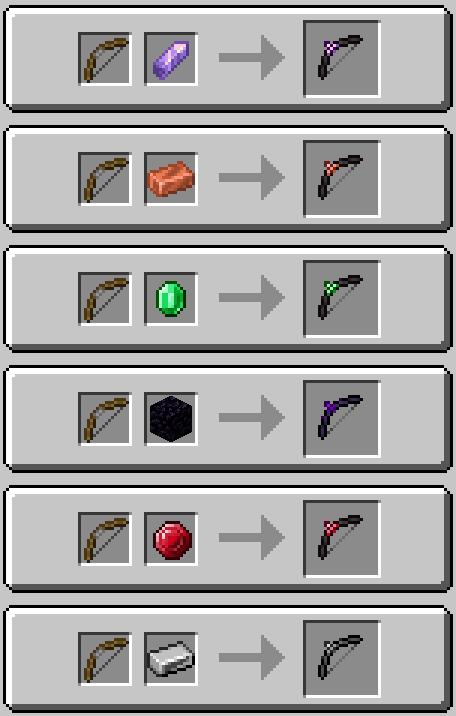
Upgrade standard bows to Amethyst, Copper, Emerald, Obsidian, Ruby, or Steel in a Smithing Table:
Additional Tools for Vanilla Materials
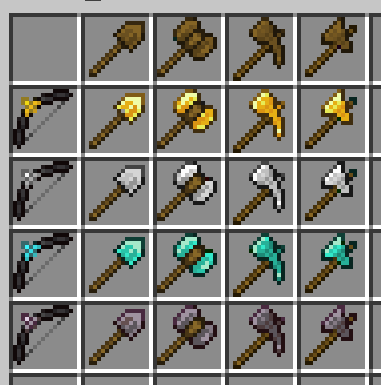
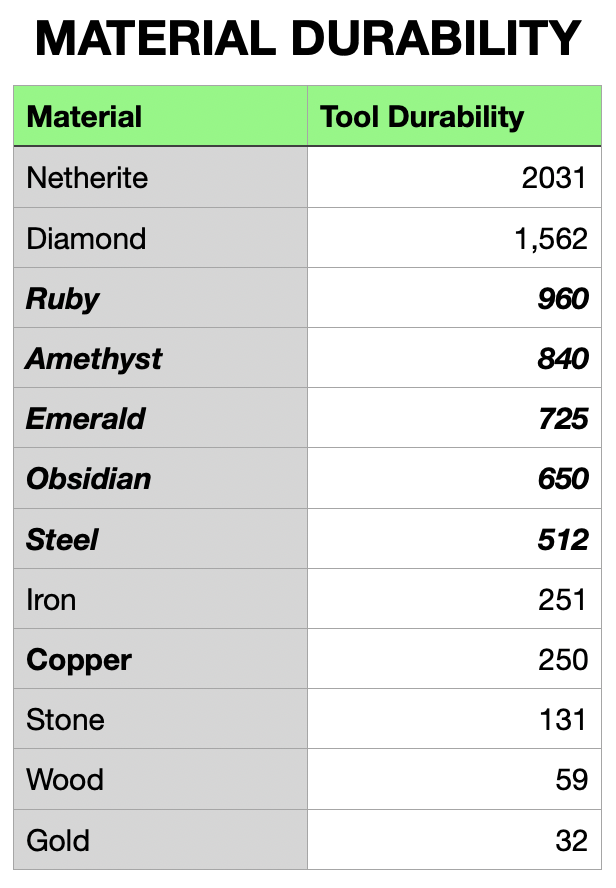
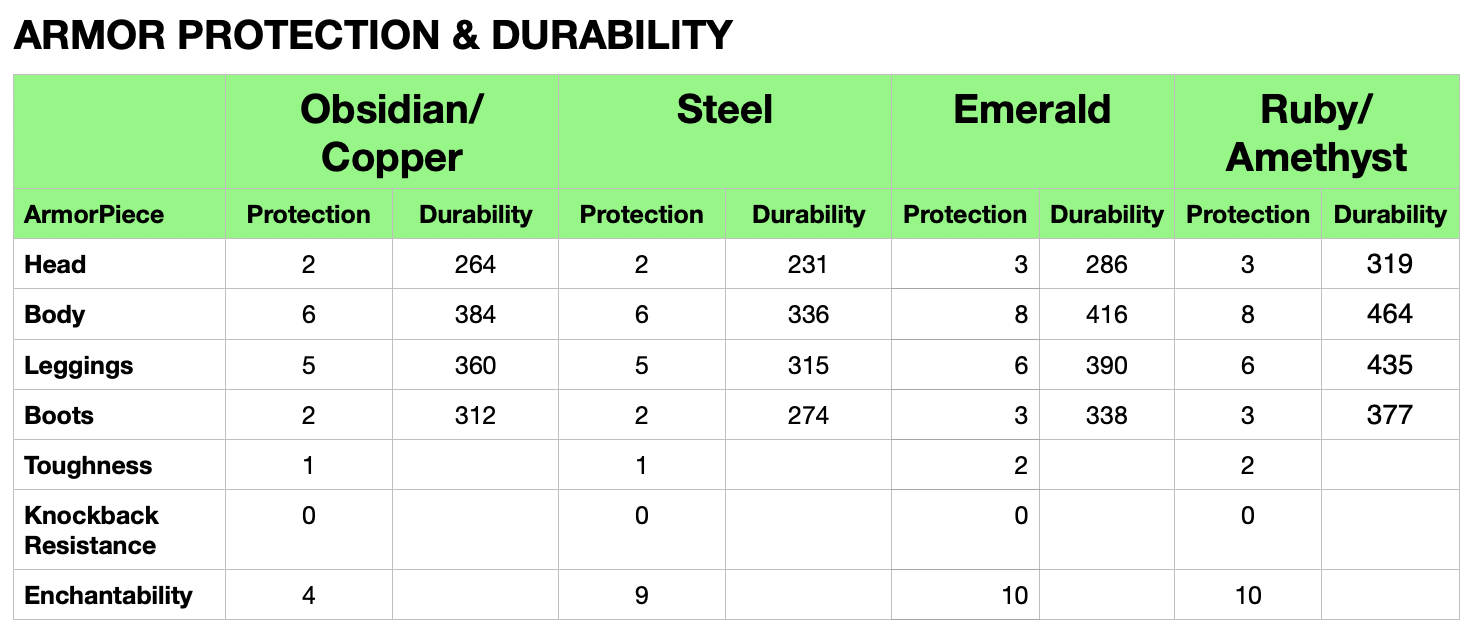
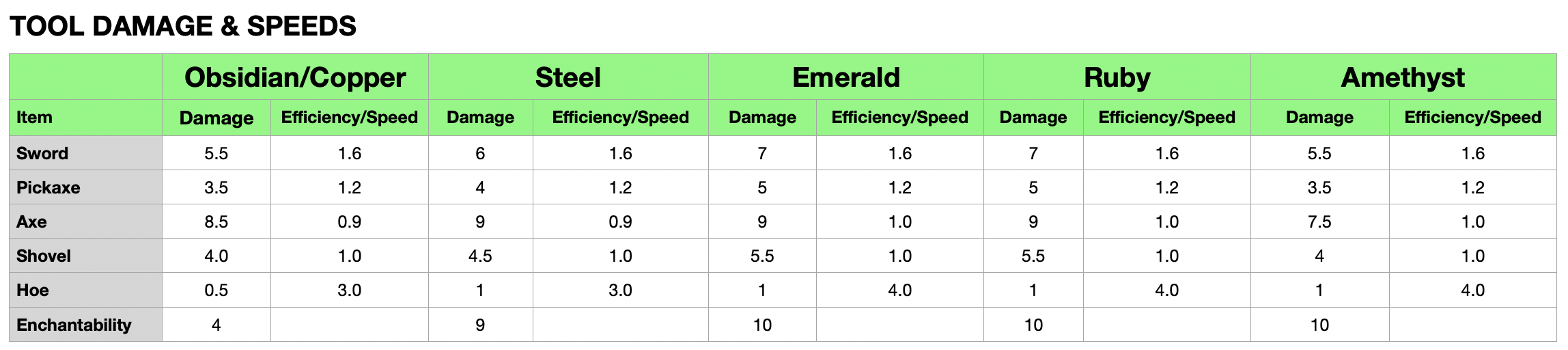

Project description from CurseForge.
Pick your setup
Easy Emerald Tools & More [FABRIC] by Minecraft version and loader
Choose the version and loader you play, then open the matching release.
Minecraft version
1.21
1 loader buildMinecraft version
1.20.6
1 loader buildMinecraft version
1.20.5-Snapshot
1 loader buildMinecraft version
1.20.5
2 loader buildsMinecraft version
1.20.4
1 loader buildMinecraft version
1.20.1
1 loader buildMinecraft version
1.19.3
1 loader buildMinecraft version
1.19.2
1 loader buildMinecraft version
1.19.1
1 loader buildMinecraft version
1.19
1 loader buildMinecraft version
1.18.2
1 loader buildShowing the newest 12 of 18 game versions. Older files are in the list below.
Check the dependencies, then try the file in a copied instance before changing a world you care about.
Recent files
Easy Emerald Tools & More [FABRIC] versions and loaders
EmeraldTools-Fabric-1.21.1-1.8.17.jar
19 Sept 2024
Client Source doesn’t say Server Source doesn’t say Dependencies No extras listed Listed on Release listing
Check the 1.21.1 · Fabric setup Fabric1.21.1 release
EmeraldTools-Fabric-1.21.1-1.8.16.jar
10 Aug 2024
Client Source doesn’t say Server Source doesn’t say Dependencies No extras listed Listed on Release listing
Check the 1.21.1 · Fabric setup Fabric1.21.1 release
EmeraldTools-Fabric-1.21-1.8.15.jar
6 Aug 2024
Client Source doesn’t say Server Source doesn’t say Dependencies No extras listed Listed on Release listing
Check the 1.21 · Fabric setup 1.21Fabric release
EmeraldTools-Fabric-1.21-1.8.14.jar
3 Aug 2024
Client Source doesn’t say Server Source doesn’t say Dependencies No extras listed Listed on Release listing
Check the 1.21 · Fabric setup 1.21Fabric release
EmeraldTools-Fabric-1.21-1.8.13.jar
27 Jul 2024
Client Source doesn’t say Server Source doesn’t say Dependencies No extras listed Listed on Release listing
Check the 1.21 · Fabric setup 1.21Fabric release
EmeraldTools-Fabric-1.21-1.8.12.jar
24 Jul 2024
Client Source doesn’t say Server Source doesn’t say Dependencies No extras listed Listed on Release listing
Check the 1.21 · Fabric setup 1.21Fabric release
EmeraldTools-Fabric-1.21-1.8.11.jar
17 Jul 2024
Client Source doesn’t say Server Source doesn’t say Dependencies No extras listed Listed on Release listing
Check the 1.21 · Fabric setup 1.21Fabric release
EmeraldTools-Fabric-1.21-1.8.10.jar
28 Jun 2024
Client Source doesn’t say Server Source doesn’t say Dependencies No extras listed Listed on Release listing
Check the 1.21 · Fabric setup 1.21Fabric release
EmeraldTools-Fabric-1.21-1.8.8.jar
25 Jun 2024
Client Source doesn’t say Server Source doesn’t say Dependencies No extras listed Listed on Release listing
Check the 1.21 · Fabric setup 1.21Fabric release
EmeraldTools-Fabric-1.21-1.8.7.jar
13 Jun 2024
Client Source doesn’t say Server Source doesn’t say Dependencies No extras listed Listed on Release listing
Check the 1.21 · Fabric setup 1.21Fabric release
EmeraldTools-Fabric-1.20.6-1.7.20.jar
6 May 2024
Client Source doesn’t say Server Source doesn’t say Dependencies No extras listed Listed on Release listing
Check the 1.20.6 · Fabric setup Fabric1.20.6 release
EmeraldTools-Fabric-1.20.6-1.7.19.jar
3 May 2024
Client Source doesn’t say Server Source doesn’t say Dependencies No extras listed Listed on Release listing
Check the 1.20.6 · Fabric setup Fabric1.20.6 release
Looking for an older file? The official CurseForge project page is in Resources.
 mod
mod CurseForge · Minecraft
Durt's Nether Dungeons
Expands the Nether dimension.
 mod
mod CurseForge · Minecraft
Artificery
Become an Artificer with this Technology & Enchanting Overhaul
 mod
mod CurseForge + Modrinth · Minecraft
Enhanced Anvils
Allows you to use colors / fonts and set lore when renaming items in an anvil.