
Minecraft version
Back to mods 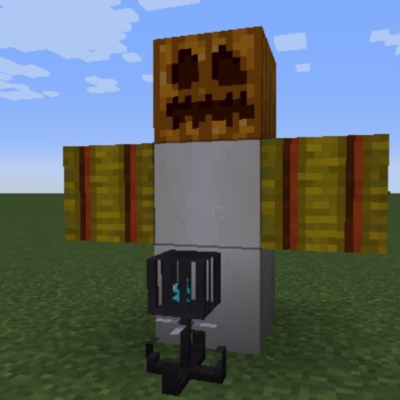
CurseForge · Minecraft mod
Malek's Multiblock Mobs
Adds the ability to change a new multiblockmobs.mbm file to create structures that spawn mobs and execute commands. Using modded blocks and entities.
Choose a version Pick your version below, then grab the matching file.
Quick answer
Which Malek's Multiblock Mobs release should I use?
Latest stable file Multiblock mobs 1.5.jar
Game version 1.12.2
Loader Forge
Malek's Multiblock Mobs Multiblock mobs 1.5.jar targets 1.12.2 with Forge. The project page does not say whether this file belongs on the client, dedicated server, or both. No extra mods listed for this file.
Where it goes
Is Malek's Multiblock Mobs required on the client, server, or both?
The project page does not say whether this file belongs on the client, dedicated server, or both.
Client Source doesn’t say
Dedicated server Source doesn’t say
Loader for this release Forge
Required install it here Optional supported, not mandatory Not supported do not install here Source doesn’t say do not assume
The source does not explicitly classify this release as client-only or server-only.
What else does Malek's Multiblock Mobs Multiblock mobs 1.5.jar need?
Multiblock mobs 1.5.jar. Change the file and its required mods may change too.
This file does not list any required mods. Do not add a library just because a different file uses it.
This file does not list any required or optional mods.
Before you install it
Add Malek's Multiblock Mobs without breaking your instance.
Built for Malek's Multiblock Mobs Multiblock mobs 1.5.jar. Pick another file and the loader, install side or required mods may change.
- 01
Stick to this file
Use Multiblock mobs 1.5.jar. It targets 1.12.2 with Forge; another release may have different loader, side or dependency requirements.
- 02
Bring the mods it needs
This file does not list any required mods. Do not add a library just because a different file uses it.
- 03
Put it on the correct side
The project page does not say whether this file belongs on the client, dedicated server, or both.
- 04
Pick the file you checked
Use the “Get this file” button beside Multiblock mobs 1.5.jar. It opens that exact file at the source.
About this project
What does Malek's Multiblock Mobs add?
You spawn mobs and execute commands. You must edit the multiblockmobs.mbm file. Two examples are listed here for how to set up the file. You must place the soul chassis somewhere on the multiblock structure, but you do not have to include it in the multiblock structure file, which means it will not get deleted. If your game crashes on startup you messed up the file. Everything needs to be exactly like it is below, spaces between equal signs must be the same, you have to have the quotation marks, etc. Do not add or remove spacing between characters!
The mod does not have a crafting recipe for the soul chassis, you must add that yourself either through another mod, or something like crafttweaker.
Example file of two mobs and blocks, one modded, one without modded stuff.
#Dimension
#Hashtags are comments
#X goes across, Y goes down
#Spacing is important
#Mob 1
!startMultiblockMob
!startDim
Dimensions:[x = 3, y = 3, z = 2]
!endDim
!startInit
minecraft:hay_block = "w"
minecraft:bone_block = "p"
multiblockmobs:soul_chassis = "s"
minecraft:air = "~"
minecraft:gold_block = "g"
!endInit
!startLoc
#z=0
["s"]
["wpw"]
["p"]
#z=1
["ggg"]
["ggg"]
["ggg"]
!endLoc
!startCustom
particals = "true"
particaltype = "modid:partical"
music = "true"
musicFile = "music"
soundEffect = "true"
soundEffectFile = "sound_effect"
customChat = "true"
customChat = "You made a mistake"
customCommand = "say Hi"
!stopCustom
!entityStart
entity = "harvestersnight:harvester"
!entityStop
!endMultiblockMob
!startMultiblockMob
!startDim
Dimensions:[x = 3, y = 2, z = 1]
!endDim
!startInit
minecraft:wool = "w"
minecraft:stone = "c"
multiblockmobs:soul_chassis = "s"
minecraft:air = "~"
!endInit
!startLoc
#z=0
["www"]
["c~c"]
!endLoc
!startCustom
particals = "true"
particaltype = "modid:partical"
musicBoolean = "true"
musicFile = "music"
soundEffectBoolean = "true"
soundEffectFile = "sound_effect"
customChat = "true"
customChat = "You made a mistake"
!stopCustom
!entityStart
entity = "minecraft:sheep"
!entityStop
!endMultiblockMob
Project description from CurseForge.
Pick your setup
Malek's Multiblock Mobs by Minecraft version and loader
Choose the version and loader you play, then open the matching release.
Check the dependencies, then try the file in a copied instance before changing a world you care about.
Recent files
Malek's Multiblock Mobs versions and loaders
MaleksMultiblockMobs-1.7.jar
30 Oct 2020
Client Source doesn’t say Server Source doesn’t say Dependencies No extras listed Listed on Release listing
Check the 1.12.2 setup 1.12.2 beta
MaleksMultiblockMobs-1.6.jar
23 Jul 2020
Client Source doesn’t say Server Source doesn’t say Dependencies No extras listed Listed on Release listing
Check the 1.12.2 · Forge setup Forge1.12.2 beta
Multiblock mobs 1.5.jar
15 May 2020
Client Source doesn’t say Server Source doesn’t say Dependencies No extras listed Listed on Release listing
Check the 1.12.2 · Forge setup Forge1.12.2 release
Multiblock mobs 1.2.jar
15 May 2020
Client Source doesn’t say Server Source doesn’t say Dependencies No extras listed Listed on Release listing
Check the 1.12.2 · Forge setup Forge1.12.2 release
V 2.0
malek's multiblock mobs 2.0.jar
20 Apr 2020
Client Source doesn’t say Server Source doesn’t say Dependencies No extras listed Listed on Release listing
Check the 1.12.2 setup 1.12.2 release
malek's multiblock mobs.jar
18 Apr 2020
Client Source doesn’t say Server Source doesn’t say Dependencies No extras listed Listed on Release listing
Check the 1.12.2 · Forge setup Forge1.12.2 release
Looking for an older file? The official CurseForge project page is in Resources.
 mod
Modrinth · Minecraft
Better Mob Drop(No Advancements Version)
[Better Mob Drop without advancements]A Minecraft mod/data pack which provide more reasonable mob drop
 mod
Modrinth · Minecraft
Better Mob Drop
A Minecraft mod/data pack which provide more reasonable mob drop
 mod
CurseForge · Minecraft
TONI's Wizardry
Become a wizard: wands with their own mana, 9 spells from tomes (fireball, frost nova, lightning, meteor...), good and dark wizards, necromancers, and Dark Towers guarded by the Archwarlock boss.