Ash API Needed by Transparent [Forge 1.20.4] v20.4.1
requiredMatching file found Matched file: [Forge 1.20.4] v20.4.0

CurseForge · Minecraft mod
Allows resource packs to make certain entities support transparency.
Quick answer
Transparent [Forge 1.20.4] v20.4.1 targets 1.20.4 with Forge. The project page does not say whether this file belongs on the client, dedicated server, or both. All 1 required mods have matching files.
Where it goes
The project page does not say whether this file belongs on the client, dedicated server, or both.
The source does not explicitly classify this release as client-only or server-only.
[Forge 1.20.4] v20.4.1 on 1.20.4 Forge. Every mod below is checked against that same setup.
Install Ash API first. We found matching files for this game-version and loader setup.
We only count dependency files that match this setup. A file for another loader does not fill the gap.
Before you install it
Built for Transparent [Forge 1.20.4] v20.4.1 on 1.20.4 Forge. Pick another file and the loader, install side or required mods may change.
Use [Forge 1.20.4] v20.4.1. It targets 1.20.4 with Forge; another release may have different loader, side or dependency requirements.
Install Ash API first. We found matching files for this game-version and loader setup.
The project page does not say whether this file belongs on the client, dedicated server, or both.
Use the “Get this file” button beside [Forge 1.20.4] v20.4.1. It opens that exact file at the source.
About this project
Transparent allows resource packs to give certain entities textures with transparent (or translucent) pixels. To use, simply install the mod and use or create a resource pack that gives one of the supported entities a transparent texture.
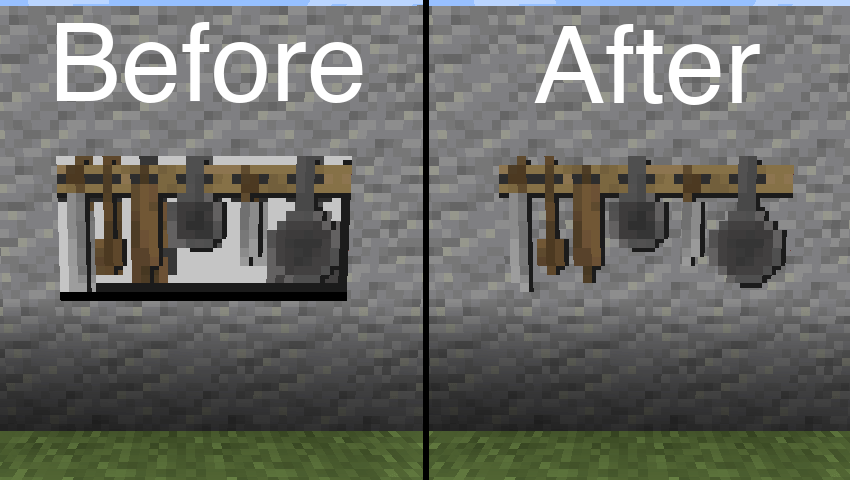
Resource pack used in the above image: BwW Texturepack.
Officially supports Paintings++ Mod!
If you want another entity to be supported by this mod, please let me know on Discord or GitHub Issues.
In order to change the default configuration, paste the following json file content into a file in your resource pack located at /assets/transparent/transparent.json.
{
    "armor_stand": true,
    "beacon_beam": false,
    "end_crystal": true,
    "end_crystal_beam": true,
    "item_frame": true,
    "painting": true,
    "player_cape": true,
    "player_armor": true
}
Report any issues on GitHub. Chat on Discord in the #transparent channel.
Support the development of my mods on Ko-fi.

Project description from CurseForge.
Pick your setup
Choose the version and loader you play, then open the matching release.
Showing the newest 12 of 13 game versions. Older files are in the list below.
Check the dependencies, then try the file in a copied instance before changing a world you care about.
Recent files
transparent-forge-20.4.1.jar
26 Dec 2023
transparent-forge-20.4.0.jar
26 Dec 2023
Looking for an older file? The official CurseForge project page is in Resources.