Auto Config Updated API Needed by Linkart (Fabric) linkart-1.3.3+fabric-1.16.3.jar
requiredMatching file found Matched file: [Fabric 1.16.x/1.17.x/1.18.x] v3.3.1
CurseForge · Minecraft mod
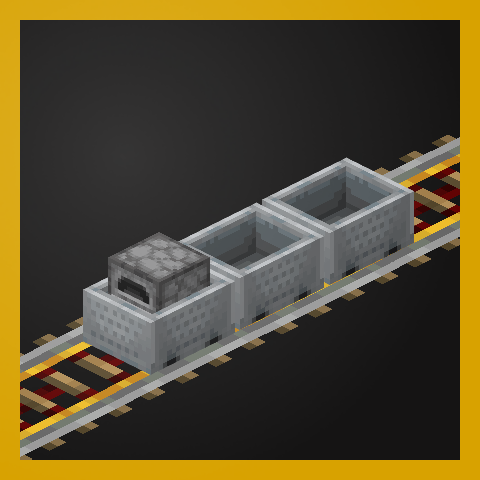
Want some smooth coupling action? Yea', we've got that!
Quick answer
Linkart (Fabric) linkart-1.3.3+fabric-1.16.3.jar targets 1.16.3, 1.16.5, 1.16.4 with Fabric. The project page does not say whether this file belongs on the client, dedicated server, or both. All 2 required mods have matching files.
Where it goes
The project page does not say whether this file belongs on the client, dedicated server, or both.
The source does not explicitly classify this release as client-only or server-only.
linkart-1.3.3+fabric-1.16.3.jar. Change the file and its required mods may change too.
Install Auto Config Updated API, Cloth Config API (UNUSED) first. We found matching files for this game-version and loader setup. 1 comes through another mod in the chain.
1 extra mod was pulled in by another dependency. Indented rows show who needs each one. We only count dependency files that match this setup. A file for another loader does not fill the gap.
Before you install it
Built for Linkart (Fabric) linkart-1.3.3+fabric-1.16.3.jar. Pick another file and the loader, install side or required mods may change.
Use linkart-1.3.3+fabric-1.16.3.jar. It targets 1.16.3, 1.16.5, 1.16.4 with Fabric; another release may have different loader, side or dependency requirements.
Install Auto Config Updated API, Cloth Config API (UNUSED) first. We found matching files for this game-version and loader setup. 1 comes through another mod in the chain.
The project page does not say whether this file belongs on the client, dedicated server, or both.
Use the “Get this file” button beside linkart-1.3.3+fabric-1.16.3.jar. It opens that exact file at the source.
About this project
Linkart
Linkart adds the Linker, a new item that you can use for cart linking, optionally, by default, consuming Chains. Carts have a frontal "locomotive" which dictates which direction they go in.
SHIFT + RIGHT CLICK to select the parent of a cart.
SHIFT + RIGHT CLICK again on another cart to mark it as a child of the parent.
LINKER is the item used for the previous actions. It can be disabled.
CHAIN is the item used by the LINKER for the previous actions. It can be disabled.
If the LINKER is enabled, and CHAIN is enabled, the player requires CHAIN in their inventory to link carts.
If the LINKER is enabled, and CHAIN is disabled, the player does not require CHAIN in their inventory to link carts.
If the LINKER is disabled, whether CHAIN is enabled or not does not matter. Cart linking can only be done by third-party mods that register a linking item.
Whenever the parent moves, the others follow - simple as that!
Project description from CurseForge.
Pick your setup
Choose the version and loader you play, then open the matching release.
Check the dependencies, then try the file in a copied instance before changing a world you care about.
Recent files
18 Oct 2020
30 Jun 2020
29 Jun 2020
27 Jun 2020
23 May 2020
15 May 2020
13 May 2020
13 May 2020
13 May 2020
11 May 2020
Looking for an older file? The official CurseForge project page is in Resources.
 mod
modDynamic Trains brings Create freight cars to life with modular containers and visible cargo. Load dirt, sand, gravel, and other gravity blocks, then transport them seamlessly on assembled trains.
 mod
modA Create: Aeronautics addon adding a full magnetism layer for Sable-driven contraptions: emitters that pull or push ships (electromagnets, anchors, tractor beams, repulsor coils, excavators), permanent and temporary magnets.
 mod
modA configurable 1-in-5000 chance every second for a elephant green screen effect.