Minecraft version
Back to mods 
CurseForge · Minecraft mod
MCDJ
A mod that allow you to add as many music discs as you want.
Choose a version Pick your version below, then grab the matching file.
Quick answer
Which MCDJ release matches 1.16.4 Forge?
Best match for your filters MCDJ v2.1.1 for 1.16.4
Game version 1.16.5, 1.16.4
Loader Forge
MCDJ v2.1.1 for 1.16.4 targets 1.16.5, 1.16.4 with Forge. The project page does not say whether this file belongs on the client, dedicated server, or both. No extra mods listed for this file.
Where it goes
Is MCDJ required on the client, server, or both?
The project page does not say whether this file belongs on the client, dedicated server, or both.
Client Source doesn’t say
Dedicated server Source doesn’t say
Loader for this release Forge
Required install it here Optional supported, not mandatory Not supported do not install here Source doesn’t say do not assume
The source does not explicitly classify this release as client-only or server-only.
What else does MCDJ v2.1.1 for 1.16.4 need?
MCDJ v2.1.1 for 1.16.4 on 1.16.4 Forge. Every mod below is checked against that same setup.
This file does not list any required mods. Do not add a library just because a different file uses it.
This file does not list any required or optional mods.
Before you install it
Add MCDJ without breaking your instance.
Built for MCDJ v2.1.1 for 1.16.4 on 1.16.4 Forge. Pick another file and the loader, install side or required mods may change.
- 01
Stick to this file
Use MCDJ v2.1.1 for 1.16.4. It targets 1.16.5, 1.16.4 with Forge; another release may have different loader, side or dependency requirements.
- 02
Bring the mods it needs
This file does not list any required mods. Do not add a library just because a different file uses it.
- 03
Put it on the correct side
The project page does not say whether this file belongs on the client, dedicated server, or both.
- 04
Pick the file you checked
Use the “Get this file” button beside MCDJ v2.1.1 for 1.16.4. It opens that exact file at the source.
About this project
What does MCDJ add?
...Someday...
...he will returns...
Srsly??? Update after 4 years? YEEeah!
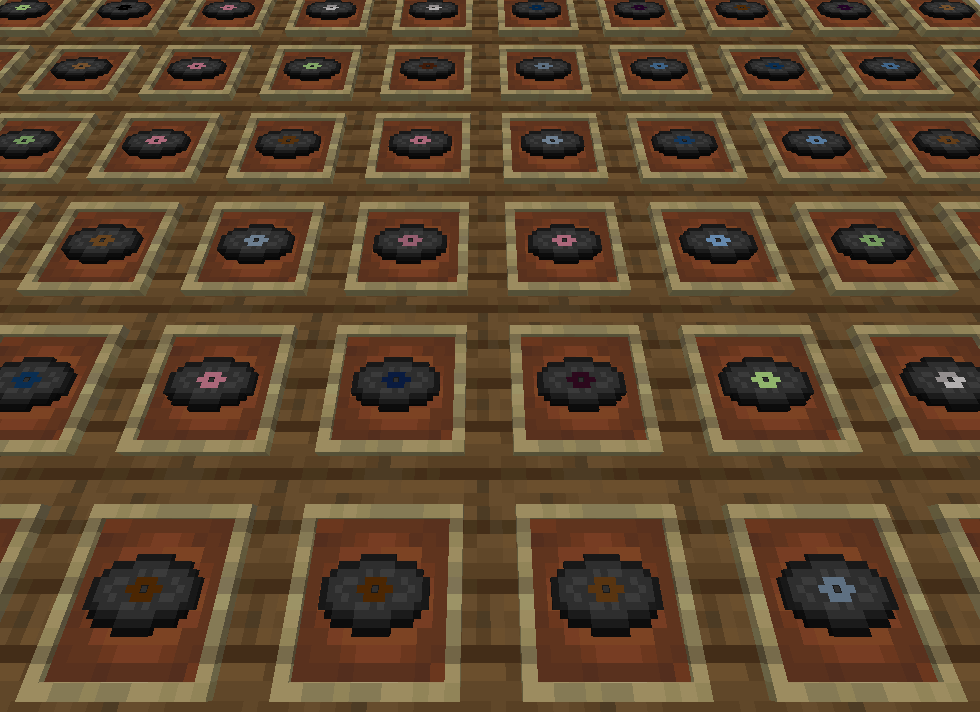
Vanilla records are not enough for you and want more? MCDJ is just what you need!
With MCDJ, you can easily add as many music discs as you like.
To add your music just go: Minecraft main menu -> Mods -> MCDJ -> Config. Aaaand... }
just drag&drop a folder with mp3s into Minecraft window
And... That's it!
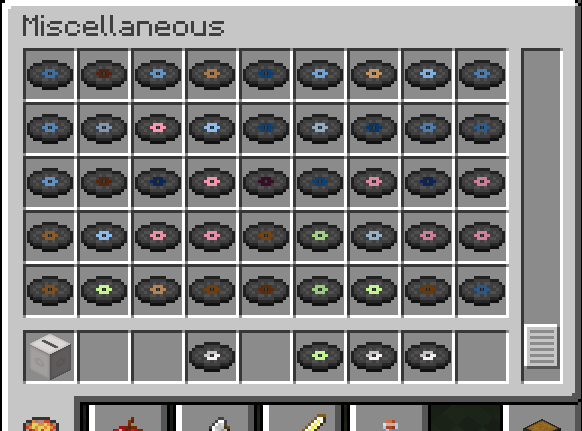
Whats new in 3.0.0:
MP3 files now can be converted automatically. Converter is not required anymore. (FFmpeg should be installed in your system)!
The playlist control menu has been added:
Here you can add new tracks by simply drag&drop folder with mp3 files.
In playlist menu you can add/play/delete tracks.
Added the "Sealed record" item with is contains 1 random music disc.
Sealed records can be found in dungeons or as drop from zombie or creeper (when they get killed by skeleton)
Removed from MCDJ:
Album Arts and related config options
High Resolution Textures and related config options
Legacy Music Generator and related config options
Spawn blank disc in dungeons. Now you can get them only by crafting
MCDJ now requires FFmpeg to be installed. Without it, MCDJ can only work with OGG audio files.
For more information about installing, configuring, and using the mod, please visit MCDJ wiki
Credits:
This mod is using FFmpeg to work with MP3 (and other formats in future updates)
This mod is using a modified version of the VorbisJava library to work with vorbis tags
Thank you for using MCDJ, i hope you find it useful!
Also try Audio Cassettes! this mod greatly simplifies listening to music in the game.
Project description from CurseForge.
Pick your setup
MCDJ by Minecraft version and loader
Choose the version and loader you play, then open the matching release.
Minecraft version
1.20.1
1 loader buildMinecraft version
1.16.5
1 loader buildMinecraft version
1.16.4
1 loader buildMinecraft version
1.16.3
1 loader buildMinecraft version
1.16.2
1 loader buildMinecraft version
1.16.1
1 loader buildMinecraft version
1.16
1 loader buildMinecraft version
1.15.2
1 loader buildMinecraft version
1.15.1
1 loader buildMinecraft version
1.15
1 loader buildMinecraft version
1.14.4
2 loader buildsShowing the newest 12 of 15 game versions. Older files are in the list below.
Check the dependencies, then try the file in a copied instance before changing a world you care about.
Recent files
MCDJ versions and loaders
MCDJ v2.1.1 for 1.16.4
MCDJ-1.16.4-2.1.1.jar
9 Feb 2021
Client Source doesn’t say Server Source doesn’t say Dependencies No extras listed Listed on Release listing
Check the 1.16.4 · Forge setup 1.16.5Forge1.16.4 release
MCDJ v2.1 for 1.16.4
MCDJ-1.16.4-2.1.jar
6 Nov 2020
Client Source doesn’t say Server Source doesn’t say Dependencies No extras listed Listed on Release listing
Check the 1.16.4 · Forge setup Forge1.16.4 release
Looking for an older file? The official CurseForge project page is in Resources.
 mod
CurseForge + Modrinth · Minecraft
EffectMC
Trigger special effects live in-game! Multiple mod loaders supported!
 mod
CurseForge · Minecraft
Collective
🎓 Collective is a shared library with common code for all of Serilum's mods.
 mod
CurseForge · Minecraft
The Undergarden
Deep underground, a forgotten land awaits.