



Minecraft version
Back to mods 
CurseForge · Minecraft mod
Surrounding Indicators
An interesting health/damage indicators mod.
Choose a version Pick your version below, then grab the matching file.
Quick answer
Which Surrounding Indicators release matches 1.19.3 Forge?
Best match for your filters Surrounding Indicators 1.19.1-v1.2.1
Game version 1.19.3, 1.19.2, 1.19.1
Loader Forge
Surrounding Indicators 1.19.1-v1.2.1 targets 1.19.3, 1.19.2, 1.19.1 with Forge. The project page does not say whether this file belongs on the client, dedicated server, or both. No extra mods listed for this file.
Where it goes
Is Surrounding Indicators required on the client, server, or both?
The project page does not say whether this file belongs on the client, dedicated server, or both.
Client Source doesn’t say
Dedicated server Source doesn’t say
Loader for this release Forge
Required install it here Optional supported, not mandatory Not supported do not install here Source doesn’t say do not assume
The source does not explicitly classify this release as client-only or server-only.
What else does Surrounding Indicators 1.19.1-v1.2.1 need?
Surrounding Indicators 1.19.1-v1.2.1 on 1.19.3 Forge. Every mod below is checked against that same setup.
This file does not list any required mods. Do not add a library just because a different file uses it.
This file does not list any required or optional mods.
Before you install it
Add Surrounding Indicators without breaking your instance.
Built for Surrounding Indicators 1.19.1-v1.2.1 on 1.19.3 Forge. Pick another file and the loader, install side or required mods may change.
- 01
Stick to this file
Use Surrounding Indicators 1.19.1-v1.2.1. It targets 1.19.3, 1.19.2, 1.19.1 with Forge; another release may have different loader, side or dependency requirements.
- 02
Bring the mods it needs
This file does not list any required mods. Do not add a library just because a different file uses it.
- 03
Put it on the correct side
The project page does not say whether this file belongs on the client, dedicated server, or both.
- 04
Pick the file you checked
Use the “Get this file” button beside Surrounding Indicators 1.19.1-v1.2.1. It opens that exact file at the source.
About this project
What does Surrounding Indicators add?
Surrounding Indicators


An interesting health indicators mod.
💞 What is this?
This is a simple lightweight client-side mod that adds health information from any mob within range in the corner of your screen. It should work with any mobs including ones from other mods. Also, it works on multiplayer and displays other Player health information as well!
🧪 Latest Updates
- Updated to support Minecraft 1.19
- Added custom heart visuals for illager mobs, Husks, Strays, Elder Guardians, and mounts in general
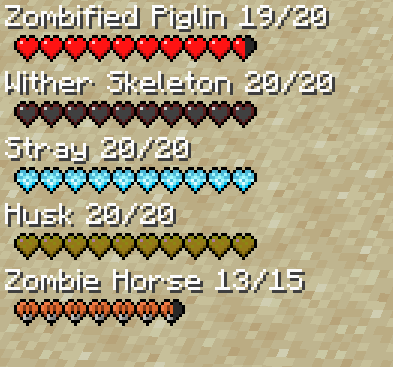
Displays Mob and Player Health Information
By default on the left side of your screen this mod will display health information of the mobs and players that are visible to you! You can modify how the hud looks in the config. Read the configuration guide down below.
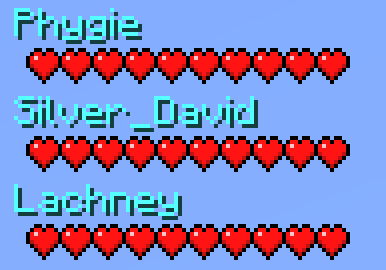
Team Information
Health information also displays on the right by default of those who are in your scoreboard team. This is useful for multiplayer games.
Configuration Guide
[common] #Max amount of health indicators that will be displayed. maxIndicatorsDisplayed = 5 #Max amount of team health indicators that will be displayed. maxTeamIndicatorsDisplayed = 7 #The starting point for the indicator on the x axis. indicatorX = 0 #The starting point for the indicator on the y axis. indicatorY = 0 #Distance the health indicator will detect entities. indicatorDistance = 7.0 #Enables the numerical indicators alongside the mob name. enableNumericalIndicator = false #The starting point for the team indicator on the x axis. (subtracted from right side) teamIndicatorX = 95 #Determines weather or not only player health indicators should show. onlyPlayerIndicators = false #Determines weather or not only team health indicators should show. enableTeamIndicators = false #The starting point for the team indicator on the y axis. teamIndicatorY = 0
🤷 FAQ (Frequently Asked Questions)
Can I use this in my modpack?
Yes, you definitely can. Just make to provide credit to all the authors respectively and link back to the CurseForge page.
Can I redistribute this mod onto other platforms?
Yes, but before doing so make sure that all downloads are directly linked to CurseForge and provide credit to all the authors respectively.
🤚 Support: If you have questions or any issues with our mods, read the FAQ! You can also either submit an issue on the issue tracker, or come into our Discord server where we can help you!

Project description from CurseForge.
Pick your setup
Surrounding Indicators by Minecraft version and loader
Choose the version and loader you play, then open the matching release.
Minecraft version
1.19.4
1 loader buildMinecraft version
1.19.3
1 loader buildMinecraft version
1.19.2
1 loader buildMinecraft version
1.19.1
1 loader buildMinecraft version
1.19
1 loader buildMinecraft version
1.16.5
1 loader buildMinecraft version
1.16.4
1 loader buildMinecraft version
1.16.3
1 loader buildMinecraft version
1.15.2
1 loader buildMinecraft version
1.14.4
1 loader buildCheck the dependencies, then try the file in a copied instance before changing a world you care about.
Recent files
Surrounding Indicators versions and loaders
Surrounding Indicators 1.19.1-v1.2.1
surrounding_indicators-1.19.1-1.2.1.jar
29 Jul 2022
Client Source doesn’t say Server Source doesn’t say Dependencies No extras listed Listed on Release listing
Check the 1.19.3 · Forge setup 1.19.31.19.2Forge1.19.1 release
Looking for an older file? The official CurseForge project page is in Resources.