Modder Name Lib Needed by packages-1.21.1-neoforge-2026.08.07.jar
requiredMatching file found Matched file: 2026.08.07-neoforge-1.21.1

CurseForge · Minecraft mod
512 items is all you need.
Quick answer
packages-1.21.1-neoforge-2026.08.07.jar targets 1.21.1 with NeoForge. The project page does not say whether this file belongs on the client, dedicated server, or both. All 1 required mods have matching files.
Where it goes
The project page does not say whether this file belongs on the client, dedicated server, or both.
The source does not explicitly classify this release as client-only or server-only.
packages-1.21.1-neoforge-2026.08.07.jar. Change the file and its required mods may change too.
Install Modder Name Lib first. We found matching files for this game-version and loader setup.
We only count dependency files that match this setup. A file for another loader does not fill the gap.
Before you install it
Built for packages-1.21.1-neoforge-2026.08.07.jar. Pick another file and the loader, install side or required mods may change.
Use packages-1.21.1-neoforge-2026.08.07.jar. It targets 1.21.1 with NeoForge; another release may have different loader, side or dependency requirements.
Install Modder Name Lib first. We found matching files for this game-version and loader setup.
The project page does not say whether this file belongs on the client, dedicated server, or both.
Use the “Get this file” button beside packages-1.21.1-neoforge-2026.08.07.jar. It opens that exact file at the source.
About this project
Mods -> NeoForge -> Client settings -> NeoForge Light PipelinePackages adds packages, which can hold 8 stacks of one item.
The catch: Packages only hold 8 stacks. There are no storage upgrades. The size is not configurable. But packages can nest inside each other, and even stack when they contain the same contents!
Other than their size, Packages behave like cheap shulker boxes. Measure with a comparator, crush with a piston, and dispense with a dispenser; shulker box loader and unloader designs work great on Packages.
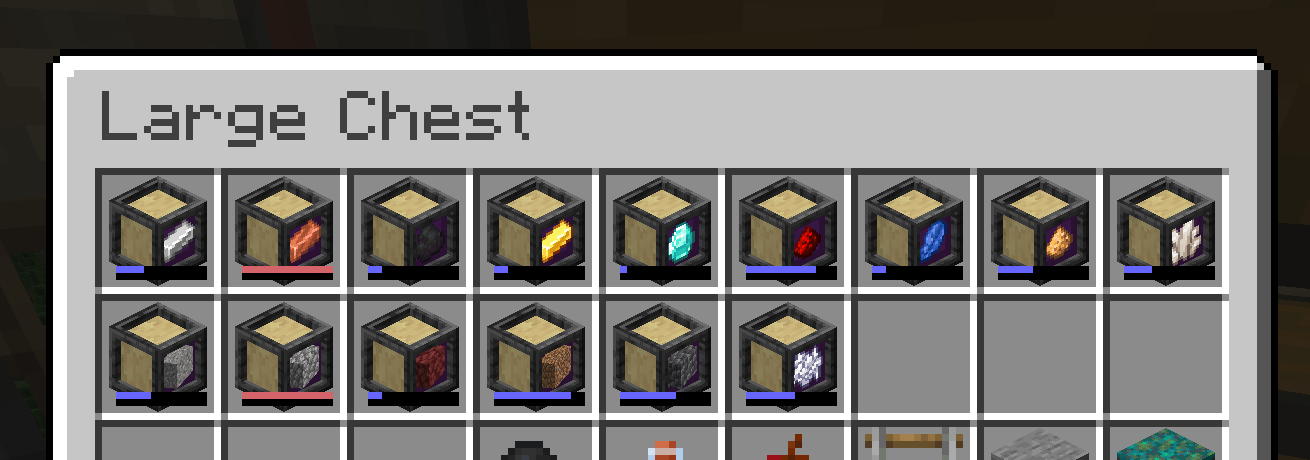
Kat came up with the Package Crafter model, unascribed came up with the idea for bundle interactions.
See the minisite for more documentation.
Questions? Comments? Just lonely? Join me on Discord: https://highlysuspect.agency/discord/
Project description from CurseForge.
Pick your setup
Choose the version and loader you play, then open the matching release.
Check the dependencies, then try the file in a copied instance before changing a world you care about.
Recent files
7 Aug 2026
7 Aug 2026
7 Aug 2026
7 Aug 2026
7 Aug 2026
7 Aug 2026
23 Dec 2025
23 Dec 2025
23 Dec 2025
23 Dec 2025
21 Oct 2025
21 Oct 2025
Looking for an older file? The official CurseForge project page is in Resources.
 mod
modA Create addon that focuses on transit fares/ticketing system.
 mod
modenhances neoforge modlist by adding options to hide mods, libraries, adding badges to mods to define what it does and more. as well as making it look better.
 mod
modAdds ambient waves to beaches,oceans and rivers!