Minecraft version
Back to mods 
CurseForge · Minecraft mod
Ambience - Extras (Music Mod)
Add your custom soundtracks to Minecraft with some extra features
Choose a version Pick your version below, then grab the matching file.
Quick answer
Which Ambience - Extras (Music Mod) release should I use?
Latest stable file Ambience-1.12.2-1.7.8.jar
Game version 1.12.2
Loader forge
Ambience - Extras (Music Mod) Ambience-1.12.2-1.7.8.jar targets 1.12.2. The project page does not say whether this file belongs on the client, dedicated server, or both. No extra mods listed for this file.
Where it goes
Is Ambience - Extras (Music Mod) required on the client, server, or both?
The project page does not say whether this file belongs on the client, dedicated server, or both.
Client Source doesn’t say
Dedicated server Source doesn’t say
Loader for this release No loader listed
Required install it here Optional supported, not mandatory Not supported do not install here Source doesn’t say do not assume
The source does not explicitly classify this release as client-only or server-only.
What else does Ambience - Extras (Music Mod) Ambience-1.12.2-1.7.8.jar need?
Ambience-1.12.2-1.7.8.jar. Change the file and its required mods may change too.
This file does not list any required mods. Do not add a library just because a different file uses it.
This file does not list any required or optional mods.
Before you install it
Add Ambience - Extras (Music Mod) without breaking your instance.
Built for Ambience - Extras (Music Mod) Ambience-1.12.2-1.7.8.jar. Pick another file and the loader, install side or required mods may change.
- 01
Stick to this file
Use Ambience-1.12.2-1.7.8.jar. It targets 1.12.2; another release may have different loader, side or dependency requirements.
- 02
Bring the mods it needs
This file does not list any required mods. Do not add a library just because a different file uses it.
- 03
Put it on the correct side
The project page does not say whether this file belongs on the client, dedicated server, or both.
- 04
Pick the file you checked
Use the “Get this file” button beside Ambience-1.12.2-1.7.8.jar. It opens that exact file at the source.
About this project
What does Ambience - Extras (Music Mod) add?

I have created this mod on top of the original Ambience mod from Vazkii because I really loved his mod but I felt that some things were missing in his mod and as he made the source code available on github I have added things to this mod just for fun and things that I found necessary for a mod that adds music to Minecraft, see below the extra blocks and the tool recipes and how to configure and use it.
Obs: This mod isn't an addon for the Ambience mod this is the entire Ambience mod with extra features, so you don't need to have the original Ambience mod in your game, and as this mod adds blocks and items to the game you have to install it in the CLIENT and SERVER sides!
This mod have all the events from original mod where you can read here and the new events below that you can add in the ambience.properties file:
- area.[areaname]
- area.[areaname].[redstonepower 0-15]
- event.attacked
- event.advancement
- event.bossEnderDragon
- event.bossWither
- event.falling
- event.flyingelytra
- event.lava
- event.gameover
- event.paused
- event.connecting
- event.disconnected
- event.oceanMonument
- event.loadingWorld
- event.ranch
- event.fortress
- event.stronghold
- event.mansion
- event.oceanmonument
- event.mineshaft
- event.deserttemple
- event.endcity
- event.igloo
- event.jungletemple
- event.oceanruin
- event.pillageroutpost
- event.shipwreck
- event.swamphut
- event.dripwaterincave (works when there is dripping water inside lake caves)
- event.riding.[entityname]
- effect.[potionname] (ex: effect.nightVision=visionbeyondreach)
- mob.[mobname] ( ex.: mob.wroughtnaut=Boss3)
Per dimension events:
- dimension.[DimensionID] ( set a music to play globally in a custom dimension )
- dimension.[DimensionID].[Event] ( ex.: dimension.-11325.sleeping=sleeping )
- effect.[potionname].[DimensionID] (ex: effect.nightVision.-1=visionbeyondreach)
Ok, Just give me the music pack:
(extract it in the root folder of you minecraft installation)
For the Configurations see the wiki
To add a sound to a selected area first you need the Soundnizer tool:
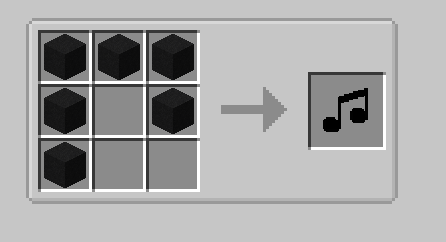
With the Soundnizer tool you can select an area by left-clicking with the tool in your and in a block and right-clicking in another block to form a rectangular shape:
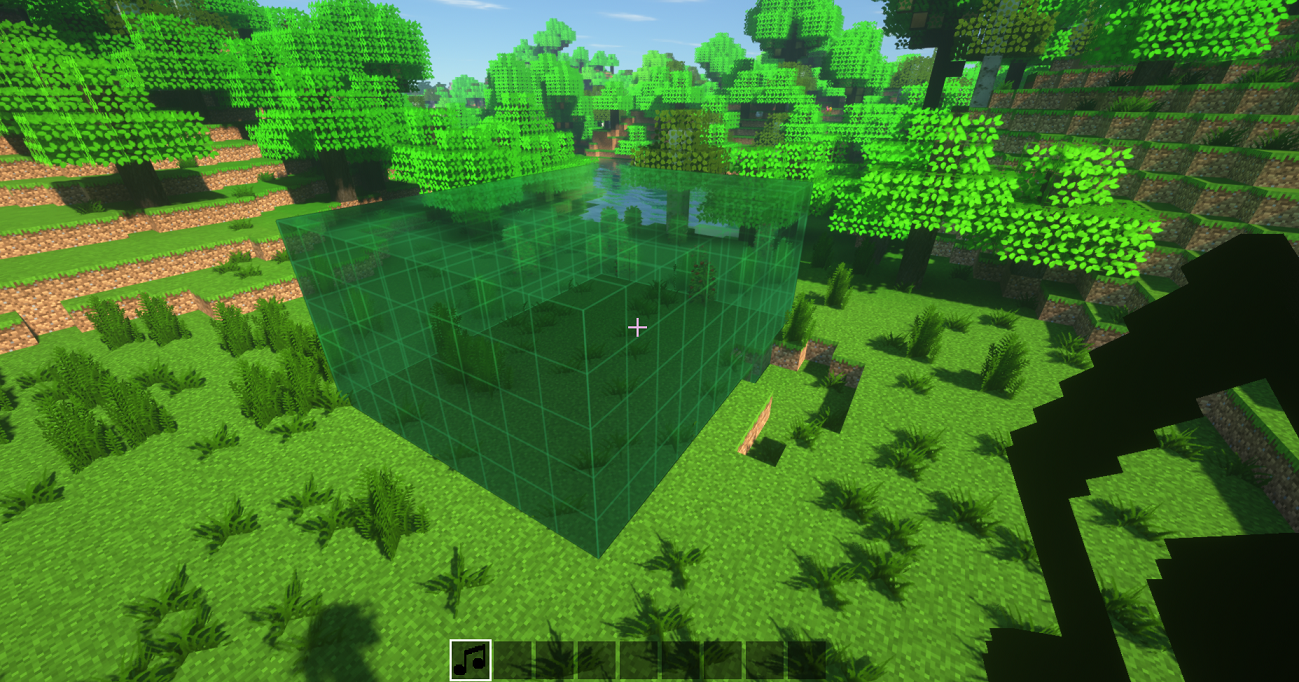
After that enter inside the area look to the sky or get away of all other blocks and right click again to open the Creation Gui:

The name of the created area must be equal the name of the area that you have created in the ambience.properties file
Example: if in the configs you created a area.Shop=shop the name in the GUI will be: Shop.
To edif an area you have to just right click in the air with the Soundnizer tool in your hand to open the GUI
To clear the selection press Shift+Right-click
There are six blocks:
The Song Switcher:

This block changes the song being played in a region depending on the redstone signal strength, to make it work it's simple, create an region with the Soundnizer tool put the song switch anywhere inside that region and put some redstone signal to it to power the region with energy for it to play the different songs, so you can setup up to 15 diferent songs to be played in the region by setting the area redstone signal in the config file like that:
area.Course.15=course
area.Course.14=race_start
area.Course.13=race_running
area.Course.12=race_over
obs.: it's perfect for creating mini-games with themed musics 😁
The Alarm:
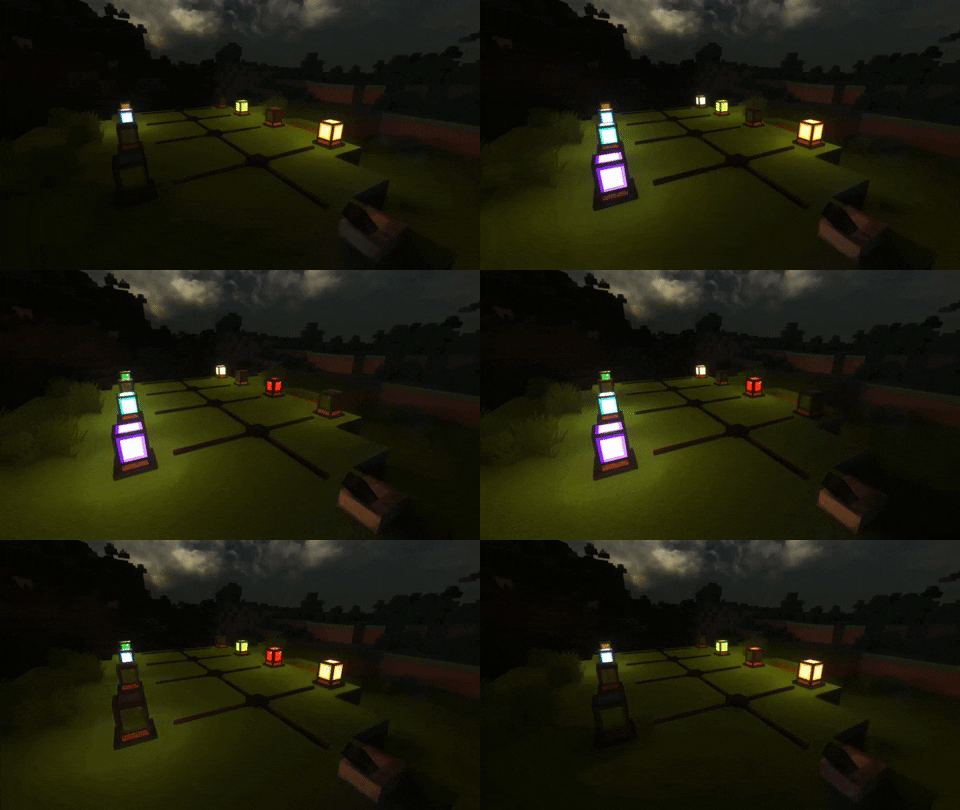
It's an Alarm that you can configure any sounds to be played on it and it blinks light when turned on, also it works with SEUS PTGI shader, you have only to edit the line of code bellow where it says "block.50=minecraft:torch" in the block.properties inside the shaderpack:
block.50=minecraft:torch ambience:alarm_lit_white ambience:alarm_lit_red ambience:alarm_lit_orange ambience:alarm_lit_yellow ambience:alarm_lit_lime ambience:alarm_lit_green ambience:alarm_lit_cyan ambience:alarm_lit_lightblue ambience:alarm_lit_blue ambience:alarm_lit_purple ambience:alarm_lit_magenta ambience:alarm_lit_pink ambience:alarm_lit_brown
The speaker
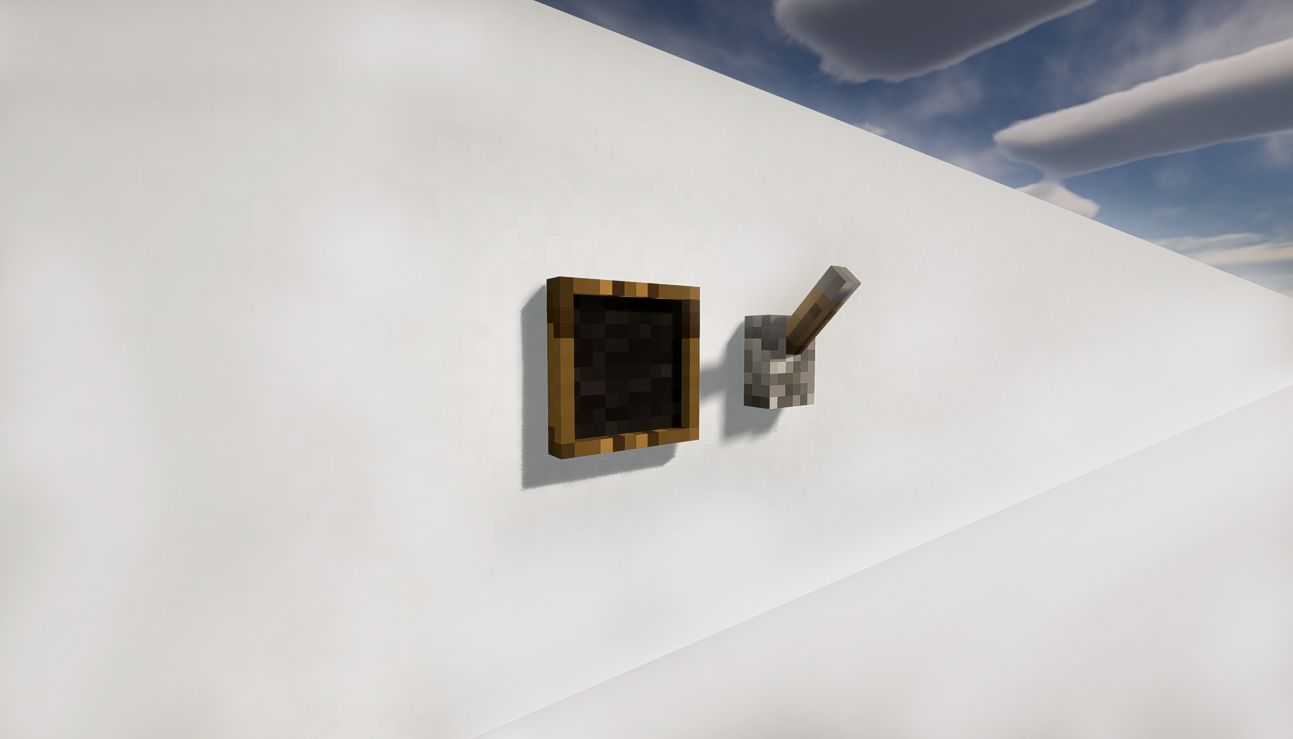
A block that plays a sound defined by you, to define a sound rightclick on it with the Soundnizer tool in your hand and to play it activate the speaker use a redstone signal.
**How To add sounds to the Speaker:**You have to add the sounds as a resource pack in the minecraft folder, and edit the sounds.json to add your sound, and inside the game you have to go to ResourcePacks and add the AmbienceSounds as a resource as you would do with a normal texture pack
Here are the basic resource pack with a few sounds added as an example:
❗Note: You must extract it for it to work and is already included in the My personal music pack above)
The Ocarina

The legend says that this ocarina was left forgotten on this world by a great hero and if played correctly it do powerful things, it can't be crafted only found in chests.
There are 7 know songs that you can play (the buttons for playing the songs can be configurated in the ambience.properties:
ocarina.sunssong
ocarina.songofstorms
ocarina.bolerooffire
ocarina.horsesong
ocarina.serenadeofwater
ocarina.preludeoflight
ocarina.minuetofforest
The Horn from the Gods

The horn is a very powerful item that causes fear in the hearts of your enemies and encourages your allies in the battle field.
Cinematic Transitions
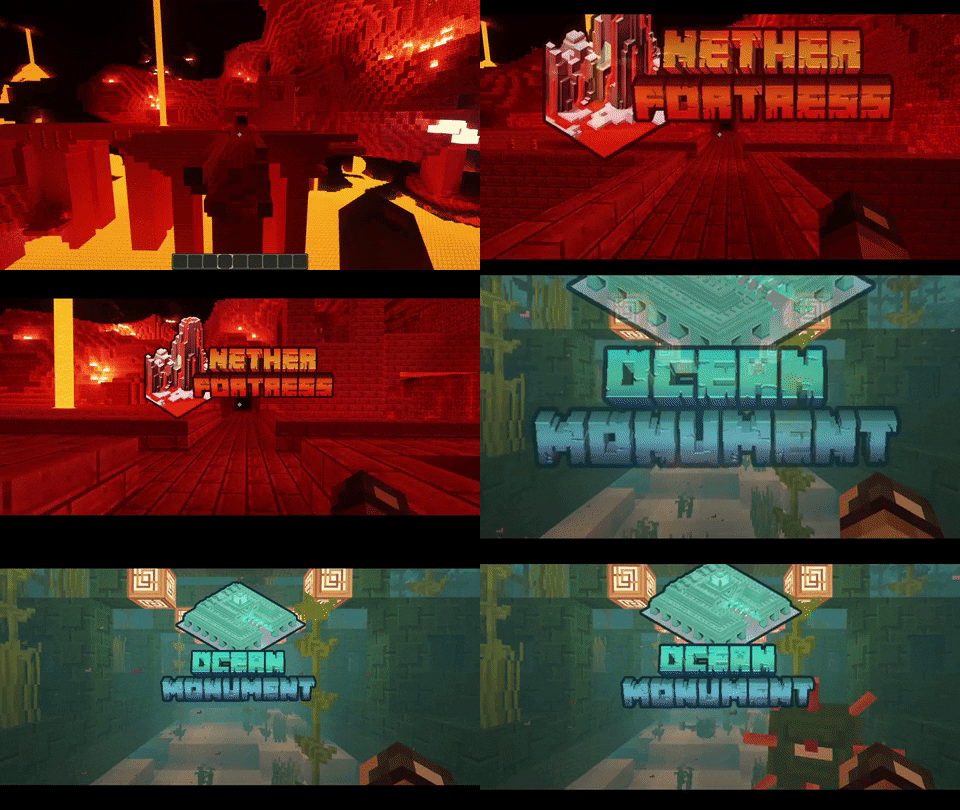
You can create images to show up when you enter a structure or a custom created region, to do so you must put an image inside the AmbienceSounds.zip resource pack inside the "assets\ambience\textures\transitions" and the file name must be the same name of the structure or the createdarea all in lowercase.

NOTE: This mod is incompatible with mineTunes, as they both use the same library that requires access to the audio system.
Original mod from Vazkii:
https://www.curseforge.com/minecraft/mc-mods/ambience-music-mod
Project description from CurseForge.
Pick your setup
Ambience - Extras (Music Mod) by Minecraft version and loader
Choose the version and loader you play, then open the matching release.
Minecraft version
1.16.4
1 loader buildMinecraft version
1.15.2
1 loader buildMinecraft version
1.12.2
2 loader buildsCheck the dependencies, then try the file in a copied instance before changing a world you care about.
Recent files
Ambience - Extras (Music Mod) versions and loaders
Ambience-1.16.5-1.0.0.jar
3 Aug 2021
Client Source doesn’t say Server Source doesn’t say Dependencies No extras listed Listed on Release listing
Check the 1.16.5 setup 1.16.5 alpha
Ambience-1.16.4-1.0.1.jar
20 Jan 2021
Client Source doesn’t say Server Source doesn’t say Dependencies No extras listed Listed on Release listing
Check the 1.16.4 setup 1.16.4 beta
Ambience-1.16.4-1.0.0.jar
12 Jan 2021
Client Source doesn’t say Server Source doesn’t say Dependencies No extras listed Listed on Release listing
Check the 1.16.4 setup 1.16.4 alpha
Ambience-1.12.2-1.7.8.jar
2 Dec 2020
Client Source doesn’t say Server Source doesn’t say Dependencies No extras listed Listed on Release listing
Check the 1.12.2 setup 1.12.2 release
Ambience-1.12.2-1.7.7.jar
25 Nov 2020
Client Source doesn’t say Server Source doesn’t say Dependencies No extras listed Listed on Release listing
Check the 1.12.2 setup 1.12.2 release
Ambience-1.15.2-1.0.7.4.jar
9 Nov 2020
Client Source doesn’t say Server Source doesn’t say Dependencies No extras listed Listed on Release listing
Check the 1.15.2 setup 1.15.2 release
Ambience-1.12.2-1.7.6.jar
9 Nov 2020
Client Source doesn’t say Server Source doesn’t say Dependencies No extras listed Listed on Release listing
Check the 1.12.2 setup 1.12.2 release
Ambience-1.12.2-1.7.5.jar
27 Oct 2020
Client Source doesn’t say Server Source doesn’t say Dependencies No extras listed Listed on Release listing
Check the 1.12.2 setup 1.12.2 release
Ambience-1.12.2-1.7.4.jar
20 Oct 2020
Client Source doesn’t say Server Source doesn’t say Dependencies No extras listed Listed on Release listing
Check the 1.12.2 setup 1.12.2 release
Ambience-1.12.2-1.7.3.jar
14 Oct 2020
Client Source doesn’t say Server Source doesn’t say Dependencies No extras listed Listed on Release listing
Check the 1.12.2 setup 1.12.2 release
Ambience-1.15.2-1.0.7.3.jar
14 Oct 2020
Client Source doesn’t say Server Source doesn’t say Dependencies No extras listed Listed on Release listing
Check the 1.15.2 setup 1.15.2 release
Ambience-1.15.2-1.0.7.2.jar
5 Oct 2020
Client Source doesn’t say Server Source doesn’t say Dependencies No extras listed Listed on Release listing
Check the 1.15.2 setup 1.15.2 release
Looking for an older file? The official CurseForge project page is in Resources.