Minecraft version
Back to mods 
CurseForge · Minecraft mod
Fans mod
Fans for moving entities
Choose a version Pick your version below, then grab the matching file.
Quick answer
Which Fans mod release should I use?
Latest stable file fansmod-1.21-2.0.1.2.jar
Game version 1.21
Loader NeoForge
Fans mod fansmod-1.21-2.0.1.2.jar targets 1.21 with NeoForge. The project page does not say whether this file belongs on the client, dedicated server, or both. No extra mods listed for this file.
Where it goes
Is Fans mod required on the client, server, or both?
The project page does not say whether this file belongs on the client, dedicated server, or both.
Client Source doesn’t say
Dedicated server Source doesn’t say
Loader for this release NeoForge
Required install it here Optional supported, not mandatory Not supported do not install here Source doesn’t say do not assume
The source does not explicitly classify this release as client-only or server-only.
What else does Fans mod fansmod-1.21-2.0.1.2.jar need?
fansmod-1.21-2.0.1.2.jar. Change the file and its required mods may change too.
This file does not list any required mods. Do not add a library just because a different file uses it.
This file does not list any required or optional mods.
Before you install it
Add Fans mod without breaking your instance.
Built for Fans mod fansmod-1.21-2.0.1.2.jar. Pick another file and the loader, install side or required mods may change.
- 01
Stick to this file
Use fansmod-1.21-2.0.1.2.jar. It targets 1.21 with NeoForge; another release may have different loader, side or dependency requirements.
- 02
Bring the mods it needs
This file does not list any required mods. Do not add a library just because a different file uses it.
- 03
Put it on the correct side
The project page does not say whether this file belongs on the client, dedicated server, or both.
- 04
Pick the file you checked
Use the “Get this file” button beside fansmod-1.21-2.0.1.2.jar. It opens that exact file at the source.
About this project
What does Fans mod add?
This is minecraft forge modification adding fans. Discord: https://discord.gg/KhsSzfm 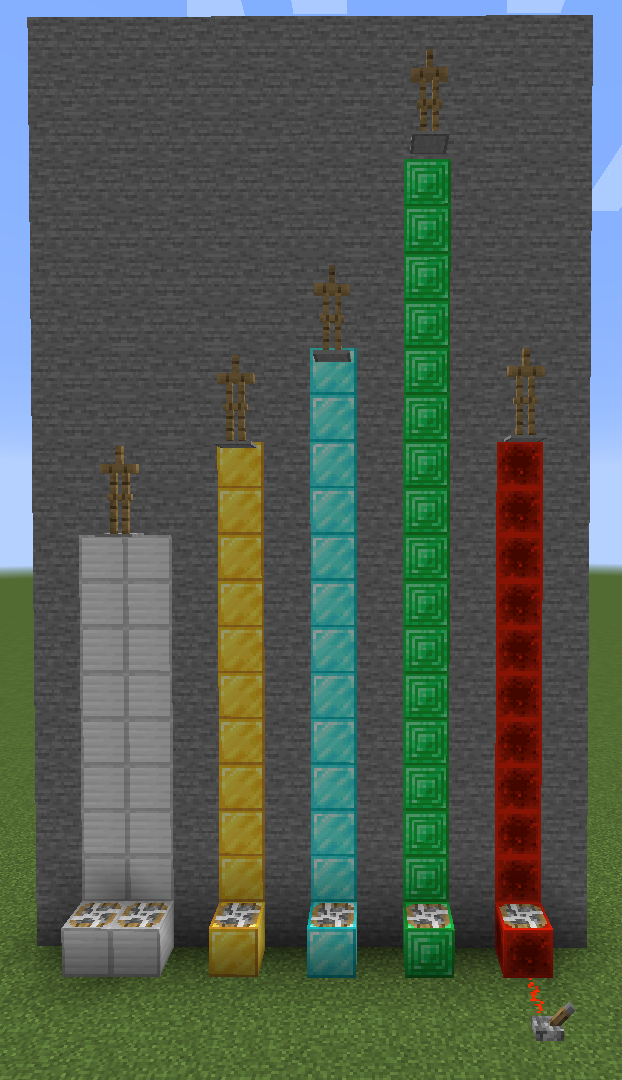
Basic fans
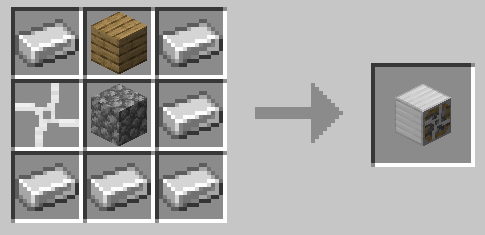
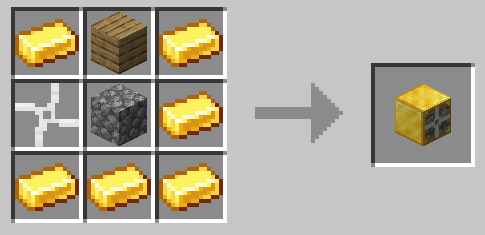
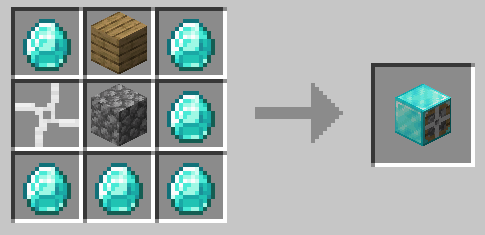
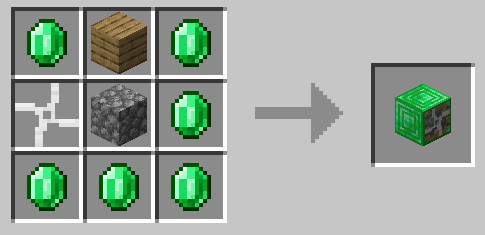
Currently there are iron, gold, diamond and emerald fans (each faster than its predecessor). Iron fan is weaker than gravity. If entity stands on two fans at once, then their force adds up.
Redstone fan
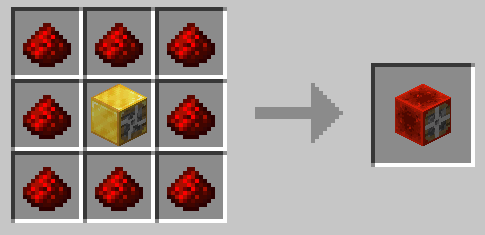
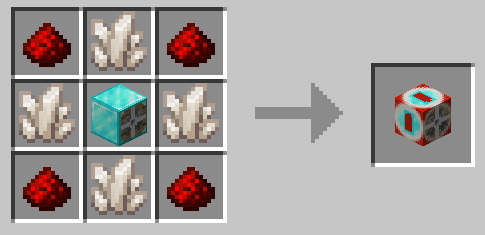
Redstone fan has range depending on redstone signal strength.
Configurable fan
Range of this fan can be configured by right clicking on it (0 blocks - 15 blocks).
Sticky fan
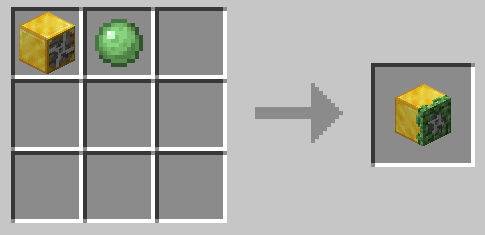
Doesn't push entities while they are touching it.
Sticky boots
Fans don't push you while you are standing on ground.
Leaf blower
Item used to push entities.
Recipes

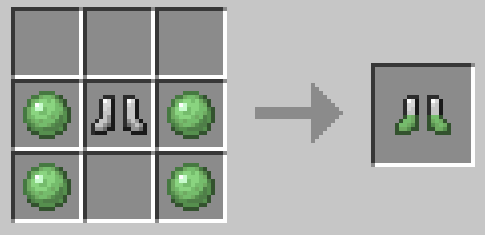
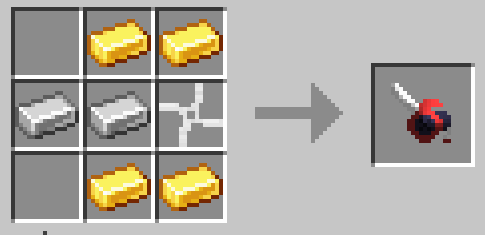
Need a server? I've got something for you! Click on the picture above, select a plan and use my code sappy to get 25% off your first month and play with your friends!
Project description from CurseForge.
Pick your setup
Fans mod by Minecraft version and loader
Choose the version and loader you play, then open the matching release.
Minecraft version
1.20
1 loader buildMinecraft version
1.19.1
1 loader buildMinecraft version
1.19
1 loader buildMinecraft version
1.18.2
1 loader buildMinecraft version
1.18.1
1 loader buildMinecraft version
1.18
1 loader buildMinecraft version
1.17.1
1 loader buildMinecraft version
1.16.5
1 loader buildMinecraft version
1.16.4
1 loader buildMinecraft version
1.16.3
1 loader buildMinecraft version
1.16.2
1 loader buildShowing the newest 12 of 15 game versions. Older files are in the list below.
Check the dependencies, then try the file in a copied instance before changing a world you care about.
Recent files
Fans mod versions and loaders
fansmod-1.21-2.0.1.2.jar
29 Jun 2024
Client Source doesn’t say Server Source doesn’t say Dependencies No extras listed Listed on Release listing
Check the 1.21 · NeoForge setup 1.21NeoForge release
fansmod-1.20-2.0.1.2.jar
11 Jun 2023
Client Source doesn’t say Server Source doesn’t say Dependencies No extras listed Listed on Release listing
Check the 1.20 · Forge setup Forge1.20 release
fansmod-1.19-2.0.1.2.jar
29 Jun 2022
Client Source doesn’t say Server Source doesn’t say Dependencies No extras listed Listed on Release listing
Check the 1.19.1 · Forge setup Forge1.19.11.19 release
fansmod-1.18-2.0.1.2.jar
9 Dec 2021
Client Source doesn’t say Server Source doesn’t say Dependencies No extras listed Listed on Release listing
Check the 1.18.2 · Forge setup 1.18.11.18.2Forge1.18 release
fansmod-1.17.1-2.0.1.2.jar
23 Jul 2021
Client Source doesn’t say Server Source doesn’t say Dependencies No extras listed Listed on Release listing
Check the 1.17.1 · Forge setup 1.17.1Forge release
fansmod-1.16.5-2.0.1.2.jar
4 Mar 2021
Client Source doesn’t say Server Source doesn’t say Dependencies No extras listed Listed on Release listing
Check the 1.16.5 · Forge setup 1.16.5Forge release
fansmod-1.16.4-2.0.1.2.jar
15 Dec 2020
Client Source doesn’t say Server Source doesn’t say Dependencies No extras listed Listed on Release listing
Check the 1.16.4 · Forge setup Forge1.16.4 release
fansmod-1.16.4-2.0.1.1.jar
13 Dec 2020
Client Source doesn’t say Server Source doesn’t say Dependencies No extras listed Listed on Release listing
Check the 1.16.4 · Forge setup Forge1.16.4 release
fansmod-1.16.3-2.0.1.0.jar
13 Sept 2020
Client Source doesn’t say Server Source doesn’t say Dependencies No extras listed Listed on Release listing
Check the 1.16.3 · Forge setup 1.16.3Forge release
fansmod-1.16.2-2.0.0.2.jar
21 Aug 2020
Client Source doesn’t say Server Source doesn’t say Dependencies No extras listed Listed on Release listing
Check the 1.16.2 · Forge setup Forge1.16.2 release
fansmod-1.16.2-2.0.0.1.jar
19 Aug 2020
Client Source doesn’t say Server Source doesn’t say Dependencies No extras listed Listed on Release listing
Check the 1.16.2 · Forge setup Forge1.16.2 release
fansmod-1.16.1-2.0.0.0-rc0.jar
28 Jun 2020
Client Source doesn’t say Server Source doesn’t say Dependencies No extras listed Listed on Release listing
Check the 1.16.1 setup 1.16.1 release
Looking for an older file? The official CurseForge project page is in Resources.
 mod
mod CurseForge + Modrinth · Minecraft
Create: Waterparked
Build real Waterparks with fully customizable slides!
 mod
mod CurseForge + Modrinth · Minecraft
Scannable Unofficial
This is an unofficial version of the Scannable mod (originally authored by Sangar) for version 1.21.x
 mod
mod CurseForge + Modrinth · Minecraft
Potentials
Library to allow mod developers to use cross platform capabilities