Fabric API Needed by VM Computers 1.4.15fix
requiredMatching file found Matched file: [1.16.5] Fabric API 0.42.0
CurseForge · Minecraft mod
Build a computer that actually works as a Virtual Machine!
Quick answer
VM Computers 1.4.15fix targets 1.16.5 with Fabric. The project page does not say whether this file belongs on the client, dedicated server, or both. All 1 required mods have matching files.
Where it goes
The project page does not say whether this file belongs on the client, dedicated server, or both.
The source does not explicitly classify this release as client-only or server-only.
1.4.15fix. Change the file and its required mods may change too.
Install Fabric API first. We found matching files for this game-version and loader setup.
We only count dependency files that match this setup. A file for another loader does not fill the gap.
Before you install it
Built for VM Computers 1.4.15fix. Pick another file and the loader, install side or required mods may change.
Use 1.4.15fix. It targets 1.16.5 with Fabric; another release may have different loader, side or dependency requirements.
Install Fabric API first. We found matching files for this game-version and loader setup.
The project page does not say whether this file belongs on the client, dedicated server, or both.
Use the “Get this file” button beside 1.4.15fix. It opens that exact file at the source.
About this project
Warning: This mod can screw with your VirtualBox settings. If VirtualBox doesn't start normally, delete your configuration folder and try to start it again. If this doesn't fix it, please contact me on Reddit.
You can donate in BTC to the address 3GubEkHV69gCkjWhRgRWYqWqyjcWW3gxFF, or in BCH to bitcoincash:qq6jttzlvgj68lvecnh75pt3znezj4vx6sysfvj3j5.


Order yourself computer parts from a satellite orbiting around your Minecraft world to build a computer that actually works!
How to install
Put the mod into your mods folder
Install VirtualBox (You need a version that starts with "6.1")
Done! The mod (or even VirtualBox) might not work if you don't restart your computer after installing VirtualBox.
How to order computer parts
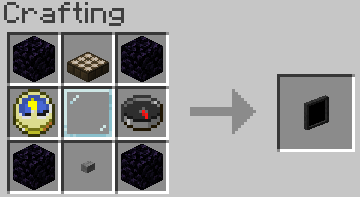
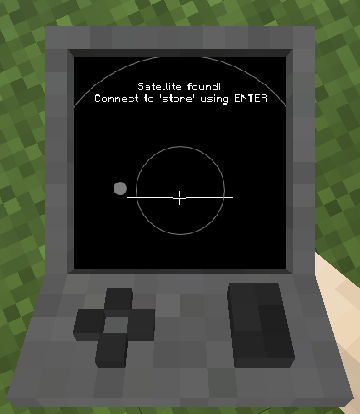
(It says "Satellite found! Connect to 'store' using ENTER")
How to create a virtual hard drive
Get a hard drive.
Right click, it doesn't matter if it's already assigned to a file or not.
Use the menu.
How to import an ISO
Put it into [minecraft directory]/vm_computers/isos and it will be automatically updated in-game.
How to build a computer
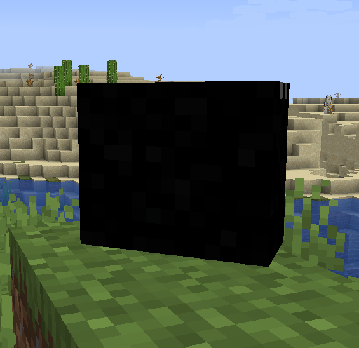
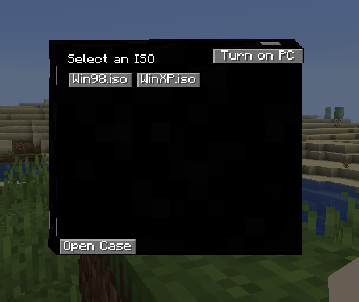
(I am the legal owner of a copy of Windows 98 and Windows XP)
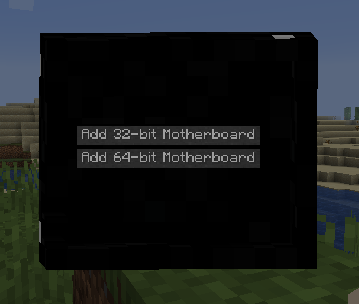
From here on out, it's basic. Greyed out button means that you don't own that item.
How to use a computer
Start it by clicking on the pc case and clicking on "Turn on". Then focus your input to the VM by clicking a screen. Warning: Key combinations are still processed by the host, e.g. Alt+F4 still closes the game.
How to pick up placed stuff
Sneak + right click on the thing
Contribute to the project on GitHub!
Project description from CurseForge.
Pick your setup
Choose the version and loader you play, then open the matching release.
Check the dependencies, then try the file in a copied instance before changing a world you care about.
Recent files
mcvmcomputers-1.4.15.jar
9 Apr 2021
mcvmcomputers-1.4.15.jar
6 Apr 2021
mcvmcomputers-1.4.14.jar
27 Feb 2021
mcvmcomputers-1.4.13.jar
1 Nov 2020
mcvmcomputers-1.4.12.jar
15 Sept 2020
mcvmcomputers-1.4.11.jar
14 Sept 2020
mcvmcomputers-1.4.10.jar
11 Sept 2020
mcvmcomputers-1.4.9.jar
10 Sept 2020
mcvmcomputers-1.4.8.jar
2 Aug 2020
mcvmcomputers-1.4.7.jar
31 Jul 2020
mcvmcomputers-1.4.6.jar
28 Jul 2020
mcvmcomputers-1.4.5.jar
20 Jul 2020
Looking for an older file? The official CurseForge project page is in Resources.
 mod
Allows you play normally even when authentication servers are down
 mod
BuildCraft Community Edition - port of original BC to newer versions
 mod
A copper-themed Fabric storage network with a searchable terminal, camouflage and automated item transfer.