Minecraft version
Back to mods 
CurseForge · Minecraft mod
Auto Restart
Adds auto restarting to Minecraft servers.
Choose a version Pick your version below, then grab the matching file.
Quick answer
Which Auto Restart release should I use?
Latest stable file Auto Restart 1.21.11-3.0.1
Game version 1.21.11
Loader NeoForge
Auto Restart 1.21.11-3.0.1 targets 1.21.11 with NeoForge. The project page does not say whether this file belongs on the client, dedicated server, or both. No extra mods listed for this file.
Where it goes
Is Auto Restart required on the client, server, or both?
The project page does not say whether this file belongs on the client, dedicated server, or both.
Client Source doesn’t say
Dedicated server Source doesn’t say
Loader for this release NeoForge
Required install it here Optional supported, not mandatory Not supported do not install here Source doesn’t say do not assume
The source does not explicitly classify this release as client-only or server-only.
What else does Auto Restart 1.21.11-3.0.1 need?
Auto Restart 1.21.11-3.0.1. Change the file and its required mods may change too.
This file does not list any required mods. Do not add a library just because a different file uses it.
This file does not list any required or optional mods.
Before you install it
Add Auto Restart without breaking your instance.
Built for Auto Restart 1.21.11-3.0.1. Pick another file and the loader, install side or required mods may change.
- 01
Stick to this file
Use Auto Restart 1.21.11-3.0.1. It targets 1.21.11 with NeoForge; another release may have different loader, side or dependency requirements.
- 02
Bring the mods it needs
This file does not list any required mods. Do not add a library just because a different file uses it.
- 03
Put it on the correct side
The project page does not say whether this file belongs on the client, dedicated server, or both.
- 04
Pick the file you checked
Use the “Get this file” button beside Auto Restart 1.21.11-3.0.1. It opens that exact file at the source.
About this project
What does Auto Restart add?
Version 3.X.X
For older versions of the mod, check the wiki.
This mod restarts the Minecraft server by itself or with an external restart script.
The mod can only be used on the server side and won't work on the client side.
You need a server to play with friends? You don't know how to set up one? Just rent an already configured server!

Click on the picture above, select a plan (with recommended at least 6 GB),
use my code agent to get 25% off your first month and enjoy playing with your friends!
Support
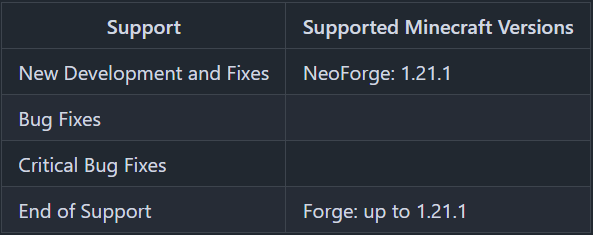
Minecraft versions, for which the mod is not released, are not supported.
You can find a text version here.
Features
- Restarting the server at specified times
- Restarting the server with a delay, if it is empty
- Restarting the server, if the TPS are below a specified level for a specified time
Server Config
The config file can be found in the "serverconfig" folder in the "world" folder and is named "auto_restart-server.toml". The name of the world folder is set for servers in the "server.properties" file.
- restart – Options for restarting:
- use_external_restart_script – Is the server started by an external restart script?
- restart_command – Command that is executed on Server stopped to restart the server. Only called if "use_external_restart_script" is false.
- auto_restart – Option for auto restarting:
- enabled – Should the Server do automatic restarts?
- times – Times in 24-hour format on which the server will automatically restart. Examples: "14:00", "16:32"
- on_crash – Should the server be automatically restarted when it crashes.
- warning_times – Times before an auto restart of the server, a restart warning should be shown. Examples:
5s– For a message 5 seconds before a restart7m– For a message 7 minutes before a restart2h– For a message 2 hours before a restart
- on_empty_restart – Options for restart, if the server is empty:
- enabled – Should the server restart, if no players are online?
- delay – Delay after the server should restart, if it is empty. Examples:
5s– For a delay 5 seconds7m– For a delay 7 minutes2h– For a delay 2 hours
- low_tps_restart – Options for restart, if the TPS of server or its dimensions are low:
- enabled – Should the server restart, if it is below a TPS level for a specified time?
- minium_tps_level – TPS level below which the server is restarted, if it lasts for the specified time.
- delay – Delay, that the server must be below the defined TPS level, in order for it to be restarted. Examples:
5s– For a delay 5 seconds7m– For a delay 7 minutes2h– For a delay 2 hours
Commands
/restart– Restarts the server
How to set up the mod?
To use the mod, one or more shell (sh or Linux) or batch (bat or cmd on Windows) scripts/files are needed.
To set up everything to use this mod, please check the Setup Guide.
Thanks for the logo to Muse31.
You can use this mod in non-commercial modpacks without asking.
You can find more mods from me on CurseForge or Modrinth.

Project description from CurseForge.
Pick your setup
Auto Restart by Minecraft version and loader
Choose the version and loader you play, then open the matching release.
Minecraft version
1.21.10
1 loader buildMinecraft version
1.21.9
1 loader buildMinecraft version
1.21.8
1 loader buildMinecraft version
1.21.7
1 loader buildMinecraft version
1.21.6
1 loader buildMinecraft version
1.21.5
1 loader buildMinecraft version
1.21.4
1 loader buildMinecraft version
1.21.3
1 loader buildMinecraft version
1.21.2
1 loader buildMinecraft version
1.21.1
2 loader buildsMinecraft version
1.21
1 loader buildShowing the newest 12 of 33 game versions. Older files are in the list below.
Check the dependencies, then try the file in a copied instance before changing a world you care about.
Recent files
Auto Restart versions and loaders
Auto Restart 1.21.11-3.0.1
AutoRestart-1.21.11-3.0.1.jar
29 Sept 2026
Client Source doesn’t say Server Source doesn’t say Dependencies No extras listed Listed on Release listing
Check the 1.21.11 · NeoForge setup NeoForge1.21.11 release
Auto Restart 1.21.1-3.0.1
AutoRestart-1.21.1-3.0.1.jar
2 May 2026
Client Source doesn’t say Server Source doesn’t say Dependencies No extras listed Listed on Release listing
Check the 1.21.10 · NeoForge setup 1.21.81.21.51.21.41.21.1 release
Auto Restart 1.21.1-3.0.0
AutoRestart-1.21.1-3.0.0.jar
11 Dec 2025
Client Source doesn’t say Server Source doesn’t say Dependencies No extras listed Listed on Release listing
Check the 1.21.1 · NeoForge setup 1.21.1NeoForge release
Auto Restart 1.21.1-2.0.2
AutoRestart-1.21.1-2.0.2.jar
1 Sept 2024
Client Source doesn’t say Server Source doesn’t say Dependencies No extras listed Listed on Release listing
Check the 1.21.1 · Forge setup Forge1.21.1 release
Auto Restart 1.21-2.0.2
AutoRestart-1.21-2.0.2.jar
30 Aug 2024
Client Source doesn’t say Server Source doesn’t say Dependencies No extras listed Listed on Release listing
Check the 1.21 · Forge setup 1.21Forge release
Auto Restart 1.20.6-2.0.2
AutoRestart-1.20.6-2.0.2.jar
1 Jun 2024
Client Source doesn’t say Server Source doesn’t say Dependencies No extras listed Listed on Release listing
Check the 1.20.6 · Forge setup Forge1.20.6 release
Auto Restart 1.20.4-2.0.2
AutoRestart-1.20.4-2.0.2.jar
13 Jan 2024
Client Source doesn’t say Server Source doesn’t say Dependencies No extras listed Listed on Release listing
Check the 1.20.4 · Forge setup Forge1.20.4 release
Auto Restart 1.20.2-2.0.2
AutoRestart-1.20.2-2.0.2.jar
13 Jan 2024
Client Source doesn’t say Server Source doesn’t say Dependencies No extras listed Listed on Release listing
Check the 1.20.2 · Forge setup 1.20.2Forge release
Auto Restart 1.20.1-2.0.2
AutoRestart-1.20.1-2.0.2.jar
13 Jan 2024
Client Source doesn’t say Server Source doesn’t say Dependencies No extras listed Listed on Release listing
Check the 1.20.1 · Forge setup 1.20.1Forge release
Auto Restart 1.20.4-2.0.1
AutoRestart-1.20.4-2.0.1.jar
13 Dec 2023
Client Source doesn’t say Server Source doesn’t say Dependencies No extras listed Listed on Release listing
Check the 1.20.4 · Forge setup Forge1.20.4 release
Auto Restart 1.20.2-2.0.1
AutoRestart-1.20.2-2.0.1.jar
19 Oct 2023
Client Source doesn’t say Server Source doesn’t say Dependencies No extras listed Listed on Release listing
Check the 1.20.2 · Forge setup 1.20.2Forge release
Auto Restart 1.20.1-2.0.1
AutoRestart-1.20.1-2.0.1.jar
6 Jul 2023
Client Source doesn’t say Server Source doesn’t say Dependencies No extras listed Listed on Release listing
Check the 1.20.1 · Forge setup 1.20.1Forge release
Looking for an older file? The official CurseForge project page is in Resources.
 mod
mod CurseForge + Modrinth · Minecraft
Elytra/Chestplate Swapper
A simple quality of life mod that swaps between chestplate and elytra on a keystroke.
 mod
mod CurseForge + Modrinth · Minecraft
Biology Dictionary
Discover, highlight, inspect, modify - your vanilla & modded mob encyclopedia
 mod
mod Modrinth · Minecraft
Auto Restart
Adds auto restarting to Minecraft servers.