TheDragonLib Needed by Sword Displays sworddisplay-1.20.1-2.1.0.jar
requiredMatching file found Matched file: thedragonlib-1.20.1-1.0.0.jar
CurseForge · Minecraft mod
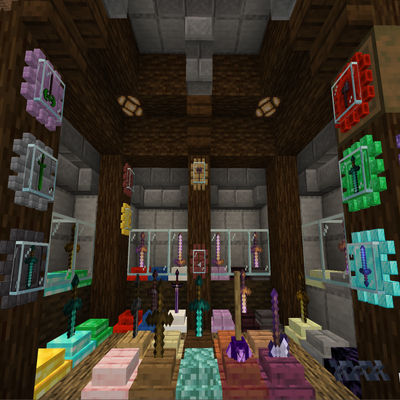
A mod that allows you to display your weapons
Quick answer
Sword Displays sworddisplay-1.20.1-2.1.0.jar targets 1.20.1 with Forge. The project page does not say whether this file belongs on the client, dedicated server, or both. All 1 required mods have matching files.
Where it goes
The project page does not say whether this file belongs on the client, dedicated server, or both.
The source does not explicitly classify this release as client-only or server-only.
sworddisplay-1.20.1-2.1.0.jar. Change the file and its required mods may change too.
Install TheDragonLib first. We found matching files for this game-version and loader setup.
We only count dependency files that match this setup. A file for another loader does not fill the gap.
Before you install it
Built for Sword Displays sworddisplay-1.20.1-2.1.0.jar. Pick another file and the loader, install side or required mods may change.
Use sworddisplay-1.20.1-2.1.0.jar. It targets 1.20.1 with Forge; another release may have different loader, side or dependency requirements.
Install TheDragonLib first. We found matching files for this game-version and loader setup.
The project page does not say whether this file belongs on the client, dedicated server, or both.
Use the “Get this file” button beside sworddisplay-1.20.1-2.1.0.jar. It opens that exact file at the source.
About this project
The mod introduces sword displays to your minecraft world.

To Insert an item: Right-Click with a sword (type) item | Note: You can only place one sword at a time.
To Withdraw the item: Shift + Right-Click
To Inverse Rotate the item in the display: Right-Click with an empty hand, while the display isn't empty.
To Add/Insert additional item(s) or Replace/Remove currently available ones:
Create a new datapack: "sworddisplay"
Create the following folder structure inside the datapack**: 1.21+: "data/tags/item/", pre 1.21: "data/tags/items/"**
Create a new file inside items/ called: "swords.json"
Follow the scheme/format of https://minecraft.fandom.com/wiki/Tags
{

  "replace": false,

  "values": [

    "minecraft:diamond_axe",

    "minecraft:mace",

    "modid:item"

  ]

}
At the current moment there are NO plans to port the mod to Fabric.
Project description from CurseForge.
Pick your setup
Choose the version and loader you play, then open the matching release.
Showing the newest 12 of 18 game versions. Older files are in the list below.
Check the dependencies, then try the file in a copied instance before changing a world you care about.
Recent files
10 Oct 2025
9 Oct 2025
2 Oct 2025
27 Sept 2025
26 Sept 2025
8 Jul 2024
5 Jul 2024
4 Jul 2024
24 Dec 2023
8 Feb 2023
21 Jan 2023
21 Jan 2023
Looking for an older file? The official CurseForge project page is in Resources.
 mod
modEnchantment Shifter is a Minecraft mod that allows players to freely move enchantments between items using the anvil. Transfer enchantments to books for storage, shift enchantments between tools, and customize XP costs and limits.
 mod
modForge flying-sword combat with formations, sword riding, active targeting, and reversible material upgrades.
 mod
modA simple mod that adds a new dimension, new ores, new tools, weapons, and armor, as well as various features.