
Minecraft version
Back to mods 
CurseForge · Minecraft mod
Desired Servers
Your desired servers will always be listed.
Choose a version Pick your version below, then grab the matching file.
Quick answer
Which Desired Servers release should I use?
Latest stable file desiredservers-neoforge-1.21.1-1.6.0.jar
Game version 1.21.1
Loader NeoForge
Desired Servers desiredservers-neoforge-1.21.1-1.6.0.jar targets 1.21.1 with NeoForge. The project page does not say whether this file belongs on the client, dedicated server, or both. No extra mods listed for this file.
Where it goes
Is Desired Servers required on the client, server, or both?
The project page does not say whether this file belongs on the client, dedicated server, or both.
Client Source doesn’t say
Dedicated server Source doesn’t say
Loader for this release NeoForge
Required install it here Optional supported, not mandatory Not supported do not install here Source doesn’t say do not assume
The source does not explicitly classify this release as client-only or server-only.
What else does Desired Servers desiredservers-neoforge-1.21.1-1.6.0.jar need?
desiredservers-neoforge-1.21.1-1.6.0.jar. Change the file and its required mods may change too.
This file does not list any required mods. Do not add a library just because a different file uses it.
This file does not list any required or optional mods.
Before you install it
Add Desired Servers without breaking your instance.
Built for Desired Servers desiredservers-neoforge-1.21.1-1.6.0.jar. Pick another file and the loader, install side or required mods may change.
- 01
Stick to this file
Use desiredservers-neoforge-1.21.1-1.6.0.jar. It targets 1.21.1 with NeoForge; another release may have different loader, side or dependency requirements.
- 02
Bring the mods it needs
This file does not list any required mods. Do not add a library just because a different file uses it.
- 03
Put it on the correct side
The project page does not say whether this file belongs on the client, dedicated server, or both.
- 04
Pick the file you checked
Use the “Get this file” button beside desiredservers-neoforge-1.21.1-1.6.0.jar. It opens that exact file at the source.
About this project
What does Desired Servers add?





If you want a server setup for nearly any mod pack with zero effort, get a server with BisectHosting and receive 25% off your first month as a new customer using the code kreezxil
From a page that is GPLv3 licensed that sounds very familiar to this.
Fabric versions require Fabric API.
Desired Servers
This is a mod that removes the need to ship a servers.dat file that overwrites player-added servers.
Stop shipping that file and add Desired Servers! You can add multiple servers with a simple json format.
On first run, the mod will generate a desiredservers.json with the following content if one isn't present:
[
  {
    "serverName": "Desired Server",
    "serverIP": "127.0.0.1",   "forceResourcePack":"true"
  },
  {
    "serverName": "Another Desired Server!",
    "serverIP": "192.168.1.1",   "forceResourcePack":"false"
  }
]
Adding a server is as simple as adding another json block with the details.
The server is added to the server list on load, if it is already there it will be ignored.
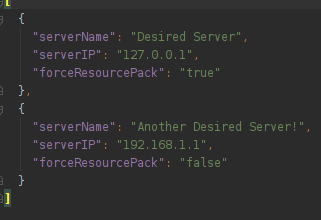
Server list JSON
Using forceResourcePack
set it to true if the server has a resource pack that the player must have no matter what to connect. when the value is true, they will be forced to receive the servers forced resource pack.
if the server does not have a resource that must be installed as in that it does not have one to force on the user, set this to false. Or in the case it's not required to have the resource pack to connect.
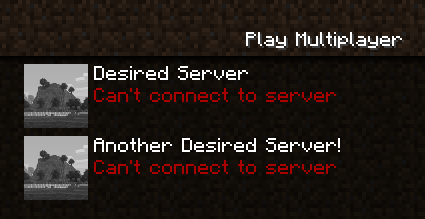
Servers in the multiplayer screen
The TidBit
The Featured Servers/ folder now lives in the config folder.
Neat Feature
You can colorize your server entries using /u (universal) and semoleans.
We tested putting §6 inside the servername in the desiredservers.json
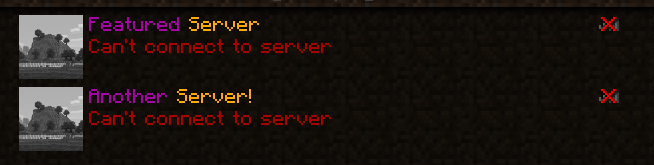

Same works on fabric
CMS COMPATIBILITY
The only thing cms does is allow you to do color codes using % instead of §
So there's no reason to even add CMS support
The What and How
Forge didn't like how the mod was laid out and wanted it to be more like the default example. So I added in some stuff for that. Also the mod was catching way too much stuff with reporting, so I unwrapped that added try/catch clauses where it was absolutely necessary.

Other Info
* Same license as the original GPLv3 at https://www.curseforge.com/minecraft/mc-mods/featured-servers
* ported to 1.16.1
* source now available
* client only
Project description from CurseForge.
Pick your setup
Desired Servers by Minecraft version and loader
Choose the version and loader you play, then open the matching release.
Minecraft version
1.20.6
2 loader buildsMinecraft version
1.20.4
2 loader buildsMinecraft version
1.20.2
2 loader buildsMinecraft version
1.20.1
2 loader buildsMinecraft version
1.19.4
2 loader buildsMinecraft version
1.19.3
2 loader buildsMinecraft version
1.19.2
2 loader buildsMinecraft version
1.19.1
2 loader buildsMinecraft version
1.19
1 loader buildMinecraft version
1.18.2
2 loader buildsMinecraft version
1.18.1
2 loader buildsShowing the newest 12 of 21 game versions. Older files are in the list below.
Check the dependencies, then try the file in a copied instance before changing a world you care about.
Recent files
Desired Servers versions and loaders
desiredservers-neoforge-1.21.1-1.6.0.jar
22 Dec 2024
Client Source doesn’t say Server Source doesn’t say Dependencies No extras listed Listed on Release listing
Check the 1.21.1 · NeoForge setup NeoForge1.21.1 release
desiredservers-fabric-1.21.1-1.6.0.jar
22 Dec 2024
Client Source doesn’t say Server Source doesn’t say Dependencies 2 required · 2 unchecked Listed on Release listing
Check the 1.21.1 · Fabric setup Fabric1.21.1 release
desiredservers-neoforge-1.20.6-1.5.0.jar
26 May 2024
Client Source doesn’t say Server Source doesn’t say Dependencies No extras listed Listed on Release listing
Check the 1.20.6 · NeoForge setup NeoForge1.20.6 release
desiredservers-fabric-1.20.6-1.5.0.jar
26 May 2024
Client Source doesn’t say Server Source doesn’t say Dependencies 2 required · 2 unchecked Listed on Release listing
Check the 1.20.6 · Fabric setup Fabric1.20.6 release
desiredservers-neoforge-1.20.4-1.4.0.jar
26 May 2024
Client Source doesn’t say Server Source doesn’t say Dependencies No extras listed Listed on Release listing
Check the 1.20.4 · NeoForge setup NeoForge1.20.4 release
desiredservers-fabric-1.20.4-1.4.0.jar
26 May 2024
Client Source doesn’t say Server Source doesn’t say Dependencies 2 required · 2 unchecked Listed on Release listing
Check the 1.20.4 · Fabric setup Fabric1.20.4 release
desiredservers-neoforge-1.20.2-1.3.1.jar
16 Feb 2024
Client Source doesn’t say Server Source doesn’t say Dependencies No extras listed Listed on Release listing
Check the 1.20.2 · NeoForge setup 1.20.2NeoForge release
desiredservers-fabric-1.20.2-1.3.1.jar
16 Feb 2024
Client Source doesn’t say Server Source doesn’t say Dependencies 2 required · 2 unchecked Listed on Release listing
Check the 1.20.2 · Fabric setup 1.20.2Fabric release
desiredservers-forge-1.19.2-1.1.1.jar
16 Feb 2024
Client Source doesn’t say Server Source doesn’t say Dependencies No extras listed Listed on Release listing
Check the 1.19.2 · Forge setup 1.19.2Forge release
desiredservers-fabric-1.19.2-1.1.1.jar
16 Feb 2024
Client Source doesn’t say Server Source doesn’t say Dependencies 2 required · 2 unchecked Listed on Release listing
Check the 1.19.2 · Fabric setup Fabric1.19.2 release
desiredservers-forge-1.20.1-1.2.1.jar
16 Feb 2024
Client Source doesn’t say Server Source doesn’t say Dependencies No extras listed Listed on Release listing
Check the 1.20.1 · Forge setup 1.20.1Forge release
desiredservers-fabric-1.20.1-1.2.1.jar
16 Feb 2024
Client Source doesn’t say Server Source doesn’t say Dependencies 2 required · 2 unchecked Listed on Release listing
Check the 1.20.1 · Fabric setup Fabric1.20.1 release
Looking for an older file? The official CurseForge project page is in Resources.
 mod
mod CurseForge + Modrinth · Minecraft
Better Search
Search for items even with typos, in other languages and more!
 mod
mod CurseForge + Modrinth · Minecraft
Fireball Predictor
Predicts and visualizes the trajectory and explosive impact of fireballs, wither skulls and wind charges in real-time.
 mod
mod CurseForge + Modrinth · Minecraft
Sodium Chinese Localization Mod
A project can translate you sodium mod into Chinese