Minecraft version
Back to mods 
CurseForge · Minecraft mod
Datapack Recipe Maker
Visual GUI to maker datapack ingame[Client side only]
Choose a version Pick your version below, then grab the matching file.
Quick answer
Which Datapack Recipe Maker release should I use?
Latest stable file DatapackRecipeMaker-1.16.4-1.1
Game version 1.16.3, 1.16.4
Loader Forge
Datapack Recipe Maker DatapackRecipeMaker-1.16.4-1.1 targets 1.16.3, 1.16.4 with Forge. The project page does not say whether this file belongs on the client, dedicated server, or both. No extra mods listed for this file.
Where it goes
Is Datapack Recipe Maker required on the client, server, or both?
The project page does not say whether this file belongs on the client, dedicated server, or both.
Client Source doesn’t say
Dedicated server Source doesn’t say
Loader for this release Forge
Required install it here Optional supported, not mandatory Not supported do not install here Source doesn’t say do not assume
The source does not explicitly classify this release as client-only or server-only.
What else does Datapack Recipe Maker DatapackRecipeMaker-1.16.4-1.1 need?
DatapackRecipeMaker-1.16.4-1.1. Change the file and its required mods may change too.
This file does not list any required mods. Do not add a library just because a different file uses it.
This file does not list any required or optional mods.
Before you install it
Add Datapack Recipe Maker without breaking your instance.
Built for Datapack Recipe Maker DatapackRecipeMaker-1.16.4-1.1. Pick another file and the loader, install side or required mods may change.
- 01
Stick to this file
Use DatapackRecipeMaker-1.16.4-1.1. It targets 1.16.3, 1.16.4 with Forge; another release may have different loader, side or dependency requirements.
- 02
Bring the mods it needs
This file does not list any required mods. Do not add a library just because a different file uses it.
- 03
Put it on the correct side
The project page does not say whether this file belongs on the client, dedicated server, or both.
- 04
Pick the file you checked
Use the “Get this file” button beside DatapackRecipeMaker-1.16.4-1.1. It opens that exact file at the source.
About this project
What does Datapack Recipe Maker add?
This mod provided a Gui that you can make datapack more easier! You only need to drag items into corresponding slots and click confirm button to generate a recipe in your save's directory.
Both client side and server side need to install it
Open GUI by command. (Only operator-permission)
/dprm Open menu GUI
The recipes you created will be saved in datapack at "saves/<save name>/datapacks/" directory.
After adding the recipes, you need to input "/reload" command manually to let your datapack effect in your game.
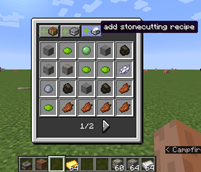

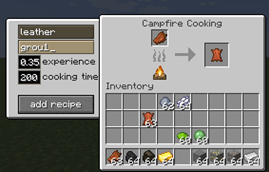

Project description from CurseForge.
Pick your setup
Datapack Recipe Maker by Minecraft version and loader
Choose the version and loader you play, then open the matching release.
Minecraft version
1.16.3
1 loader buildMinecraft version
1.15.2
1 loader buildMinecraft version
1.14.4
1 loader buildCheck the dependencies, then try the file in a copied instance before changing a world you care about.
Recent files
Datapack Recipe Maker versions and loaders
DatapackRecipeMaker-1.16.4-1.1
DatapackRecipeMaker-1.16.4-1.1.jar
11 Jan 2021
Client Source doesn’t say Server Source doesn’t say Dependencies No extras listed Listed on Release listing
Check the 1.16.4 · Forge setup 1.16.3Forge1.16.4 release
DatapackRecipeMaker-1.16.4-1.0
DatapackRecipeMaker-1.16.4-1.0.jar
10 Jan 2021
Client Source doesn’t say Server Source doesn’t say Dependencies No extras listed Listed on Release listing
Check the 1.16.4 · Forge setup 1.16.3Forge1.16.4 alpha
DatapackRecipeMaker-1.0
DatapackRecipeMaker-1.0.jar
6 Aug 2020
Client Source doesn’t say Server Source doesn’t say Dependencies No extras listed Listed on Release listing
Check the 1.14.4 · Forge setup 1.14.4Forge beta
DatapackRecipeMaker-1.15.2-1.2
DatapackRecipeMaker-1.15.2-1.2.jar
27 Jul 2020
Client Source doesn’t say Server Source doesn’t say Dependencies No extras listed Listed on Release listing
Check the 1.15.2 · Forge setup 1.15.2Forge release
DatapackRecipeMaker-1.15.2-1.1
DatapackRecipeMaker-1.15.2-1.1.jar
26 Jul 2020
Client Source doesn’t say Server Source doesn’t say Dependencies No extras listed Listed on Release listing
Check the 1.15.2 · Forge setup 1.15.2Forge beta
DatapackRecipeMaker-1.15.2-1.0
DatapackRecipeMaker-1.15.2-1.0.jar
22 Jul 2020
Client Source doesn’t say Server Source doesn’t say Dependencies No extras listed Listed on Release listing
Check the 1.15.2 · Forge setup 1.15.2Forge alpha
Looking for an older file? The official CurseForge project page is in Resources.
 mod
CurseForge + Modrinth · Minecraft
Flan (Forge, NeoForge)
Serverside Claiming Mod
 mod
CurseForge · Minecraft
Bkups
A backup mod with GUI, three different types of backups and a trash system, all customizable. V3 available with Whopper System, Detailed Screen and Settings Menu.
 mod
CurseForge · Minecraft
Tensura: Power Limits
Pick your build instead of collecting everything: skill limits and EP caps for Tensura: Reincarnated, growing as you evolve.