Minecraft version
Back to mods 
CurseForge · Minecraft mod
Claim Chunk
Allow player to claim a chunk
Choose a version Pick your version below, then grab the matching file.
Quick answer
Which Claim Chunk release matches 1.20.2?
Best match for your filters ClaimChunk-1.20.2-1.0.17.jar
Game version 1.20.2
Loader Forge
Claim Chunk ClaimChunk-1.20.2-1.0.17.jar targets 1.20.2 with Forge. The project page does not say whether this file belongs on the client, dedicated server, or both. No extra mods listed for this file.
Where it goes
Is Claim Chunk required on the client, server, or both?
The project page does not say whether this file belongs on the client, dedicated server, or both.
Client Source doesn’t say
Dedicated server Source doesn’t say
Loader for this release Forge
Required install it here Optional supported, not mandatory Not supported do not install here Source doesn’t say do not assume
The source does not explicitly classify this release as client-only or server-only.
What else does Claim Chunk ClaimChunk-1.20.2-1.0.17.jar need?
ClaimChunk-1.20.2-1.0.17.jar on 1.20.2. Every mod below is checked against that same setup.
This file does not list any required mods. Do not add a library just because a different file uses it.
This file does not list any required or optional mods.
Before you install it
Add Claim Chunk without breaking your instance.
Built for Claim Chunk ClaimChunk-1.20.2-1.0.17.jar on 1.20.2. Pick another file and the loader, install side or required mods may change.
- 01
Stick to this file
Use ClaimChunk-1.20.2-1.0.17.jar. It targets 1.20.2 with Forge; another release may have different loader, side or dependency requirements.
- 02
Bring the mods it needs
This file does not list any required mods. Do not add a library just because a different file uses it.
- 03
Put it on the correct side
The project page does not say whether this file belongs on the client, dedicated server, or both.
- 04
Pick the file you checked
Use the “Get this file” button beside ClaimChunk-1.20.2-1.0.17.jar. It opens that exact file at the source.
About this project
What does Claim Chunk add?

With this mod, players can claim chunks to create a safe area where other players can't break blocks, place blocks, blow up blocks, open chests, doors, etc.
They have the option of allowing a list of other players to use doors, chests, buttons, interact with entities, etc. (see Permissions below)
The list can also be a wild card (*) which will allow all other players to use doors, chests, buttons in that chunk.
They have the option of allowing a list of other players to modify blocks and use things. (see Permissions below)
The server operator (level 3 or 4) while in creative mode can bypass claims.
The server operator may configure the mod to allow players to claim between 0 to 250 chunks. The mod default is to allow players to claim 4 chunks.
The server operator can also decide a minimum distance in chunks from worldspawn before a player can claim a chunk. The default is 10 chunks (160 meters).
If the gamerule reducedDebugInfo is false then you can see the chunk borders using F3+G, otherwise the debug screen (F3) will show "Chunk-relative: x y z" and as long as x and z are consecutive as you move then you are in the same chunk.
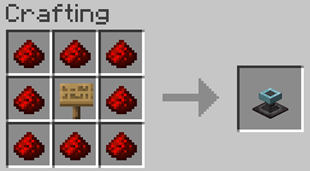
Recipe: Players can craft a claim block out of a sign surrounded by 8 redstone dust like so:
Permissions
You can enter a list of people (separate by comma or * for anyone) in Access to give permission to use things (buttons, doors, chests, interact with entities) in your claim. This permission list is by chunk so you could keep one chunk just for yourself while having a shared common area.
Modify will give other people permission to destroy blocks and attack non-hostiles in your claim as well as permission to use things.
Fake players can be listed for allowing devices to modify blocks in claims, but can't tell who owner is, so be careful. Here are a few names listed after a mod that can be used
Create: Deployer, Plough, Converter
Industrial foregoing: [IF]
Modular Routers: [Modular Routers]
You can copy the settings on a claim block using Minecraft paper (click on block to copy, shift click looking up to clear it) and then use it to set other claim blocks.
Claims Command
Format: /claims <optional name> <remove | check>
Any level 3 or 4 operator in creative mode can use /claims to see the location of any player's claim chunk blocks or remove or check them
Any player can use /claims to see the location of their own claim chunk blocks.
Configuration File
it is found in the config folder and is called cc-common.toml. You can also use this command in the game /config showfile cc COMMON then enter chat so you can click the provided link to edit the config, but you might have to restart the game, depending on OS and editor used or unlucky, for the settings to take effect.
#Chunks from world spawn
#Range: -1 ~ 5000
ChunksFromSpawn = 10
#Maximum claims per player
#Range: 0 ~ 250
ClaimLimit = 4
#Add owner name to some messages
AddOwner = true
#Mob explosions can destroy blocks based on mob target
MobDestroy = true
#Blocks that bypass claims on right click
BypassBlocks = ["minecraft:ender_chest", "minecraft:vault"]
#Entities that bypass claims on right click
BypassEntities = [""]
#Include dimensions
IncludeDims = ["*"]
#Exclude dimensions
ExcludeDims = [""]
#Explosions caused by any player can destroy blocks
PvpMode = false
#Report placing fluid from a bucket
ReportBucket = false
Working with other mods:
Quark: either turn off having pistons move tile entities or add "cc:claim_block" to movement blacklist or don't use piston on the claim block.
Waystones: you might want to add "waystones:*-warp_plate" to the bypass blocks in claim chunk config.
Lootr: you might want to add "lootr:*-trophy" to the bypass blocks in claim chunk config.
Corpse: you might want to add "corpse:corpse" to the bypass entities in claim chunk config.
GraveStone: change sneak_pickup to true in the serverconfig/gravestone-server.toml file.
Corail Tombstone: you can sneak to pickup, but you can also add "tombstone:grave_simple", "tombstone:grave_normal", "tombstone:grave_cross", "tombstone:tombstone", "tombstone:subaraki_grave", "tombstone:grave_original" to the bypass blocks in claim chunk config.
Using LAN:
Note: If Cheats are on when opening LAN then all players are operator level 4. It is best to setup a local dedicated server if some form of cheats are wanted.
Using Dedicated server:
The server property spawn-protection can interfere with normal players interacting with blocks in that area, which operators don't experience. Currently, this mod doesn't alter that behavior. If you have blocks in that area you want normal players to interact with and still have some spawn protection then it is best to disable spawn-protection by setting it to 0 and have an operator place claims to cover that original area. Then you can either give all players access with the wild card on each of those claims or can set any block in the config if you want all to be access no matter whether they are claims (e.g. waystone).
Possible future work:
similar mod that isn't chunked based
workaround Forge (1.17.1 to 1.19.1) bug with armor stands
y limit
map support
Please Check Out Our Other Fine Mods!
Bisect offers a hosting discount to Two Guys followers

You can join us on our Discord Server at the link below.

Project description from CurseForge.
Pick your setup
Claim Chunk by Minecraft version and loader
Choose the version and loader you play, then open the matching release.
Minecraft version
1.21.7
1 loader buildMinecraft version
1.21.6
1 loader buildMinecraft version
1.21.5
1 loader buildMinecraft version
1.21.4
1 loader buildMinecraft version
1.21.3
1 loader buildMinecraft version
1.21.1
1 loader buildMinecraft version
1.21
1 loader buildMinecraft version
1.20.6
1 loader buildMinecraft version
1.20.4
1 loader buildMinecraft version
1.20.2
1 loader buildMinecraft version
1.20.1
1 loader buildShowing the newest 12 of 27 game versions. Older files are in the list below.
Check the dependencies, then try the file in a copied instance before changing a world you care about.
Recent files
Claim Chunk versions and loaders
ClaimChunk-1.20.2-1.0.17.jar
21 Nov 2023
Client Source doesn’t say Server Source doesn’t say Dependencies No extras listed Listed on Release listing
Check the 1.20.2 · Forge setup 1.20.2Forge release
Looking for an older file? The official CurseForge project page is in Resources.
 mod
CurseForge · Minecraft
Natural Disasters: DOOMSDAY
Earthquakes, tsunamis, tornadoes, hurricanes, volcanoes, meteors and more. 7 intensity tiers up to The End of the World, warning signs, chain reactions and real terrain destruction. Summon any disaster with the Harbinger.
 mod
CurseForge + Modrinth · Minecraft
IndyPets - Independent Pets (Fabric)
Free your pets from the curse of having to sit, let 'em roam!
 mod
CurseForge + Modrinth · Minecraft
Safra
Don’t mess with the server Play Minecraft with your friends in 2 clicks via P2P