Minecraft version
Back to mods 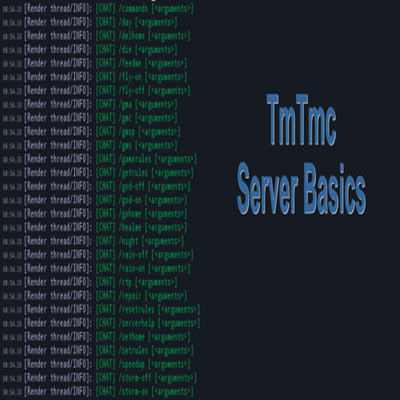
CurseForge · Minecraft mod
TmTmc-ServerBasics
Minecraft server basics for beginners/admins
Choose a version Pick your version below, then grab the matching file.
Quick answer
Which TmTmc-ServerBasics release matches 1.16.5 Forge?
Best match for your filters TmTmc-ServerBasics-1.16.5-1.0.4.jar
Game version 1.16.5
Loader Forge
TmTmc-ServerBasics-1.16.5-1.0.4.jar targets 1.16.5 with Forge. The project page does not say whether this file belongs on the client, dedicated server, or both. No extra mods listed for this file.
Where it goes
Is TmTmc-ServerBasics required on the client, server, or both?
The project page does not say whether this file belongs on the client, dedicated server, or both.
Client Source doesn’t say
Dedicated server Source doesn’t say
Loader for this release Forge
Required install it here Optional supported, not mandatory Not supported do not install here Source doesn’t say do not assume
The source does not explicitly classify this release as client-only or server-only.
What else does TmTmc-ServerBasics-1.16.5-1.0.4.jar need?
TmTmc-ServerBasics-1.16.5-1.0.4.jar on 1.16.5 Forge. Every mod below is checked against that same setup.
This file does not list any required mods. Do not add a library just because a different file uses it.
This file does not list any required or optional mods.
Before you install it
Add TmTmc-ServerBasics without breaking your instance.
Built for TmTmc-ServerBasics-1.16.5-1.0.4.jar on 1.16.5 Forge. Pick another file and the loader, install side or required mods may change.
- 01
Stick to this file
Use TmTmc-ServerBasics-1.16.5-1.0.4.jar. It targets 1.16.5 with Forge; another release may have different loader, side or dependency requirements.
- 02
Bring the mods it needs
This file does not list any required mods. Do not add a library just because a different file uses it.
- 03
Put it on the correct side
The project page does not say whether this file belongs on the client, dedicated server, or both.
- 04
Pick the file you checked
Use the “Get this file” button beside TmTmc-ServerBasics-1.16.5-1.0.4.jar. It opens that exact file at the source.
About this project
What does TmTmc-ServerBasics add?
Tmc-ServerBasics is a mod that I wrote to help me remember which Gamerules there are, what the defaults are, and some useful commands that I frequently use on all my servers.
This mod specifically targets administrators or developers with Op Level 4. Some features will not work unless you have this elevated access. It is nothing fancy and does not have a lot of bells and whistles as it was designed more for convenience and maintenance of servers.
This mod helps the administrators who setup and manage Minecraft Servers. There are specific commands and features they can make to enhance the users experience.

Commands (5): /commands - Opens website to https://www.TakeMeTo-MC.com/tmtmc-serverbasics to get list of commands
Note: The default settings in the configuration file is listed below. Administrators can choose to override any of the commands to make them available to OPS or ALL.
Player Commands
/del-home - Deletes the current home setting for the player
/die - Immediate Death by being crushed
/go-home - Returns player to their home setting used in /sethome
/random-tp - Random Teleport Player somewhere on server (using /spreadplayers command)
/recycle - Opens inventory UI so players can drop items in to recycle (delete)
/set-home - Sets the NBT Player Tags for X, Y, Z to current location
/spawn - Takes the player to worldspawn
Admin Commands
/day - Sets the current in-game time to 10:00AM
/feedme - Sets food levels up to 20 and saturation to 10 - quick fix when you are starving with no food around
/fly-on - Turns on Fly mode
/fly-off - Turns off Fly mode
/gma - Changes players gamemode to Adventure
/gmc - Changes players gamemode to Creative
/gms - Changes players gamemode to Survival
/gmsp - Changes players gamemode to Spectator
/getrules - Displays a list of all gamerule settings
/god-off - Changes player to be invulnerable
/god-on - Changes player back to being vulnerable
/healme - Heal yourself
/night - Sets the current in-game time to 10:00PM
/rain-off - Turns off the in-game weather for raining/snowing depending on biome
/rain-on - Sets the in-game weather to raining/snowing depending on biome
/repair - Repairs item in your hand
/resetrules - Opposite of /setrules to reset back to default values
/serverhelp - Opens chat with shortcut links to get this information
/setrules - Sets keepInventory=true, doFireTick=false, doVinesSpread=false & doWeatherCycle=false
/speedup - Change players walking speed by a factor of 2 for about 30 seconds
/storm-off - Turns off thunder and lightning when raining
/storm-on - When raining, thunder and lightning will be turned on
/worldspawn - Allows administrator to set the worldspawn location for all players

File Location: /{minecraft world}/config/serverbasicsconfig.json
Command Options: ALL - all players, OPS - Level 4 Ops Only
{
"enable_commands": true,
"command_commands": "OPS",
"enable_welcome_message": true,
"command_mod-commands": "ALL",
"welcome_message": "Welcome to our server ",
"enable_player_join": true,
"command_day": "OPS",
"command_del-home": "ALL",
"command_die": "ALL",
"command_feedme": "OPS",
"command_fly-on": "OPS",
"command_fly-off": "OPS",
"command_gma": "OPS",
"command_gmc": "OPS",
"command_gms": "OPS",
"command_gmsp": "OPS",
"command_getrules": "OPS",
"command_god-off": "OPS",
"command_god-on": "OPS",
"command_go-home": "ALL",
"command_healme": "OPS",
"command_night": "OPS",
"command_rain-off": "OPS",
"command_rain-on": "OPS",
"command_random-tp": "ALL",
"command_recycle": "ALL",
"command_repair": "OPS",
"command_resetrules": "OPS",
"command_serverhelp": "OPS",
"command_setrules": "OPS",
"command_set-home": "ALL",
"command_spawn": "ALL",
"command_speedup": "OPS",
"command_storm-off": "OPS",
"command_storm-on": "OPS",
"command_worldspawn": "OPS"
}

The server.properties file instructs your minecraft server on what state to be in, who can access the server and what defaults you want to start with. Normally, this is a one-time setup but when starting a new server, you may need to tweak these settings.
There are many default settings that can restrict or enable access to your server. All server owners should read, test and understand what each option provides. Depending on who or what you want to allow access to the server for, many settings may need to change from their defaults.
How to configure this file can be found here.

The whitelist.json file instructs your minecraft server exactly who can access the server and what their corresponding registered Minecraft User Name and UUID are. Only these accounts will be allowed access to the server. This is especially useful to keep hacked clients (pirated software) off your server for your protection as well as other players. If the player won't pay for Minecraft, they will most likely not follow other rules you impose.
How to configure this file can be found here.

The ops.json file assigns elevated access to players joining. The default Op Level is configured in the server.properties, but having the Player Name & UUID here either increases or decreases what they can do.
How to configure this file can be found here.

TmTmc-ResourcePack: Want to get HD images for all the blocks, items, etc, then add this ResourcePack. Supports HD Image of Gravel Blocks. The same Resource/Texture Pack supports all released TmTmc Mods (TmTmc-Gravels, TmTmc-OresAndMore & TmTmc-ServerBasics). Also includes HD Textures for Coarse Dirt, Cobblestone, Dirt, Mossy Cobblestone, and Stone
For crafting and smelting recipes, we recommend using JEIas it provides all the recipes when you click on a block/item.
This mod is made with MCreator mod maker. If you want to make a mod too, check their website https://mcreator.net/
Author/Owner: smmmadden
Maps/Worlds Tested: Single Player and MultiPlayer Server
Mod (some) Compatibility: Better Title Screen, BetterF3, Cycle Paintings, JEI, MineColonies, Portable Mobs, TmTmc-Gravels, TmTmc-ServerBasics
Our other Projects
TmTmc-ServerBasics is available for Forge 1.18.2, 1.19.2, 1.19.4 & 1.20.1 and NeoForge 1.20.4
TmTmc-Gravels is available for Forge 1.18.2, 1.19.2, 1.19.4 & 1.20.1 and NeoForge 1.20.4
TmTmc-ResourcePack is available for Forge 1.18.2, 1.19.2, 1.19.4 & 1.20.1 and NeoForge 1.20.4
Website: https://www.TakeMeTo-Minecraft.com
Discord: https://discord.gg/Gn6YW6a
Project description from CurseForge.
Pick your setup
TmTmc-ServerBasics by Minecraft version and loader
Choose the version and loader you play, then open the matching release.
Minecraft version
1.21.8
1 loader buildMinecraft version
1.21.1
1 loader buildMinecraft version
1.20.6
1 loader buildMinecraft version
1.20.4
1 loader buildMinecraft version
1.20.1
1 loader buildMinecraft version
1.19.4
1 loader buildMinecraft version
1.19.2
1 loader buildMinecraft version
1.18.2
1 loader buildMinecraft version
1.17.1
1 loader buildMinecraft version
1.16.5
1 loader buildMinecraft version
1.15.2
1 loader buildShowing the newest 12 of 13 game versions. Older files are in the list below.
Check the dependencies, then try the file in a copied instance before changing a world you care about.
Recent files
TmTmc-ServerBasics versions and loaders
TmTmc-ServerBasics-1.16.5-1.0.4.jar
9 Nov 2021
Client Source doesn’t say Server Source doesn’t say Dependencies No extras listed Listed on Release listing
Check the 1.16.5 · Forge setup 1.16.5Forge release
TmTmc-ServerBasics-1.16.5-1.0.3.jar
17 Oct 2021
Client Source doesn’t say Server Source doesn’t say Dependencies No extras listed Listed on Release listing
Check the 1.16.5 · Forge setup 1.16.5Forge release
TmTmc-ServerBasics-1.16.5-1.0.1.jar
29 May 2021
Client Source doesn’t say Server Source doesn’t say Dependencies No extras listed Listed on Release listing
Check the 1.16.5 · Forge setup 1.16.5Forge release
Looking for an older file? The official CurseForge project page is in Resources.