Minecraft version
Back to mods 
CurseForge · Minecraft mod
Redstone Manager
Control all your redstone switches from one place. Link all the levers and control them from a single block.
Choose a version Pick your version below, then grab the matching file.
Quick answer
Which Redstone Manager release matches 26.1.2?
Best match for your filters redstonemanager-neoforge_26.1.2-1.0.0.jar
Game version 26.1.2
Loader NeoForge
Redstone Manager redstonemanager-neoforge_26.1.2-1.0.0.jar targets 26.1.2 with NeoForge. The project page does not say whether this file belongs on the client, dedicated server, or both. No extra mods listed for this file.
Where it goes
Is Redstone Manager required on the client, server, or both?
The project page does not say whether this file belongs on the client, dedicated server, or both.
Client Source doesn’t say
Dedicated server Source doesn’t say
Loader for this release NeoForge
Required install it here Optional supported, not mandatory Not supported do not install here Source doesn’t say do not assume
The source does not explicitly classify this release as client-only or server-only.
What else does Redstone Manager redstonemanager-neoforge_26.1.2-1.0.0.jar need?
redstonemanager-neoforge_26.1.2-1.0.0.jar on 26.1.2. Every mod below is checked against that same setup.
This file does not list any required mods. Do not add a library just because a different file uses it.
This file does not list any required or optional mods.
Before you install it
Add Redstone Manager without breaking your instance.
Built for Redstone Manager redstonemanager-neoforge_26.1.2-1.0.0.jar on 26.1.2. Pick another file and the loader, install side or required mods may change.
- 01
Stick to this file
Use redstonemanager-neoforge_26.1.2-1.0.0.jar. It targets 26.1.2 with NeoForge; another release may have different loader, side or dependency requirements.
- 02
Bring the mods it needs
This file does not list any required mods. Do not add a library just because a different file uses it.
- 03
Put it on the correct side
The project page does not say whether this file belongs on the client, dedicated server, or both.
- 04
Pick the file you checked
Use the “Get this file” button beside redstonemanager-neoforge_26.1.2-1.0.0.jar. It opens that exact file at the source.
About this project
What does Redstone Manager add?
Redstone Manager
This mods is relatively new and might have some bugs.
Please report issues and feedback on the GitHub.
Manage all your redstone switches from one central command block
Here is a sample image of how the mod is supposed to work, this is still all work in progress, and things are sure to change:
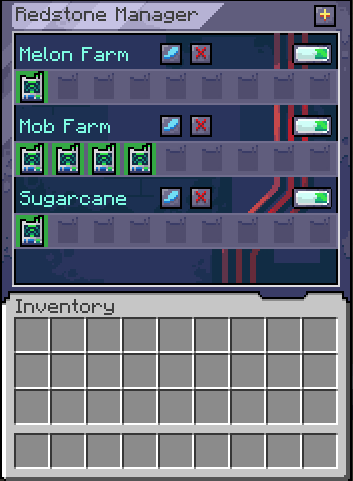
Using the mod
Start by crafting a Manager and a Linker.
Crouch + right click with the Linker on a Lever to link them.
Or right click with a linker on one block and right click on another to link all the levers in that range if you have the Pouch with Linkers in it.
Open the manager and create your first group by clicking on the plus button.
Place the Linker inside the newly created group.
From within the Manager, you can now toggle that single lever on/off or toggle the entire group.
For modpacks
The linker works on a tag system, where it looks if the block has a tag: redstonemanager:linkable_items.
If the block has that tag, it will allow the link to be created between them.
Afterward it is checking for the powered state of that block to get its state.
For devs
You can add this mod to your project by adding this:
maven {
    name = "Gac Repository"
    url = uri("https://maven.igorilic.dev/releases")
}
And then adding this as a dependency:
implementation "dev.igorilic:redstonemanager:${rm_version}"
Have suggestions?
If you have any suggestions that you think can improve the mod, open an issue for it and let's have a discussion about it.
Project description from CurseForge.
Pick your setup
Redstone Manager by Minecraft version and loader
Choose the version and loader you play, then open the matching release.
Minecraft version
1.21.1
1 loader buildCheck the dependencies, then try the file in a copied instance before changing a world you care about.
Recent files
Redstone Manager versions and loaders
redstonemanager-neoforge_26.1.2-1.0.0.jar
18 Sept 2026
Client Source doesn’t say Server Source doesn’t say Dependencies No extras listed Listed on Release listing
Check the 26.1.2 · NeoForge setup NeoForge26.1.2 release
Looking for an older file? The official CurseForge project page is in Resources.
 mod
CurseForge + Modrinth · Minecraft
FallingTree
Break down your trees by only cutting one piece of it
 mod
CurseForge + Modrinth · Minecraft
Oh My, Meteors! - A meteorite mod
A Modern falling Meteor mod, highly configurable, pretty and with spirt of the old ones!
 mod
CurseForge + Modrinth · Minecraft
Better /help
Replaces /help with a clearer, interactable, paginated list. Adds descriptions for commands and arguments, plus optional metadata from other mods.