MaLiLib Needed by Litematica Printer 3.2.2
requiredMatching file found Matched file: 0.29.5

Modrinth · Minecraft mod
This fork adds the missing printing functionality for Litematica
Quick answer
Litematica Printer 3.2.2 targets 26.2 with Fabric. It must be installed on the client. Do not install it on the dedicated server. All 2 required mods have matching files.
Where it goes
It must be installed on the client. Do not install it on the dedicated server.
This file is marked client-only.
3.2.2. Change the file and its required mods may change too.
Install MaLiLib, Litematica first. We found matching files for this game-version and loader setup.
We only count dependency files that match this setup. A file for another loader does not fill the gap.
Before you install it
Built for Litematica Printer 3.2.2. Pick another file and the loader, install side or required mods may change.
Use 3.2.2. It targets 26.2 with Fabric; another release may have different loader, side or dependency requirements.
Install MaLiLib, Litematica first. We found matching files for this game-version and loader setup.
It must be installed on the client. Do not install it on the dedicated server.
Use the “Get this file” button beside 3.2.2. It opens that exact file at the source.
About this project
Litematica printer is a mod that allows players to build big structures more quickly by automatically placing the correct blocks around you.
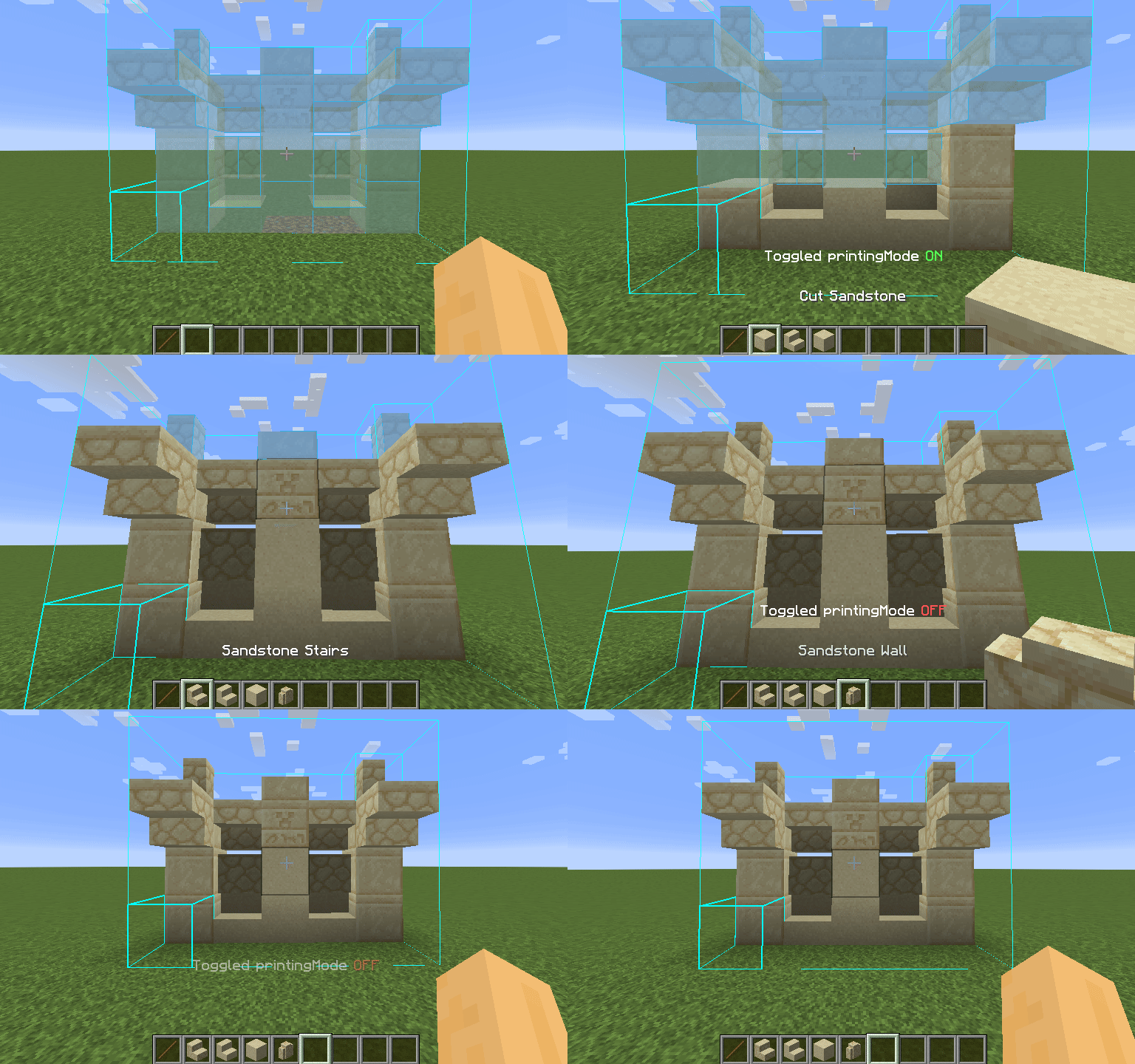
Using the printer is straightforward: You can toggle the feature by pressing CAPS_LOCK by default. To configure variables such as
printing speed and range, open Litematica's settings by pressing M + C and navigate to "Generic" tab. Printer's configuration can be
found at the bottom of the page. You can also rebind the printing toggle under "Hotkeys" tab. Holding down V by default will also
print regardless if the printer is toggled on or off.
These blocks have not been implemented yet for various reasons and the printer will skip them instead of placing them wrong. If any
other blocks are placed incorrectly, try to lower the printing speed. If certain block is still placed incorrectly, you can create
an issue.
This mod requires Fabric API, Litematica, and MaLiLib.
Fabric-API is available on Modrinth however litematica and malilib are not and must be downloaded through CurseForge or their respective Githubs.
Please be aware, using this mod on a server may be against the rules and could get you banned!
I am not a developer of this project, but I have been given permission to upload it here and will attempt to keep it updated. Full credits go to aleksilassila for making this mod and maruohon for making Litematica. Please only ping (using a github issue) me if this page is missing a version that has been released on the github.
Sakura also gave me permission to upload their files for litematica printer.
Project description from Modrinth.
Pick your setup
Choose the version and loader you play, then open the matching release.
Showing the newest 12 of 30 game versions. Older files are in the list below.
Check the dependencies, then try the file in a copied instance before changing a world you care about.
Recent files
litematica-printer-26.2-3.2.2.jar
17 Jun 2026
litematica-printer-26.1.1-3.2.2.jar
3 Apr 2026
litematica-printer-26.1-3.2.2.jar
29 Mar 2026
litematica-printer-1.21.11-3.2.1B.jar
16 Feb 2026
litematica-printer-1.21.10-3.2.1.jar
16 Dec 2025
litematica-printer-1.21.11-3.2.1.jar
12 Dec 2025
litematica-printer-1.21.10-rc1-3.2.1.jar
6 Oct 2025
litematica-printer-1.21.8-3.2.1-sakura.8.jar
18 Jul 2025
litematica-printer-1.21.7-3.2.1-sakura.7.jar
30 Jun 2025
litematica-printer-1.21.6-3.2.1-sakura.6.jar
22 Jun 2025
litematica-printer-1.21.5-3.2.1-sakura.5.jar
20 Apr 2025
litematica-printer-1.21.4-3.2.1.jar
17 Dec 2024
Looking for an older file? The official Modrinth project page is in Resources.
 mod
modLightweight and modular API providing common hooks and intercompatibility measures utilized by mods using the Fabric toolchain.
Limits enchants on enchantable items
 mod
modImproves soundtrack playback in biomes, adds an Intelligent Playback System in Mountain and Cave biomes — something that was so missing in Minecraft. Check out the description to see what else the mod improves.