Minecraft version
Back to mods 
Modrinth · Minecraft mod
Better Tablist
A customizable, server-side tab list with animated headers and footers, rank prefixes, player status, and live server statistics.
Choose a version Pick your version below, then grab the matching file.
Quick answer
Which Better Tablist release should I use?
Latest stable file 1.7
Game version 26.3
Loader NeoForge
Better Tablist 1.7 targets 26.3 with NeoForge. The project page does not say whether this file belongs on the client, dedicated server, or both. No extra mods listed for this file.
Where it goes
Is Better Tablist required on the client, server, or both?
The project page does not say whether this file belongs on the client, dedicated server, or both.
Client Source doesn’t say
Dedicated server Source doesn’t say
Loader for this release NeoForge
Required install it here Optional supported, not mandatory Not supported do not install here Source doesn’t say do not assume
The source does not explicitly classify this release as client-only or server-only.
What else does Better Tablist 1.7 need?
1.7. Change the file and its required mods may change too.
This file does not list any required mods. Do not add a library just because a different file uses it.
This file does not list any required or optional mods.
Before you install it
Add Better Tablist without breaking your instance.
Built for Better Tablist 1.7. Pick another file and the loader, install side or required mods may change.
- 01
Stick to this file
Use 1.7. It targets 26.3 with NeoForge; another release may have different loader, side or dependency requirements.
- 02
Bring the mods it needs
This file does not list any required mods. Do not add a library just because a different file uses it.
- 03
Put it on the correct side
The project page does not say whether this file belongs on the client, dedicated server, or both.
- 04
Pick the file you checked
Use the “Get this file” button beside 1.7. It opens that exact file at the source.
About this project
What does Better Tablist add?
A customizable, server-side tab list with animated headers and footers, rank prefixes, player status, and live server statistics.
Install it on the server only. Players join with a normal vanilla client. LuckPerms, FTB Ranks and spark are optional.
Highlights
| 🎨 Colors & gradients | & codes, &#RRGGBB hex colors and two gradient syntaxes, with bold, italic and other formatting kept intact. |
| 🎞️ Animated header & footer | Any number of frames that cycle automatically, at a speed you choose. |
| 🏷️ Rich player names | Dimension symbol, health with absorption, ping, game mode and AFK status next to each name. |
| 👑 Ranks | Optional LuckPerms prefixes, suffixes and groups, or FTB Ranks, plus sorting by rank weight. |
| 📈 Live server stats | Color-coded TPS, MSPT and CPU, memory and uptime, with spark rolling averages and percentiles when installed. |
| 💤 AFK detection | Names turn grey and #AFK appears after a configurable idle time. |
| ⚡ Lightweight | Packets are only sent when content changes, and metrics are sampled once per update for all players. |
| 🔁 Hot reload | Edit config/tablist.toml and run /tablist reload, no restart needed. |
Supported versions
| Minecraft | Fabric | NeoForge | Java |
|---|---|---|---|
| 26.1 – 26.3 (26.1, 26.1.1, 26.1.2, 26.2, 26.3) | ✅ | ✅ | 25 |
| 1.21 – 1.21.11 (every release) | ✅ | ✅ | 21 |
Every Minecraft release has its own JAR per loader. Pick the file that matches your server's exact Minecraft version.
Installation
- Download the JAR for your server's Minecraft version and loader.
- Put it in the server's
mods/folder. Fabric servers also need Fabric API. - Start the server once to generate
config/tablist.toml. - Set
server_name, then customize the header, footer and player names, or start from one of the examples. - Run
/tablist reloadas an operator (permission level 2), or restart the server.
Examples
Each example is a complete, ready-to-use config. Copy it into config/tablist.toml and run /tablist reload. All screenshots are from a real Minecraft 26.3 server.
Gradient showcase
A bold gradient title, a personal welcome line and a compact status footer.
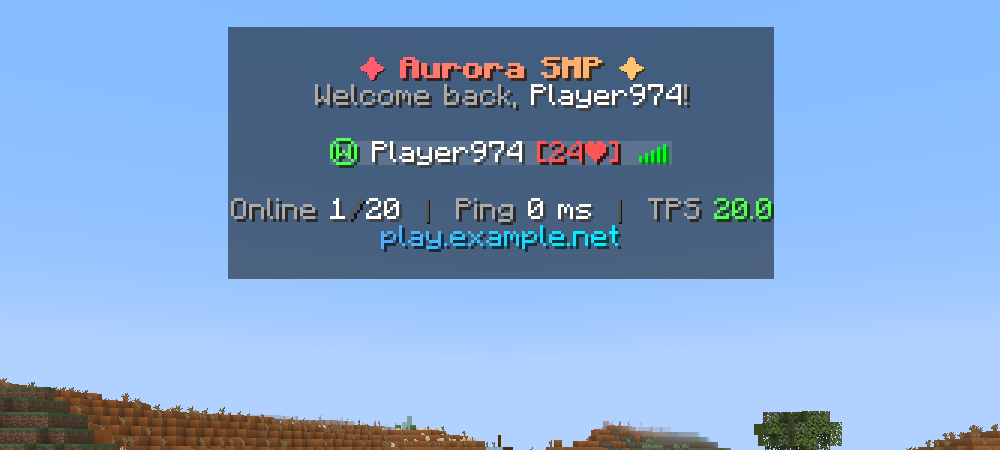
Show config · gradient-showcase.toml
[appearance]
server_name = "Aurora SMP"
header = [
    "#N<gradient:#FF5F6D:#FFC371>&l✦ #SERVERNAME ✦</gradient>&r#N&7Welcome back, &f#PLAYERNAME&7!#N"
]
footer = [
    "#N&7Online &f#PLAYERCOUNT&8/&f#MAXPLAYERS  &8┃  &7Ping &f#PING ms  &8┃  &7TPS #CTPS#N<gradient:#4FACFE:#00F2FE>play.example.net</gradient>#N"
]
name_formatting_provider = "NONE"
display_name_format = "{dimension} &f{name} {health} &7#AFK"

[sorting]
sort_mode = "ALPHABETICAL"
Performance dashboard
Live, color-coded server health for admins and modpack servers. Install spark and set metrics_provider = "SPARK" for rolling TPS and MSPT percentiles.
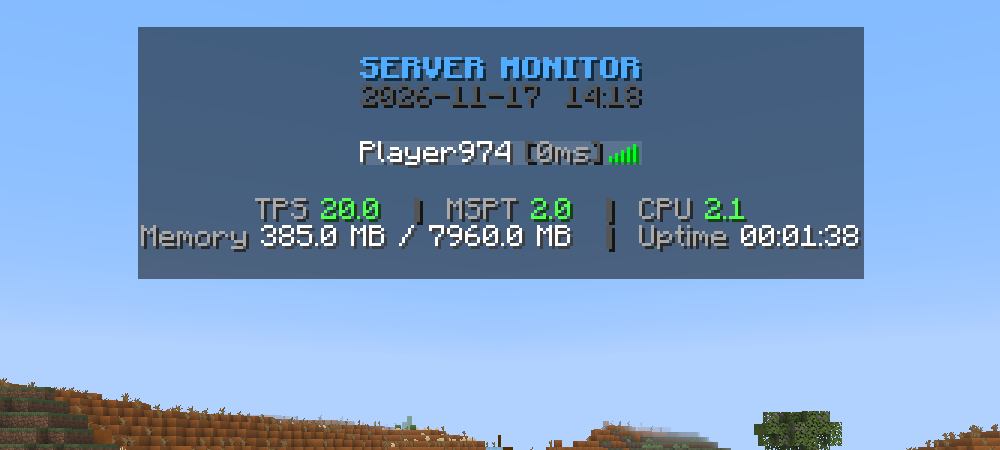
Show config · performance-dashboard.toml
[appearance]
server_name = "Aurora SMP"
header = [
"#NFACFE&lSERVER MONITOR#N&8#DATE #TIME#N"
]
footer = [
"#N&7TPS #CTPS &8│ &7MSPT #CMSPT &8│ &7CPU #CCPU#N&7Memory &f#MEMORY &8│ &7Uptime &f#UPTIME#N"
]
name_formatting_provider = "NONE"
display_name_format = "&f{name} &8[&7{ping}ms&8]"
update_interval = 1000
[performance]
metrics_provider = "VANILLA"
Survival status
Every name shows the player's dimension, health, ping and game mode at a glance.
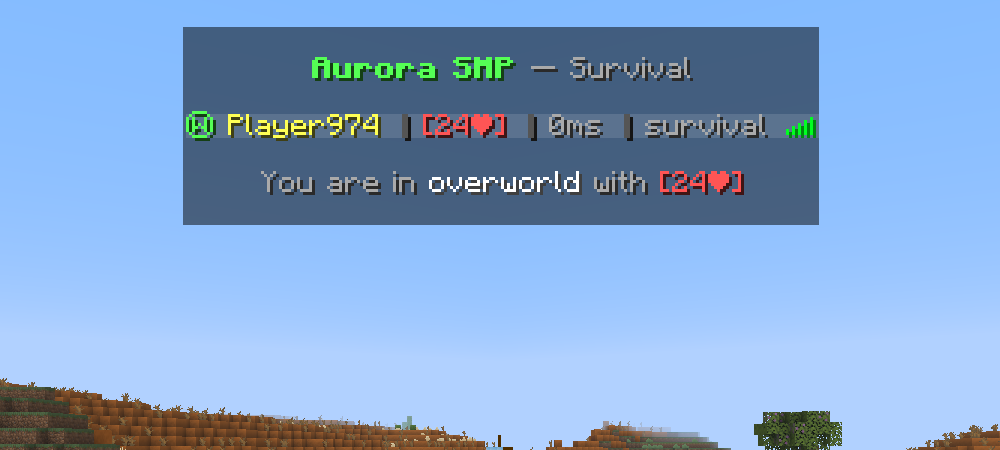
Show config · survival-status.toml
[appearance]
server_name = "Aurora SMP"
header = [
    "#N&a&l#SERVERNAME &r&7— Survival#N"
]
footer = [
    "#N&7You are in &f#WORLD &7with #HEALTH#N"
]
name_formatting_provider = "NONE"
display_name_format = "{dimension} &e{name} &8│ {health} &8│ &7{ping}ms &8│ &7{gamemode} &7#AFK"

[afk]
afk_enabled = true
afk_timeout = 300
Animated & minimal
Three header frames that cycle every ~2 seconds, and nothing more.
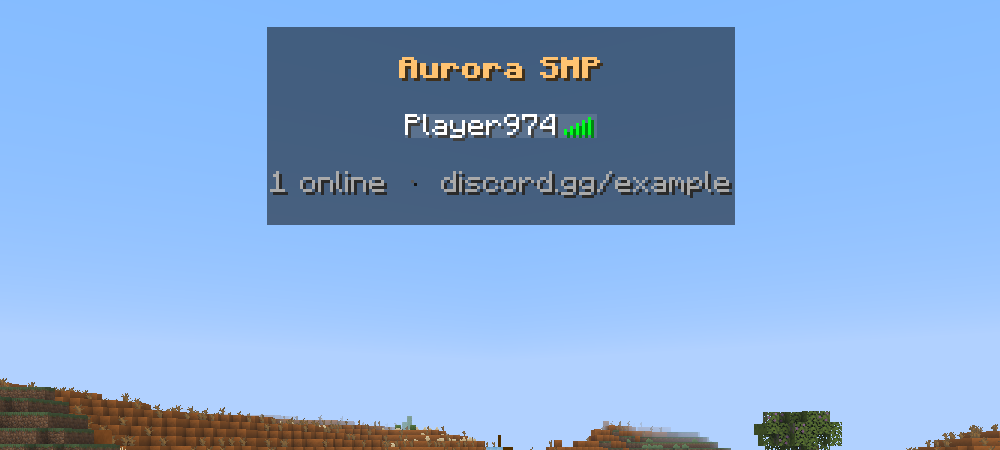
Show config · animated-minimal.toml
[appearance]
server_name = "Aurora SMP"
header = [
    "#N&f&l#SERVERNAME#N",
    "#N&#FFC371&l#SERVERNAME#N",
    "#N&#FF5F6D&l#SERVERNAME#N"
]
footer = [
    "#N&7#PLAYERCOUNT online  &8·  &7discord.gg/example#N"
]
name_formatting_provider = "NONE"
display_name_format = "&f{name}"
update_interval = 500
animation_interval = 4
Configuration
All settings live in config/tablist.toml. Keep text values in quotes, use unquoted true / false for switches, and edit the existing sections rather than adding a second [appearance].
| Section | What it controls |
|---|---|
[appearance] |
Server name, header/footer frames, player-name format, rank provider, refresh timing |
[sorting] |
Player order: NONE, ALPHABETICAL or RANK |
[afk] |
AFK detection and its timeout in seconds (300 = 5 minutes) |
[performance] |
Metrics source: VANILLA or SPARK |
Existing configs remain compatible. Your names and formats are kept, and the old ftbranks.enable_ftbranks_formatting setting chooses a provider when name_formatting_provider is missing.
Header & footer
Each quoted item is one animation frame. Use #N for a new line inside a frame.
- One item: static text. Two or more: animated.
[]: hide the header or footer. update_interval = 500refreshes every 500 milliseconds.animation_interval = 4switches frames every 4 refreshes, about 2 seconds at the default refresh rate.
Player names
Set name_formatting_provider and display_name_format in [appearance]:
| Setup | name_formatting_provider |
display_name_format |
|---|---|---|
| Plain names | "NONE" |
"{name} &7#AFK" |
| Dimension and health | "NONE" |
"{dimension} {name} {health} &7#AFK" |
| LuckPerms | "LP" |
"{prefix}{name}{suffix}&r &7#AFK" |
| FTB Ranks | "FTB" |
"[{rank}] {name} &7#AFK" |
With FTB Ranks, a player's ftbranks.name_format permission takes precedence over your format. Choose NONE to always use the config format. The default provider is FTB for compatibility, and the mod works fine without any rank mod installed.
Sorting and spark
[sorting]
sort_mode = "RANK" # NONE, ALPHABETICAL or RANK

[performance]
metrics_provider = "SPARK" # VANILLA or SPARK
RANK sorts by the highest inherited LuckPerms group weight or FTB rank power, then alphabetically. Players already on another scoreboard team stay on that team. Rolling TPS and MSPT percentiles require spark. Without it, TPS/MSPT/CPU use built-in measurements and rolling statistics show N/A.
Placeholders
Player-specific values refer to the player viewing the tab list. These placeholders work in headers, footers and display_name_format.
Server & player placeholders
| Placeholder | Description |
|---|---|
#N |
New line |
#SERVERNAME |
Server name from the config |
#PLAYERCOUNT / #MAXPLAYERS |
Online players / maximum player slots |
#PLAYERNAME |
Viewing player's name |
#PING |
Player ping in ms |
#RANK |
FTB rank or LuckPerms primary group, from the selected provider |
#AFK |
AFK while the player is AFK, empty otherwise |
#WORLD |
Player's current dimension |
#DIMENSION |
Colored dimension symbol (Ⓦ / Ⓝ / Ⓔ), or a custom dimension name |
#HEALTH |
Health + absorption, e.g. [20❤] (20 health points = 10 hearts) |
#DATE / #TIME |
Real date (yyyy-MM-dd) / time (HH:mm) |
Performance placeholders
| Placeholder | Description |
|---|---|
#TPS / #CTPS |
Estimated TPS (vanilla) or 1-minute TPS (spark), plain / colored |
#MSPT / #CMSPT |
Milliseconds per tick, plain / colored |
#CPU / #CCPU |
Server process CPU usage, plain / colored |
#TPS_1M / #CTPS_1M |
1-minute TPS, plain / colored (spark) |
#TPS_5M / #CTPS_5M |
5-minute TPS, plain / colored (spark) |
#MSPT_P95 / #CMSPT_P95 |
1-minute MSPT 95th percentile, plain / colored (spark) |
#MEMORY |
Memory usage (used / max) |
#UPTIME |
Server uptime |
Colors use green / yellow / red thresholds: TPS ≥18 / ≥15 / <15, MSPT ≤40 / ≤50 / >50, CPU ≤60% / ≤85% / >85%. Vanilla TPS is estimated from the average tick time. Unsupported measurements show N/A.
Player-name placeholders
| Placeholder | Description |
|---|---|
{name} |
Player name |
{rank} |
FTB rank or LuckPerms primary group |
{prefix}, {suffix} |
LuckPerms prefix / suffix in the player's current context |
{primary_group} |
LuckPerms primary group |
{dimension} |
Colored dimension symbol, or custom dimension name |
{health} |
Colored health + absorption indicator |
{world}, {ping}, {gamemode} |
Dimension name, ping in ms and game mode |
{prefix}, {suffix} and {primary_group} require the LP provider. Unavailable integration values are empty. AFK detection watches movement, turning and chat.
Colors
| Syntax | Example |
|---|---|
| Standard codes | &a green, &c red, &l bold, &o italic, &r reset |
| Hex colors | &#FF5555 |
| Gradient (MiniMessage style, 2+ colors) | <gradient:#FF0000:#FFAA00:#0000FF>text</gradient> |
| Gradient (TAB style) | <#FF0000>text</#0000FF> |
Starter config
Complete starter config
For a new setup only. For an existing setup, edit the matching settings instead of replacing your config.
[appearance]
server_name = "My Server"
header = [
    "#N&a&l#SERVERNAME&r#N&7Welcome, #PLAYERNAME!#N"
]
footer = [
    "#N&fOnline: &e#PLAYERCOUNT&7/&e#MAXPLAYERS#N&7TPS: #CTPS &7| MSPT: #CMSPT#N"
]
name_formatting_provider = "NONE"
display_name_format = "{name} &7#AFK"
update_interval = 500
animation_interval = 4

[sorting]
sort_mode = "NONE"

[afk]
afk_enabled = true
afk_timeout = 300

[performance]
metrics_provider = "VANILLA"
FAQ
My LuckPerms prefix is missing.
Select LP, include {prefix} in your format, and check that the player has a prefix in their current LuckPerms context.
My config name format does not apply with FTB Ranks.
Check the ftbranks.name_format permission. When it is present, it takes precedence. Select NONE to always use your config format.
Extra header items do not show up as extra lines.
Each item is an animation frame. Use #N to add lines inside one frame.
I see N/A in spark statistics.
Select SPARK and check that spark is installed and ready. Statistics that are not supported show N/A.
How do I apply changes?
Run /tablist reload as an operator, or restart. Invalid TOML, such as a missing quote or a duplicate section, must be fixed before reloading.
Do players need to install anything?
No. Better TabList only runs on the server and works with vanilla clients.
Need help? Open an issue with your Minecraft version, loader and the relevant config settings.
Contributors
- sennecools and NeofastFTL — Better TabList
- MihailDenisov — original LuckPerms integration, dimension/health display, rank-weight caching and performance-metric ideas/code from the LPintegration branch, adapted for all supported targets (issue #13).
Inspired by Tab List.
Project description from Modrinth.
Pick your setup
Better Tablist by Minecraft version and loader
Choose the version and loader you play, then open the matching release.
Minecraft version
26.2
2 loader buildsMinecraft version
26.1.2
2 loader buildsMinecraft version
26.1.1
2 loader buildsMinecraft version
26.1
2 loader buildsMinecraft version
1.21.11
2 loader buildsMinecraft version
1.21.10
2 loader buildsMinecraft version
1.21.9
2 loader buildsMinecraft version
1.21.8
2 loader buildsMinecraft version
1.21.7
2 loader buildsMinecraft version
1.21.6
2 loader buildsMinecraft version
1.21.5
2 loader buildsShowing the newest 12 of 17 game versions. Older files are in the list below.
Check the dependencies, then try the file in a copied instance before changing a world you care about.
Recent files
Better Tablist versions and loaders
1.7
tablist-neoforge-26.3-1.7.jar
17 Nov 2026
Client Source doesn’t say Server Source doesn’t say Dependencies No extras listed Listed on Release listing
Check the 26.3 · NeoForge setup 26.3NeoForge release
1.7
tablist-fabric-26.3-1.7.jar
17 Nov 2026
Client Source doesn’t say Server Source doesn’t say Dependencies 1 required · 1 unchecked Listed on Release listing
Check the 26.3 · Fabric setup 26.3Fabric release
1.7
tablist-fabric-26.2-1.7.jar
17 Nov 2026
Client Source doesn’t say Server Source doesn’t say Dependencies 1 required · 1 unchecked Listed on Release listing
Check the 26.2 · Fabric setup 26.2Fabric release
1.7
tablist-neoforge-26.2-1.7.jar
17 Nov 2026
Client Source doesn’t say Server Source doesn’t say Dependencies No extras listed Listed on Release listing
Check the 26.2 · NeoForge setup 26.2NeoForge release
1.7
tablist-neoforge-26.1.2-1.7.jar
17 Nov 2026
Client Source doesn’t say Server Source doesn’t say Dependencies No extras listed Listed on Release listing
Check the 26.1.2 · NeoForge setup 26.1.2NeoForge release
1.7
tablist-fabric-26.1.2-1.7.jar
17 Nov 2026
Client Source doesn’t say Server Source doesn’t say Dependencies 1 required · 1 unchecked Listed on Release listing
Check the 26.1.2 · Fabric setup 26.1.2Fabric release
1.7
tablist-neoforge-26.1.1-1.7.jar
17 Nov 2026
Client Source doesn’t say Server Source doesn’t say Dependencies No extras listed Listed on Release listing
Check the 26.1.1 · NeoForge setup 26.1.1NeoForge release
1.7
tablist-fabric-26.1.1-1.7.jar
17 Nov 2026
Client Source doesn’t say Server Source doesn’t say Dependencies 1 required · 1 unchecked Listed on Release listing
Check the 26.1.1 · Fabric setup 26.1.1Fabric release
1.7
tablist-fabric-1.21.9-1.7.jar
17 Nov 2026
Client Source doesn’t say Server Source doesn’t say Dependencies 1 required · 1 unchecked Listed on Release listing
Check the 1.21.9 · Fabric setup 1.21.9Fabric release
1.7
tablist-neoforge-26.1-1.7.jar
17 Nov 2026
Client Source doesn’t say Server Source doesn’t say Dependencies No extras listed Listed on Release listing
Check the 26.1 · NeoForge setup 26.1NeoForge release
1.7
tablist-fabric-26.1-1.7.jar
17 Nov 2026
Client Source doesn’t say Server Source doesn’t say Dependencies 1 required · 1 unchecked Listed on Release listing
Check the 26.1 · Fabric setup 26.1Fabric release
1.7
tablist-neoforge-1.21.9-1.7.jar
17 Nov 2026
Client Source doesn’t say Server Source doesn’t say Dependencies No extras listed Listed on Release listing
Check the 1.21.9 · NeoForge setup 1.21.9NeoForge release
Looking for an older file? The official Modrinth project page is in Resources.
 mod
CurseForge + Modrinth · Minecraft
HammerAnimations
Brings Bedrock model and animation as a compact and easy-to-use API layer with hotswapping.
 mod
GitHub · Minecraft
modpacks-ch-github-test
Disposable public fixture for testing the Modpacks.ch GitHub catalogue flow
 mod
Modrinth · Minecraft
ConfigGuard
Automatic snapshots of your config folder with a line-by-line diff and one-click restore. Undo any config change, on the client or on a server.