Minecraft version
Back to mods 
CurseForge · Minecraft mod
Untranslated Items
Display item names in English, regardless of the current language setting.
Choose a version Pick your version below, then grab the matching file.
Quick answer
Which Untranslated Items release should I use?
Latest stable file UntranslatedItems-forge-1.20.1-1.21.jar
Game version 1.20.1
Loader Forge
Untranslated Items UntranslatedItems-forge-1.20.1-1.21.jar targets 1.20.1 with Forge. The project page does not say whether this file belongs on the client, dedicated server, or both. No extra mods listed for this file.
Where it goes
Is Untranslated Items required on the client, server, or both?
The project page does not say whether this file belongs on the client, dedicated server, or both.
Client Source doesn’t say
Dedicated server Source doesn’t say
Loader for this release Forge
Required install it here Optional supported, not mandatory Not supported do not install here Source doesn’t say do not assume
The source does not explicitly classify this release as client-only or server-only.
What else does Untranslated Items UntranslatedItems-forge-1.20.1-1.21.jar need?
UntranslatedItems-forge-1.20.1-1.21.jar. Change the file and its required mods may change too.
This file does not list any required mods. Do not add a library just because a different file uses it.
This file does not list any required or optional mods.
Before you install it
Add Untranslated Items without breaking your instance.
Built for Untranslated Items UntranslatedItems-forge-1.20.1-1.21.jar. Pick another file and the loader, install side or required mods may change.
- 01
Stick to this file
Use UntranslatedItems-forge-1.20.1-1.21.jar. It targets 1.20.1 with Forge; another release may have different loader, side or dependency requirements.
- 02
Bring the mods it needs
This file does not list any required mods. Do not add a library just because a different file uses it.
- 03
Put it on the correct side
The project page does not say whether this file belongs on the client, dedicated server, or both.
- 04
Pick the file you checked
Use the “Get this file” button beside UntranslatedItems-forge-1.20.1-1.21.jar. It opens that exact file at the source.
About this project
What does Untranslated Items add?
Summary
Displays item names in English(US), regardless of the current language setting. If the item has a translation in the current language, it will be shown at the same time.
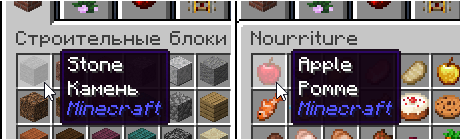
What good is that?
You may want to change the language settings to your language to make reading the in-game instructions and GUI etc easier. However, not all mods are localized to your language, so if you want to search for an item in JEI etc you may have to search for the item twice, in your native language and in English. This is pretty annoying.
With this mod, regardless of the language setting, only the item names will be unified in English, making it easier to search in JEI etc. Of course, non-item text like the in-game manual and GUI etc will be displayed in your language, if the mod has translation.
This mod is effective when the language setting is not default "English(US)". (The latest version can change the additional language to any language other than English.)
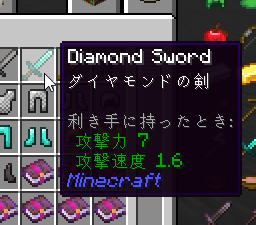
Features
- Only item names are shown in English regardless of the current language setting.
- Localized item names are shown in 2nd line of the tooltips if the items have localized item names. (You can disable it in config.)
Configuration
You can configure some options by the config file. (Some options are not exist in older version.)
- replaceItemNames (default:true)
If true, primary language is additional language (default is English).
Item names are replaced with the additional language in any case.
If false, primary language is your selected language.
Additional language (default is English) is simply added to the second line of the tooltip.
- additionalLanguage (default:en_us)
Additional language for item names.
- dispBothLanguagesOnTooltip (default:true)
Item names will be displayed in both languages to the item tooltip.
- dispBothLanguagesOnWaila (default:true)
Item names will be displayed in both languages to the Waila's tooltip.
Notes
- This is a client-side mod for now.
- It may not work for mod items that have multilingual item names in their own way.
ModPacks
Feel free to use this mod in any modpacks.
Project description from CurseForge.
Pick your setup
Untranslated Items by Minecraft version and loader
Choose the version and loader you play, then open the matching release.
Minecraft version
26.1.2
4 loader buildsForge UntranslatedItems-forge-26.1.2-1.17.1.jar 1
stable file
· 1 total · 17 Apr 2026Fabric UntranslatedItems-fabric-26.1.2-1.17.1.jar 1
stable file
· 1 total · 17 Apr 2026Quilt UntranslatedItems-fabric-26.1.2-1.17.1.jar 1
stable file
· 1 total · 17 Apr 2026NeoForge UntranslatedItems-neoforge-26.1.2-1.17.1.jar 1
stable file
· 1 total · 17 Apr 2026
Minecraft version
26.1.1
4 loader buildsForge UntranslatedItems-forge-26.1.2-1.17.1.jar 1
stable file
· 1 total · 17 Apr 2026Fabric UntranslatedItems-fabric-26.1.2-1.17.1.jar 1
stable file
· 1 total · 17 Apr 2026Quilt UntranslatedItems-fabric-26.1.2-1.17.1.jar 1
stable file
· 1 total · 17 Apr 2026NeoForge UntranslatedItems-neoforge-26.1.2-1.17.1.jar 1
stable file
· 1 total · 17 Apr 2026
Minecraft version
26.1
4 loader buildsForge UntranslatedItems-forge-26.1.2-1.17.1.jar 1
stable file
· 1 total · 17 Apr 2026Fabric UntranslatedItems-fabric-26.1.2-1.17.1.jar 1
stable file
· 1 total · 17 Apr 2026Quilt UntranslatedItems-fabric-26.1.2-1.17.1.jar 1
stable file
· 1 total · 17 Apr 2026NeoForge UntranslatedItems-neoforge-26.1.2-1.17.1.jar 1
stable file
· 1 total · 17 Apr 2026
Minecraft version
1.21.11
4 loader buildsForge UntranslatedItems-forge-1.21.11-1.16.jar 1
stable file
· 1 total · 31 Jan 2026Fabric UntranslatedItems-fabric-1.21.10-1.15.jar 1
stable file
· 1 total · 20 Dec 2025Quilt UntranslatedItems-fabric-1.21.10-1.15.jar 1
stable file
· 1 total · 20 Dec 2025NeoForge UntranslatedItems-neoforge-1.21.11-1.16.jar 1
stable file
· 1 total · 31 Jan 2026
Minecraft version
1.21.10
4 loader buildsForge UntranslatedItems-forge-1.21.10-1.15.jar 2
stable files
· 2 total · 10 Jan 2026Fabric UntranslatedItems-fabric-1.21.10-1.15.jar 2
stable files
· 2 total · 20 Dec 2025Quilt UntranslatedItems-fabric-1.21.10-1.15.jar 2
stable files
· 2 total · 20 Dec 2025NeoForge UntranslatedItems-neoforge-1.21.10-1.15.jar 2
stable files
· 2 total · 21 Dec 2025
Minecraft version
1.21.9
4 loader buildsForge UntranslatedItems-forge-1.21.10-1.15.jar 2
stable files
· 2 total · 10 Jan 2026Fabric UntranslatedItems-fabric-1.21.10-1.15.jar 2
stable files
· 2 total · 20 Dec 2025Quilt UntranslatedItems-fabric-1.21.10-1.15.jar 2
stable files
· 2 total · 20 Dec 2025NeoForge UntranslatedItems-neoforge-1.21.10-1.15.jar 2
stable files
· 2 total · 21 Dec 2025
Minecraft version
1.21.8
4 loader buildsForge UntranslatedItems-forge-1.21.8-1.13.jar 1
stable file
· 1 total · 25 Sept 2025Fabric UntranslatedItems-fabric-1.21.10-1.15.jar 2
stable files
· 2 total · 20 Dec 2025Quilt UntranslatedItems-fabric-1.21.10-1.15.jar 2
stable files
· 2 total · 20 Dec 2025NeoForge UntranslatedItems-neoforge-1.21.8-1.13.jar 1
stable file
· 1 total · 25 Sept 2025
Minecraft version
1.21.7
4 loader buildsForge UntranslatedItems-forge-1.21.8-1.13.jar 1
stable file
· 1 total · 25 Sept 2025Fabric UntranslatedItems-fabric-1.21.10-1.15.jar 2
stable files
· 2 total · 20 Dec 2025Quilt UntranslatedItems-fabric-1.21.10-1.15.jar 2
stable files
· 2 total · 20 Dec 2025NeoForge UntranslatedItems-neoforge-1.21.8-1.13.jar 1
stable file
· 1 total · 25 Sept 2025
Minecraft version
1.21.6
4 loader buildsForge UntranslatedItems-forge-1.21.8-1.13.jar 1
stable file
· 1 total · 25 Sept 2025Fabric UntranslatedItems-fabric-1.21.10-1.15.jar 2
stable files
· 2 total · 20 Dec 2025Quilt UntranslatedItems-fabric-1.21.10-1.15.jar 2
stable files
· 2 total · 20 Dec 2025NeoForge UntranslatedItems-neoforge-1.21.8-1.13.jar 1
stable file
· 1 total · 25 Sept 2025
Minecraft version
1.21.5
3 loader buildsMinecraft version
1.21.4
4 loader buildsForge UntranslatedItems-forge-1.21-1.10.jar 1
stable file
· 1 total · 28 Jul 2024Fabric UntranslatedItems-fabric-1.21.4-1.11.jar 1
stable file
· 1 total · 31 Dec 2024Quilt UntranslatedItems-fabric-1.21.4-1.11.jar 1
stable file
· 1 total · 31 Dec 2024NeoForge UntranslatedItems-neoforge-1.21.4-1.11.jar 1
stable file
· 1 total · 31 Dec 2024
Showing the newest 12 of 31 game versions. Older files are in the list below.
Check the dependencies, then try the file in a copied instance before changing a world you care about.
Recent files
Untranslated Items versions and loaders
UntranslatedItems-forge-1.20.1-1.21.jar
18 Aug 2026
Client Source doesn’t say Server Source doesn’t say Dependencies No extras listed Listed on Release listing
Check the 1.20.1 · Forge setup 1.20.1Forge release
UntranslatedItems-fabric-1.20.1-1.21.jar
18 Aug 2026
Client Source doesn’t say Server Source doesn’t say Dependencies 1 required · 1 unchecked Listed on Release listing
Check the 1.20.1 · Fabric setup Fabric1.20.1Quilt release
UntranslatedItems-forge-1.20.1-1.20.jar
22 Jul 2026
Client Source doesn’t say Server Source doesn’t say Dependencies No extras listed Listed on Release listing
Check the 1.20.1 · Forge setup 1.20.1Forge release
UntranslatedItems-neoforge-1.21.1-1.19.jar
8 Jul 2026
Client Source doesn’t say Server Source doesn’t say Dependencies No extras listed Listed on Release listing
Check the 1.21.1 · NeoForge setup 1.211.21.1NeoForge release
UntranslatedItems-fabric-26.2-1.18.jar
7 Jul 2026
Client Source doesn’t say Server Source doesn’t say Dependencies 1 required · 1 unchecked Listed on Release listing
Check the 26.2 · Fabric setup Fabric26.2 release
UntranslatedItems-neoforge-26.1.2-1.17.1.jar
17 Apr 2026
Client Source doesn’t say Server Source doesn’t say Dependencies No extras listed Listed on Release listing
Check the 26.1.2 · NeoForge setup NeoForge26.126.1.126.1.2 release
UntranslatedItems-forge-26.1.2-1.17.1.jar
17 Apr 2026
Client Source doesn’t say Server Source doesn’t say Dependencies No extras listed Listed on Release listing
Check the 26.1.2 · Forge setup Forge26.126.1.126.1.2 release
UntranslatedItems-fabric-26.1.2-1.17.1.jar
17 Apr 2026
Client Source doesn’t say Server Source doesn’t say Dependencies 1 required · 1 unchecked Listed on Release listing
Check the 26.1.2 · Fabric setup FabricQuilt26.126.1.1 release
UntranslatedItems-forge-1.21.11-1.16.jar
31 Jan 2026
Client Source doesn’t say Server Source doesn’t say Dependencies No extras listed Listed on Release listing
Check the 1.21.11 · Forge setup Forge1.21.11 release
UntranslatedItems-neoforge-1.21.11-1.16.jar
31 Jan 2026
Client Source doesn’t say Server Source doesn’t say Dependencies No extras listed Listed on Release listing
Check the 1.21.11 · NeoForge setup NeoForge1.21.11 release
UntranslatedItems-forge-1.21.10-1.15.jar
10 Jan 2026
Client Source doesn’t say Server Source doesn’t say Dependencies No extras listed Listed on Release listing
Check the 1.21.10 · Forge setup Forge1.21.91.21.10 release
UntranslatedItems-neoforge-1.21.10-1.15.jar
21 Dec 2025
Client Source doesn’t say Server Source doesn’t say Dependencies No extras listed Listed on Release listing
Check the 1.21.10 · NeoForge setup NeoForge1.21.91.21.10 release
Looking for an older file? The official CurseForge project page is in Resources.
 mod
mod CurseForge + Modrinth · Minecraft
Fusion (Connected Textures)
Fusion allows resource packs to use additional texture and model types such as connected textures!
 mod
mod CurseForge + Modrinth · Minecraft
Field Guide
Discover Plants, Animals and Monsters with a Spyglass. Collect them all and take notes in your personal Field Guide!
 mod
mod CurseForge + Modrinth · Minecraft
AcuaTARDISGadgets
Adds various gadgets to various TARDIS mods.