Searchables Optional for Emotecraft (Fabric) emotecraft-fabric-for-MC1.21.4-2.5.8
optionalMatching file found Matched file: Searchables-fabric-1.21.4-1.0.5.jar

CurseForge · Minecraft mod
Create your own emotes in Minecraft.
Quick answer
Emotecraft (Fabric) emotecraft-fabric-for-MC1.21.4-2.5.8 targets 1.21.4 with Fabric, Quilt. The project page does not say whether it belongs on the client. The project page does not say whether it belongs on the dedicated server. 1 required mod needs a matching file.
Where it goes
The project page does not say whether it belongs on the client. The project page does not say whether it belongs on the dedicated server.
The source does not explicitly classify this release as client-only or server-only.
emotecraft-fabric-for-MC1.21.4-2.5.8. Change the file and its required mods may change too.
Install Fabric API first, but 1 required mod has no matching file for this setup. Do not mix loader builds to force a match.
We only count dependency files that match this setup. A file for another loader does not fill the gap.
Before you install it
Built for Emotecraft (Fabric) emotecraft-fabric-for-MC1.21.4-2.5.8. Pick another file and the loader, install side or required mods may change.
Use emotecraft-fabric-for-MC1.21.4-2.5.8. It targets 1.21.4 with Fabric, Quilt; another release may have different loader, side or dependency requirements.
Install Fabric API first, but 1 required mod has no matching file for this setup. Do not mix loader builds to force a match.
The project page does not say whether it belongs on the client. The project page does not say whether it belongs on the dedicated server.
Use the “Get this file” button beside emotecraft-fabric-for-MC1.21.4-2.5.8. It opens that exact file at the source.
About this project
To avoid security risks, only download the mod from official sources:
🚫 Do NOT download from unofficial sources!
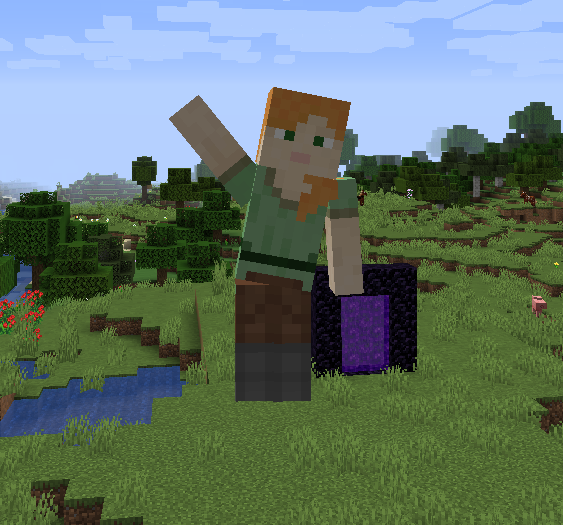
Enjoy default emotes like waving!
Create your own emotes and use them in-game.
Use Blender or Blockbench to design custom emotes.
No need to manually share emotes—sync them seamlessly with other players!
mods folder.emotecraft-*version*-bukkit.jar as a plugin.🚀 You can still connect to vanilla servers - the mod just won’t be active. You can also use online-emotes to play emotes on vanilla servers!
B to open the emote selection wheel..minecraft/emotes.📚 Learn more: Usage Guide
🌎 Emote Sharing Portal
Project description from CurseForge.
Pick your setup
Choose the version and loader you play, then open the matching release.
Check the dependencies, then try the file in a copied instance before changing a world you care about.
Recent files
emotecraft-geyser-for-MC26.2-3.4.0-b.build.162.jar
31 Jul 2026
emotecraft-paper-for-MC26.2-3.4.0-b.build.162.jar
31 Jul 2026
emotecraft-for-MC26.2-3.4.0-b.build.162.jar
31 Jul 2026
emotecraft-for-MC26.2-3.4.0-b.build.161.jar
10 Jul 2026
emotecraft-geyser-for-MC26.2-3.4.0-b.build.161.jar
10 Jul 2026
emotecraft-paper-for-MC26.2-3.4.0-b.build.161.jar
10 Jul 2026
emotecraft-for-MC26.1.2-3.3.0-b.build.160.jar
10 Jul 2026
emotecraft-paper-for-MC26.1.2-3.3.0-b.build.160.jar
10 Jul 2026
emotecraft-geyser-for-MC26.1.2-3.3.0-b.build.160.jar
10 Jul 2026
emotecraft-geyser-for-MC1.21.11-3.2.0-b.build.159.jar
10 Jul 2026
emotecraft-paper-for-MC1.21.11-3.2.0-b.build.159.jar
10 Jul 2026
emotecraft-neoforge-for-MC1.21.11-3.2.0-b.build.159.jar
10 Jul 2026
Looking for an older file? The official CurseForge project page is in Resources.
 mod
modAdds a few structures with blocks and mobs from other mods!
 mod
modAdds legendary weapons and divine armor from Greek, Hindu, Norse, and French mythology, each with unique combat mechanics inspired by the original legends
 mod
modFabric accessory mod for Minecraft 26.2 with deliberate Focus loadouts, Circles, Deep Lanterns, and an eightfold affinity counter wheel.