Just Enough Items (JEI) Optional for Recipe Printer RecipePrinter-26.1.1.jar
optionalMatching file found Matched file: 29.33.0.87 for NeoForge 26.1.2
CurseForge · Minecraft mod
Converts recipes and item groups into nice looking images
Quick answer
Recipe Printer RecipePrinter-26.1.1.jar targets 26.1.2 with NeoForge. The project page does not say whether this file belongs on the client, dedicated server, or both. All 1 required mods have matching files.
Where it goes
The project page does not say whether this file belongs on the client, dedicated server, or both.
The source does not explicitly classify this release as client-only or server-only.
RecipePrinter-26.1.1.jar. Change the file and its required mods may change too.
Install LibX first. We found matching files for this game-version and loader setup.
We only count dependency files that match this setup. A file for another loader does not fill the gap.
Before you install it
Built for Recipe Printer RecipePrinter-26.1.1.jar. Pick another file and the loader, install side or required mods may change.
Use RecipePrinter-26.1.1.jar. It targets 26.1.2 with NeoForge; another release may have different loader, side or dependency requirements.
Install LibX first. We found matching files for this game-version and loader setup.
The project page does not say whether this file belongs on the client, dedicated server, or both.
Use the “Get this file” button beside RecipePrinter-26.1.1.jar. It opens that exact file at the source.
About this project
This mod is client only and is not meant to be used in modpacks. You should not try to join a server with this mod installed. It's mainly for content creators that want to show recipes or creative tabs.
Allows you to print recipes to PNGs like this
Use /recipeprinter recipe modid:recipe_id
An astrisk can be used as a wildcard: /recipeprinter recipe modid:*
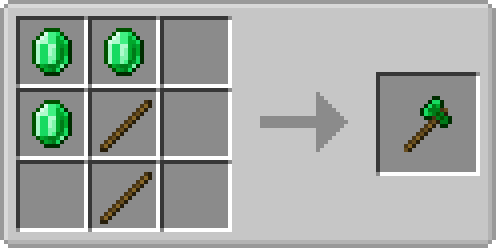
If your recipe is not directly supported by RecipePrinter but has JEI support, you can print JEI recipes using /recipeprinter fromJei modid:recipe_id
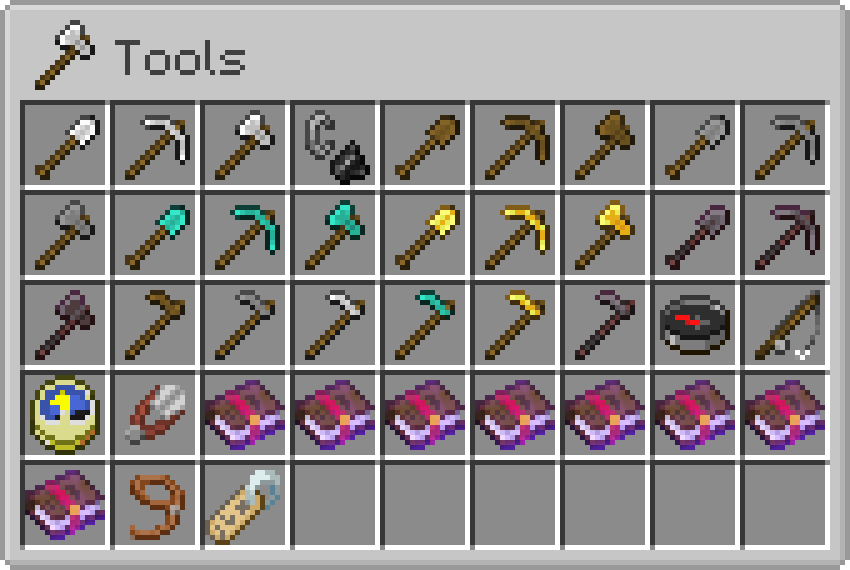
You can also print creative tabs like this
Use /recipeprinter itemgroup minecraft:item_group_id
Project description from CurseForge.
Pick your setup
Choose the version and loader you play, then open the matching release.
Check the dependencies, then try the file in a copied instance before changing a world you care about.
Recent files
28 Aug 2026
25 Aug 2026
2 Aug 2026
25 Jun 2023
26 Mar 2022
7 Mar 2022
3 Mar 2022
20 Feb 2022
9 Jan 2022
28 Mar 2021
12 Feb 2021
12 Feb 2021
Looking for an older file? The official CurseForge project page is in Resources.
 mod
modMulti-platform Minecraft web chat with map/standalone UI, DM & groups, secure server relay, moderation/content filters, rich media, notifications, and optional ImageEmojis-Bero/SimpleNicks-Bero integration.
 mod
modAdd stamina to sprinting and swimming based off your current health
 mod
modAn addon mod for SlashBlade: Resharped that significantly overhauls its combat mechanics.