Minecraft version
Back to mods 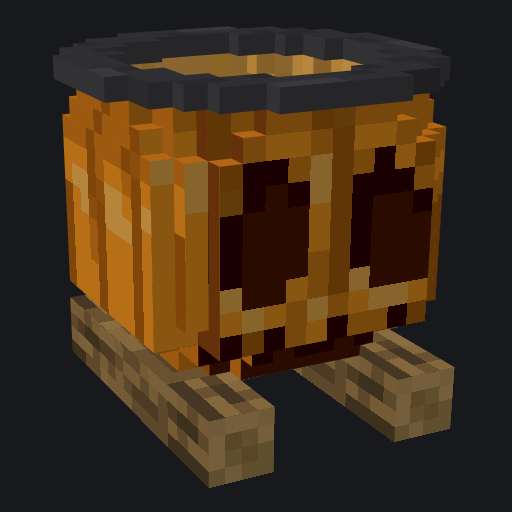
CurseForge · Minecraft mod
PumpkinPotions
Brew complex potions in a Pumpkin. A mod made for SpookyJam 2020
Choose a version Pick your version below, then grab the matching file.
Quick answer
Which PumpkinPotions release should I use?
Latest stable file PumpkinPotions-1.16.3-1.0.4.jar
Game version 1.16.3, 1.16.4
Loader Forge
PumpkinPotions-1.16.3-1.0.4.jar targets 1.16.3, 1.16.4 with Forge. The project page does not say whether this file belongs on the client, dedicated server, or both. No extra mods listed for this file.
Where it goes
Is PumpkinPotions required on the client, server, or both?
The project page does not say whether this file belongs on the client, dedicated server, or both.
Client Source doesn’t say
Dedicated server Source doesn’t say
Loader for this release Forge
Required install it here Optional supported, not mandatory Not supported do not install here Source doesn’t say do not assume
The source does not explicitly classify this release as client-only or server-only.
What else does PumpkinPotions-1.16.3-1.0.4.jar need?
PumpkinPotions-1.16.3-1.0.4.jar. Change the file and its required mods may change too.
This file does not list any required mods. Do not add a library just because a different file uses it.
This file does not list any required or optional mods.
Before you install it
Add PumpkinPotions without breaking your instance.
Built for PumpkinPotions-1.16.3-1.0.4.jar. Pick another file and the loader, install side or required mods may change.
- 01
Stick to this file
Use PumpkinPotions-1.16.3-1.0.4.jar. It targets 1.16.3, 1.16.4 with Forge; another release may have different loader, side or dependency requirements.
- 02
Bring the mods it needs
This file does not list any required mods. Do not add a library just because a different file uses it.
- 03
Put it on the correct side
The project page does not say whether this file belongs on the client, dedicated server, or both.
- 04
Pick the file you checked
Use the “Get this file” button beside PumpkinPotions-1.16.3-1.0.4.jar. It opens that exact file at the source.
About this project
What does PumpkinPotions add?
Pumpkin Potions
A mod made for SpookyJam 2020.
This mod allows you to brew complex potions in a pumpkin. It also adds 10 new potion effects. First of all craft yourself a Pumpkin Cauldron:

Now put some water in using a bucket. The first ingredient for every potion are nether warts. After that you can throw an effect item in to add a potion effect to the potion. After that you can throw in almost any vanilla item and a few special blocks to modify that effect. Every item modifies different effects in different ways. Here's a list which item adds which effect;
- Speed: Sugar
- Slowness: Cobweb
- Haste: End Crystal
- Mining Fatigue: Wet Sponge
- Strength: Blaze Powder
- Instant Health: Glistering melon slice
- Instant Damage: Soul Torch
- Jump Boost: Rabbit foot
- Nausea: Poisonous Potato
- Regeneration: Ghast tear
- Resistance: Crying Obsidian
- Fire Resistance: Magma Cream
- Water Breathing: Pufferfish
- Invisibility: Glass
- Blindness: Ink sac
- Night Vision: Golden Carrot
- Hunger: Rotten Flesh
- Weakness: Fermented Spider Eye
- Poison: Spider Eye
- Wither: Wither rose
- Health Boost: cake
- Absorption: Golden Apple
- Saturation: Pumpkin Pie
- Glowing: Lantern
- Levitation: Shulker Shell
- Luck: Twisting Vines
- Unluck: Weeping Vines
- Slow falling: Phantom Membrane
- Conduit power: Prismarine Crystals
- Dolphins Grace: Tropical Fish
- Bad Omen: Emerald
- Hero of the Village: Totem of Undying
- Mob Dizziness: Ender eye (Makes you see mobs a little bit off their real position)
- Ghost: Scaffolding (Makes you unable to interact with the world but able to fly slowly)
- Confusion: Netherite Scrap (Inverts your controls)
- Golem Agression: Carved Pumpkin (Golems will attack you)
- Random Teleport: Enderpearl (You will teleport randomly)
- Projectile Resistence: Shield (Makes you immune to projectiles)
- Deadly Aura: Spectral Arrow (Harms nearby mobs)
- Knockback Resistance: Bamboo (You'll get less knockback)
- Knockback Boost: Cactus (You'll deal more knockback)
- XP Boost: Quartz (You'll get more xp from orbs)
Additionally there are some foci that alter the whole potion. Those can be thrown in at any time:
- Redstone: Makes the potion last longer at cost of some amplifier
- Glowstone: Makes the potion stronger at cost of some duration
- Gunpowder: Makes the potion a splash potion
- Dragons Breath: Makes the potion a lingering potion (requires Gunpowder to be in the potion already)
Some other things to keep in mind:
- The more items are between an effect item and another item, the less is the effect of that item.
- More valuable items modify the potion more.
- You can only throw each item in once. So think about when you want to do it.
When your potion is ready you can right click with an empty bottle to get a Halloween Potion. If you want to brew that potion again right click the cauldron with a book right after you brewed the potion to get a potion recipe. Then put a lectern next to the cauldron, put the book on the lectern and put some water into the cauldron. You'll now always see which item you have to throw in.
Project description from CurseForge.
Pick your setup
PumpkinPotions by Minecraft version and loader
Choose the version and loader you play, then open the matching release.
Minecraft version
1.16.3
1 loader buildCheck the dependencies, then try the file in a copied instance before changing a world you care about.
Recent files
PumpkinPotions versions and loaders
PumpkinPotions-1.16.3-1.0.4.jar
15 Nov 2020
Client Source doesn’t say Server Source doesn’t say Dependencies No extras listed Listed on Release listing
Check the 1.16.4 · Forge setup 1.16.3Forge1.16.4 release
PumpkinPotions-1.16.3-1.0.3.jar
31 Oct 2020
Client Source doesn’t say Server Source doesn’t say Dependencies No extras listed Listed on Release listing
Check the 1.16.3 · Forge setup 1.16.3Forge release
PumpkinPotions-1.16.3-1.0.2.jar
27 Oct 2020
Client Source doesn’t say Server Source doesn’t say Dependencies No extras listed Listed on Release listing
Check the 1.16.3 · Forge setup 1.16.3Forge release
PumpkinPotions-1.16.3-1.0.1.jar
21 Oct 2020
Client Source doesn’t say Server Source doesn’t say Dependencies No extras listed Listed on Release listing
Check the 1.16.3 · Forge setup 1.16.3Forge release
PumpkinPotions-1.16.3-1.0.0.jar
20 Oct 2020
Client Source doesn’t say Server Source doesn’t say Dependencies No extras listed Listed on Release listing
Check the 1.16.3 · Forge setup 1.16.3Forge release
Looking for an older file? The official CurseForge project page is in Resources.
 mod
CurseForge + Modrinth · Minecraft
PolyNametag
An extremely customizable nametag mod. By Polyfrost, best with OneClient.
 mod
CurseForge + Modrinth · Minecraft
HQTiers
Display PvPHQ tiers on nametags, in the tab list and in chat
 mod
Modrinth · Minecraft
No Lag
Stop common causes of lag on your Fabric server. Even with massive farms and intentional lag machines.