Minecraft version
Back to mods 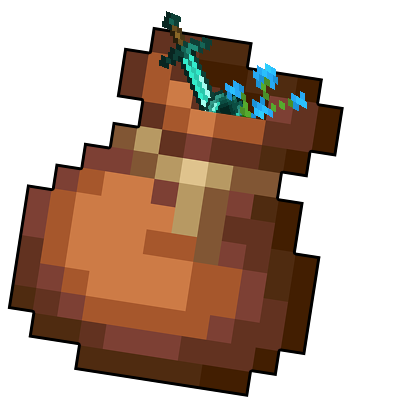
CurseForge · Minecraft mod
Bundles!
Pack your stuff and go on an adventure with the new bundles!
Choose a version Pick your version below, then grab the matching file.
Quick answer
Which Bundles! release should I use?
Latest stable file Release 1.4
Game version 1.16.5
Loader Forge
Bundles! Release 1.4 targets 1.16.5 with Forge. The project page does not say whether this file belongs on the client, dedicated server, or both. No extra mods listed for this file.
Where it goes
Is Bundles! required on the client, server, or both?
The project page does not say whether this file belongs on the client, dedicated server, or both.
Client Source doesn’t say
Dedicated server Source doesn’t say
Loader for this release Forge
Required install it here Optional supported, not mandatory Not supported do not install here Source doesn’t say do not assume
The source does not explicitly classify this release as client-only or server-only.
What else does Bundles! Release 1.4 need?
Release 1.4. Change the file and its required mods may change too.
This file does not list any required mods. Do not add a library just because a different file uses it.
This file does not list any required or optional mods.
Before you install it
Add Bundles! without breaking your instance.
Built for Bundles! Release 1.4. Pick another file and the loader, install side or required mods may change.
- 01
Stick to this file
Use Release 1.4. It targets 1.16.5 with Forge; another release may have different loader, side or dependency requirements.
- 02
Bring the mods it needs
This file does not list any required mods. Do not add a library just because a different file uses it.
- 03
Put it on the correct side
The project page does not say whether this file belongs on the client, dedicated server, or both.
- 04
Pick the file you checked
Use the “Get this file” button beside Release 1.4. It opens that exact file at the source.
About this project
What does Bundles! add?
BUNDLES!
During Minecraft Live 2020 Mojang announced that in 1.17 a new item will be introduced to the game: the Bundle!
This is like an early game version of the Shulker Box, allowing you to save some inventory space.
⚙ How to get a Bundle?
Getting a Bundle is really easy, as it doesn't require too many materials. All you need is just 5 pieces of Rabbit Hide and 2 Strings to create a Bundle!

🤔 How does it work?
Select the Bundle from your inventory, then left click on a stack to put it inside the Bundle.
But be careful, as you can't put a full stack of items inside the Bundle! Infact you can only put half the maximum stack of
an item inside the Bundle, unless is a non stackable item. When you are done, left click the Bundle on an empty slot in your Inventory.
If you want to take out the Items from the Bundle, right click it and all Items inside the Bundle will be added to your Inventory.
...or you can just watch this video to see the mod in action!
Select the Bundle from your inventory, then right-click on a stack to put it inside the Bundle, or right click with the stack on the Bundle to put inside if there's space available.
If you want to take out the Items from the Bundle, right click it in inventory to take out one Item from the Bundle (from last to the first one), or right click it outside the inventory to drop all the Bundle Items on the ground.
The functionality has been ported to mimic the latest 1.17 snapshots, where Bundle were originally developed, so you can check the Minecraft Wiki to see how a Bundle works.
Also featured in Boodlyneck's Mods of the Week serie!
👀 Can I put anything inside the Bundle?
No, there are certain blocks/items that you can't put inside a Bundle.
Which blocks or items you ask? Well, you can decide them! By default, the mod comes with two tags,
bundle_ignored_blocks and bundle_ignored_items. These two tags contains all the blocks and the items that can't
be put inside a Bundle. By default, you can't put another Bundle, a Chest, a Trapped Chest, an Ender Chest and
any Shulker Box inside a Bundle. But if you wish you can always modify those tags to allow those blocks to be
put inside the Bundle and create some black holes! Or even do the opposite and add other blocks or items
that you don't want to be put inside the Bundle. Just make sure you put the right thing in the right tag (so blocks
inside the bundle_ignored_blocks tag and items inside the bundle_ignored_items tag). The only limit is
your creativity!
🛍 How many items can fit inside a Bundle?
You can put up to 64 items (or a full stack) inside a Bundle, but remember that certain Items, like Tools or Ender Pearls, will take more space than normal blocks inside a Bundle.
😁 Conclusion
Minecraft 1.17 has been one of the greatest update of all time, full of many new content we asked for so long! This mod aims to introduce the Bundle mechanic in 1.16.5, however note that all of this is based purely on what can be done in such version, as something is really hard or practically impossible to do (like the Tooltip for example), so there might be some aspects that may change or differ entirely from what is inside this mod. Also consider that the Bundle itself is still in development in Vanilla Minecraft, so things might actually change in the future. If that is the case I will update the mod to match such changes.
That being said, I hope you enjoy it! Let me know if there are any issues on the issue tracker, have a nice day! 😁
PS: Check out Iron Bundles too!
Project description from CurseForge.
Pick your setup
Bundles! by Minecraft version and loader
Choose the version and loader you play, then open the matching release.
Minecraft version
1.16.3
1 loader buildMinecraft version
1.16.2
1 loader buildMinecraft version
1.16.1
1 loader buildMinecraft version
1.15.2
1 loader buildCheck the dependencies, then try the file in a copied instance before changing a world you care about.
Recent files
Bundles! versions and loaders
Release 1.4
Bundles-1.4.jar
28 Jul 2022
Client Source doesn’t say Server Source doesn’t say Dependencies No extras listed Listed on Release listing
Check the 1.16.5 · Forge setup 1.16.5Forge release
Bundles-1.3.jar
22 Oct 2020
Client Source doesn’t say Server Source doesn’t say Dependencies No extras listed Listed on Release listing
Check the 1.15.2 · Forge setup 1.15.2Forge release
Bundles-1.3.jar
22 Oct 2020
Client Source doesn’t say Server Source doesn’t say Dependencies No extras listed Listed on Release listing
Check the 1.16.1 · Forge setup 1.16.1Forge release
Bundles-1.3.jar
22 Oct 2020
Client Source doesn’t say Server Source doesn’t say Dependencies No extras listed Listed on Release listing
Check the 1.16.2 · Forge setup Forge1.16.2 release
Bundles-1.3.jar
22 Oct 2020
Client Source doesn’t say Server Source doesn’t say Dependencies No extras listed Listed on Release listing
Check the 1.16.3 · Forge setup 1.16.3Forge release
Bundles-1.2.jar
19 Oct 2020
Client Source doesn’t say Server Source doesn’t say Dependencies No extras listed Listed on Release listing
Check the 1.15.2 · Forge setup 1.15.2Forge release
Bundles-1.2.jar
19 Oct 2020
Client Source doesn’t say Server Source doesn’t say Dependencies No extras listed Listed on Release listing
Check the 1.16.1 · Forge setup 1.16.1Forge release
Bundles-1.2.jar
19 Oct 2020
Client Source doesn’t say Server Source doesn’t say Dependencies No extras listed Listed on Release listing
Check the 1.16.2 · Forge setup Forge1.16.2 release
Bundles-1.2.jar
19 Oct 2020
Client Source doesn’t say Server Source doesn’t say Dependencies No extras listed Listed on Release listing
Check the 1.16.3 · Forge setup 1.16.3Forge release
Bundles-1.1.jar
19 Oct 2020
Client Source doesn’t say Server Source doesn’t say Dependencies No extras listed Listed on Release listing
Check the 1.15.2 · Forge setup 1.15.2Forge release
Bundles-1.1.jar
19 Oct 2020
Client Source doesn’t say Server Source doesn’t say Dependencies No extras listed Listed on Release listing
Check the 1.16.1 · Forge setup 1.16.1Forge release
Bundles-1.1.jar
19 Oct 2020
Client Source doesn’t say Server Source doesn’t say Dependencies No extras listed Listed on Release listing
Check the 1.16.2 · Forge setup Forge1.16.2 release
Looking for an older file? The official CurseForge project page is in Resources.
 mod
mod Modrinth · Minecraft
Expanden Inventory
Expand your vanilla inventory with customizable, persistent 3x3 storage modules and upgradeable belts.
 mod
mod CurseForge · Minecraft
WhatTheCraft
WhatTheCraft expands Minecraft with new creatures, races, transformations, combat abilities, magic, exploration, and character progression.
 mod
mod CurseForge · Minecraft
Rise Of The Asens
Adds A Deadly Endgame Race Of Hyperparasitic Warriors, alongside weapons, tech, and more.