Minecraft version
Back to mods 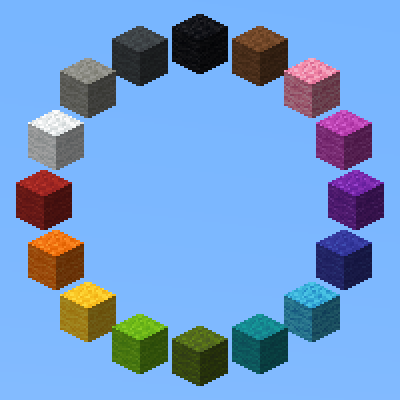
CurseForge · Minecraft mod
LotTweaks
Tweaks for builders to increase productivity.
Choose a version Pick your version below, then grab the matching file.
Quick answer
Which LotTweaks release should I use?
Latest stable file LT 2.4.6 (MC26.3 Fabric)
Game version 26.3
Loader Fabric
LotTweaks LT 2.4.6 (MC26.3 Fabric) targets 26.3 with Fabric. The project page does not say whether this file belongs on the client, dedicated server, or both. No extra mods listed for this file.
Where it goes
Is LotTweaks required on the client, server, or both?
The project page does not say whether this file belongs on the client, dedicated server, or both.
Client Source doesn’t say
Dedicated server Source doesn’t say
Loader for this release Fabric
Required install it here Optional supported, not mandatory Not supported do not install here Source doesn’t say do not assume
The source does not explicitly classify this release as client-only or server-only.
What else does LotTweaks LT 2.4.6 (MC26.3 Fabric) need?
LT 2.4.6 (MC26.3 Fabric). Change the file and its required mods may change too.
This file does not list any required mods. Do not add a library just because a different file uses it.
This file does not list any required or optional mods.
Before you install it
Add LotTweaks without breaking your instance.
Built for LotTweaks LT 2.4.6 (MC26.3 Fabric). Pick another file and the loader, install side or required mods may change.
- 01
Stick to this file
Use LT 2.4.6 (MC26.3 Fabric). It targets 26.3 with Fabric; another release may have different loader, side or dependency requirements.
- 02
Bring the mods it needs
This file does not list any required mods. Do not add a library just because a different file uses it.
- 03
Put it on the correct side
The project page does not say whether this file belongs on the client, dedicated server, or both.
- 04
Pick the file you checked
Use the “Get this file” button beside LT 2.4.6 (MC26.3 Fabric). It opens that exact file at the source.
About this project
What does LotTweaks add?
LotTweaks
LotTweaks is a Minecraft mod that adds quality-of-life tools for Creative-mode builders. Reach across an entire build with one keystroke, cycle between related blocks (stone → granite → diorite) with the scroll wheel, replace blocks in place, and pick distant blocks at a glance.
Features
Reach Extension
Break, place, and pick blocks up to 100+ blocks away. Hold the key (default: U) and scroll the mouse wheel to adjust the range on the fly.
Both client and server need this mod installed.
Palette
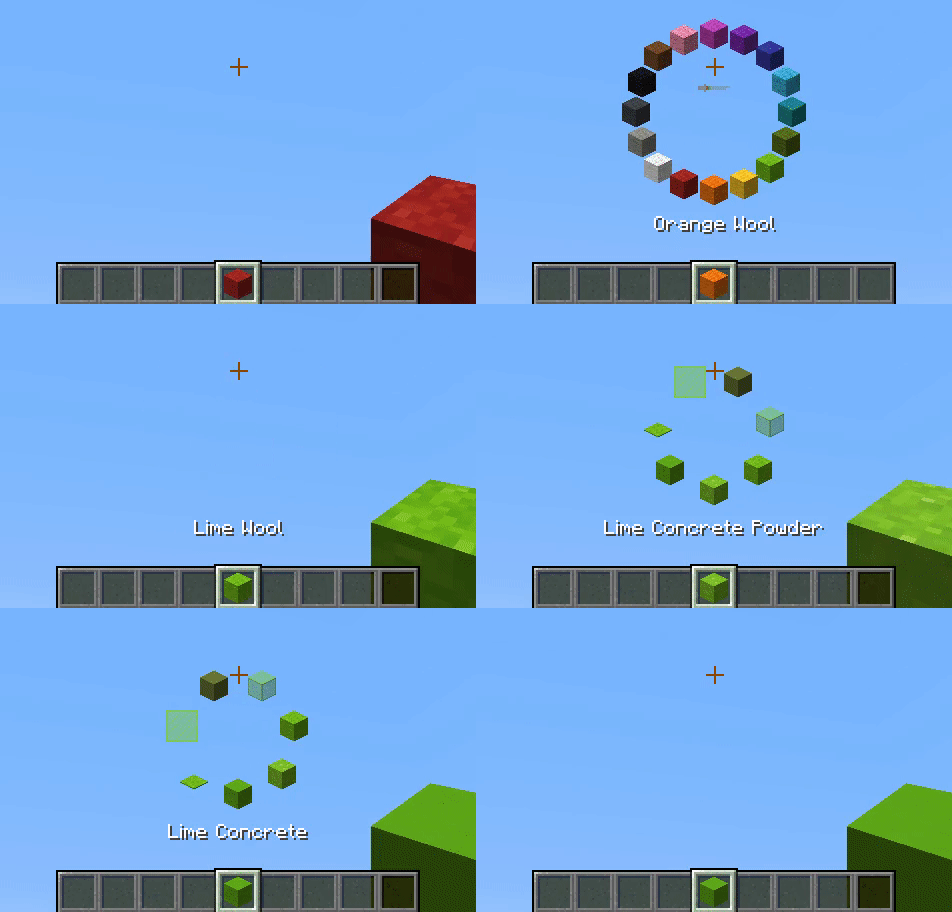
Hold the key (default: R) and scroll to swap the held item for the next one in the same item group — for example, stone → granite → diorite, or oak planks → birch planks. Double-tap to switch between palette groups.
Item groups are defined in LotTweaks-ItemGroups.json and can be edited freely. Items with components such as enchantments or custom names are supported, so an enchanted bow or a renamed item can be registered as its own palette entry.
Client-side only.
Replace Block
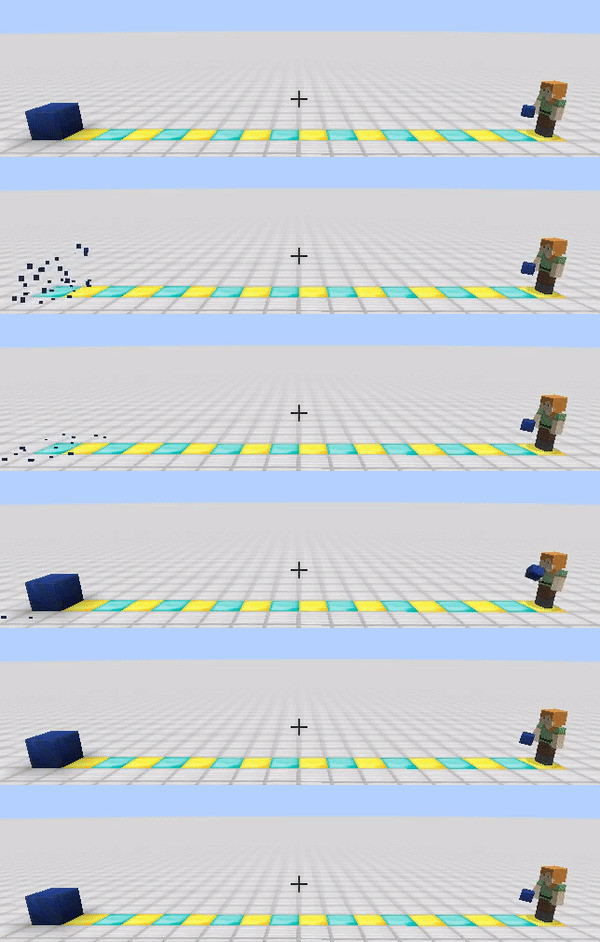
Press the key (default: G) while looking at a block to replace it with the item in your main hand.
Both client and server need this mod installed.
Smart Pick
Press the key (default: V) to pick the block you are looking at, even when it is well beyond the vanilla pick range. Long-press the key and scroll to pick from your recent pick-block history instead.
Client-side only.
Default Keybindings
| Key | Action | Required side |
|---|---|---|
| V | Smart Pick | Client |
| R | Palette | Client |
| G | Replace Block | Client + Server |
| U | Reach Extension | Client + Server |
All keys can be rebound from the standard Minecraft Controls screen.
Commands
All commands are client-side.
/lottweaks add— Register the items in your hotbar as a new entry in the primary palette group./lottweaks add 2— Register the items in your hotbar as a new entry in the secondary palette group./lottweaks reload— Reload item groups fromLotTweaks-ItemGroups.json.
Configuration
Item groups are stored in LotTweaks-ItemGroups.json inside your config/ directory. The file is created with sensible defaults the first time you launch the game.
To customize:
- Edit
LotTweaks-ItemGroups.jsondirectly, or use/lottweaks add. - Run
/lottweaks reloadto apply the changes. - If the file contains errors, the offending lines are reported in chat and in the log.
To reset to defaults:
- Delete
LotTweaks-ItemGroups.json. - Restart Minecraft. A fresh default config will be regenerated.
Migrating from older versions:
Older text-based configs (LotTweaks-BlockGroups.txt and LotTweaks-BlockGroups2.txt) are automatically migrated to the new JSON format on first launch.
FAQ
Reach Extension or Replace Block isn't working. Make sure the same version of LotTweaks is installed on the server. These two features require both sides.
Does this mod work with blocks added by other mods? Probably yes for standard blocks, but blocks from other mods are not officially supported.
Can I share a customized item-groups config with others? Yes — feel free to distribute your LotTweaks-ItemGroups.json.
Recent Changes
- 2.4.x — Items with components (enchantments, custom names, etc.) can now be registered as distinct palette entries. Configs are stored as
LotTweaks-ItemGroups.json(legacy.txtconfigs are auto-migrated). - 2.3.7 — Internal rename to clearer feature names:
ExPick→ Smart Pick,Rotate→ Palette,AdjustRange→ Reach Extension,Replace→ Replace Block. No functional changes. - 2.3.2 — Fixed Smart Pick not working for distant blocks.
- 2.3.0 — Migrated to the reach-entity-attribute library to reduce conflicts with other mods.
- 2.2.2 — Added option
SHOW_BLOCKCONFIG_ERROR_LOG_TO_CHAT. - 2.2.1 — Added pick-from-history to Smart Pick. 2.2.2+ clients can connect to 2.2.1 servers.
Discord

Disclaimer
THE SOFTWARE IS PROVIDED "AS IS", WITHOUT WARRANTY OF ANY KIND, EXPRESS OR IMPLIED, INCLUDING BUT NOT LIMITED TO THE WARRANTIES OF MERCHANTABILITY, FITNESS FOR A PARTICULAR PURPOSE AND NONINFRINGEMENT. IN NO EVENT SHALL THE AUTHORS OR COPYRIGHT HOLDERS BE LIABLE FOR ANY CLAIM, DAMAGES OR OTHER LIABILITY, WHETHER IN AN ACTION OF CONTRACT, TORT OR OTHERWISE, ARISING FROM, OUT OF OR IN CONNECTION WITH THE SOFTWARE OR THE USE OR OTHER DEALINGS IN THE SOFTWARE.
Project description from CurseForge.
Pick your setup
LotTweaks by Minecraft version and loader
Choose the version and loader you play, then open the matching release.
Minecraft version
26.2
1 loader buildMinecraft version
26.1.2
1 loader buildMinecraft version
26.1.1
1 loader buildMinecraft version
26.1
1 loader buildMinecraft version
1.21.11
1 loader buildMinecraft version
1.21.10
1 loader buildMinecraft version
1.21.9
1 loader buildMinecraft version
1.21.8
1 loader buildMinecraft version
1.21.7
1 loader buildMinecraft version
1.21.6
1 loader buildMinecraft version
1.21.5
1 loader buildShowing the newest 12 of 29 game versions. Older files are in the list below.
Check the dependencies, then try the file in a copied instance before changing a world you care about.
Recent files
LotTweaks versions and loaders
LT 2.4.6 (MC26.3 Fabric)
LotTweaks-mc26.3-fabric-2.4.6.jar
26 Oct 2026
Client Source doesn’t say Server Source doesn’t say Dependencies No extras listed Listed on Release listing
Check the 26.3 · Fabric setup Fabric26.3 release
LT 2.4.6 (MC26.2 Fabric)
LotTweaks-mc26.2-fabric-2.4.6.jar
26 Oct 2026
Client Source doesn’t say Server Source doesn’t say Dependencies No extras listed Listed on Release listing
Check the 26.2 · Fabric setup Fabric26.2 release
LT 2.4.6 (MC26.1.2 Fabric)
LotTweaks-mc26.1.2-fabric-2.4.6.jar
26 Oct 2026
Client Source doesn’t say Server Source doesn’t say Dependencies No extras listed Listed on Release listing
Check the 26.1.2 · Fabric setup Fabric26.1.2 release
LT 2.4.5 (MC26.3 Fabric)
LotTweaks-mc26.3-fabric-2.4.5.jar
11 Oct 2026
Client Source doesn’t say Server Source doesn’t say Dependencies No extras listed Listed on Release listing
Check the 26.3 · Fabric setup Fabric26.3 release
LT 2.4.4 (MC26.2 Fabric)
LotTweaks-mc26.2-fabric-2.4.4.jar
17 Aug 2026
Client Source doesn’t say Server Source doesn’t say Dependencies No extras listed Listed on Release listing
Check the 26.2 · Fabric setup Fabric26.2 release
LT 2.4.4 (MC26.1.2 Fabric)
LotTweaks-mc26.1.2-fabric-2.4.4.jar
17 Aug 2026
Client Source doesn’t say Server Source doesn’t say Dependencies No extras listed Listed on Release listing
Check the 26.1.2 · Fabric setup Fabric26.1.2 release
LT 2.4.3 (MC26.2 Fabric)
LotTweaks-mc26.2-fabric-2.4.3.jar
28 Jun 2026
Client Source doesn’t say Server Source doesn’t say Dependencies No extras listed Listed on Release listing
Check the 26.2 · Fabric setup Fabric26.2 release
LT 2.4.3 (MC26.1.2 Fabric)
LotTweaks-mc26.1.2-fabric-2.4.3.jar
7 May 2026
Client Source doesn’t say Server Source doesn’t say Dependencies No extras listed Listed on Release listing
Check the 26.1.2 · Fabric setup Fabric26.1.2 release
LT 2.4.2 (MC26.1.2 Fabric)
LotTweaks-mc26.1.2-fabric-2.4.2.jar
6 May 2026
Client Source doesn’t say Server Source doesn’t say Dependencies No extras listed Listed on Release listing
Check the 26.1.2 · Fabric setup Fabric26.1.2 release
LT 2.4.2 (MC26.1.1 Fabric)
LotTweaks-mc26.1.1-fabric-2.4.2.jar
6 May 2026
Client Source doesn’t say Server Source doesn’t say Dependencies No extras listed Listed on Release listing
Check the 26.1.1 · Fabric setup Fabric26.1.1 release
LT 2.4.2 (MC26.1 Fabric)
LotTweaks-mc26.1-fabric-2.4.2.jar
6 May 2026
Client Source doesn’t say Server Source doesn’t say Dependencies No extras listed Listed on Release listing
Check the 26.1 · Fabric setup Fabric26.1 release
LT 2.4.1 (MC1.21.11 Fabric)
LotTweaks-mc1.21.11-fabric-2.4.1.jar
16 Jan 2026
Client Source doesn’t say Server Source doesn’t say Dependencies No extras listed Listed on Release listing
Check the 1.21.11 · Fabric setup Fabric1.21.11 release
Looking for an older file? The official CurseForge project page is in Resources.