Minecraft version
Back to mods 
CurseForge · Minecraft mod
DispenSeeds
Add sowing behaviors to Dispensers
Choose a version Pick your version below, then grab the matching file.
Quick answer
Which DispenSeeds release should I use?
Latest stable file DS 1.0.1 (MC1.16.4 Forge)
Game version 1.16.4
Loader Not required
DispenSeeds DS 1.0.1 (MC1.16.4 Forge) targets 1.16.4. The project page does not say whether this file belongs on the client, dedicated server, or both. No extra mods listed for this file.
Where it goes
Is DispenSeeds required on the client, server, or both?
The project page does not say whether this file belongs on the client, dedicated server, or both.
Client Source doesn’t say
Dedicated server Source doesn’t say
Loader for this release No loader listed
Required install it here Optional supported, not mandatory Not supported do not install here Source doesn’t say do not assume
The source does not explicitly classify this release as client-only or server-only.
What else does DispenSeeds DS 1.0.1 (MC1.16.4 Forge) need?
DS 1.0.1 (MC1.16.4 Forge) . Change the file and its required mods may change too.
This file does not list any required mods. Do not add a library just because a different file uses it.
This file does not list any required or optional mods.
Before you install it
Add DispenSeeds without breaking your instance.
Built for DispenSeeds DS 1.0.1 (MC1.16.4 Forge). Pick another file and the loader, install side or required mods may change.
- 01
Stick to this file
Use DS 1.0.1 (MC1.16.4 Forge) . It targets 1.16.4; another release may have different loader, side or dependency requirements.
- 02
Bring the mods it needs
This file does not list any required mods. Do not add a library just because a different file uses it.
- 03
Put it on the correct side
The project page does not say whether this file belongs on the client, dedicated server, or both.
- 04
Pick the file you checked
Use the “Get this file” button beside DS 1.0.1 (MC1.16.4 Forge) . It opens that exact file at the source.
About this project
What does DispenSeeds add?
DispenSeeds [BETA]
This mod adds sowing behaviors to Dispensers.
MODE 2 (default)
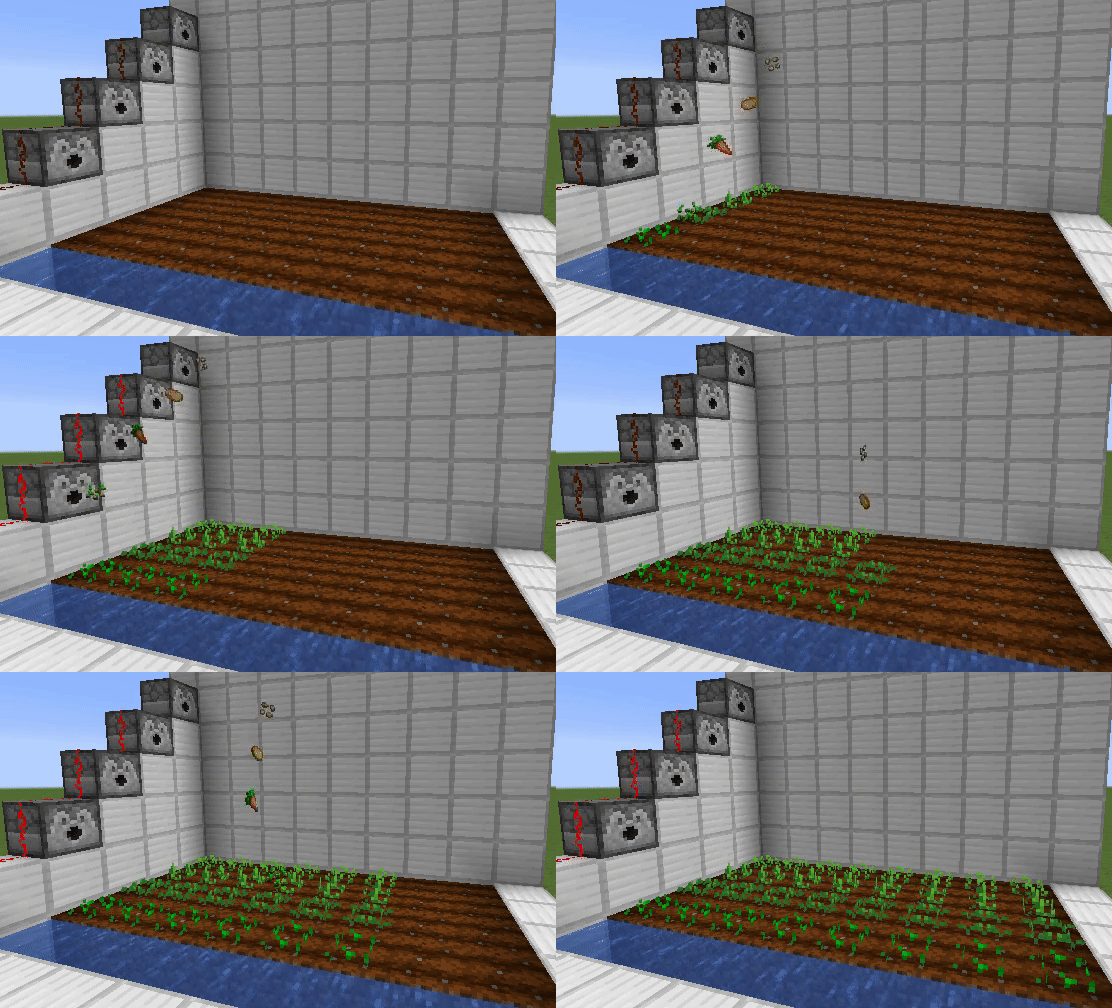
MODE 1 ( available on 1.16.x )
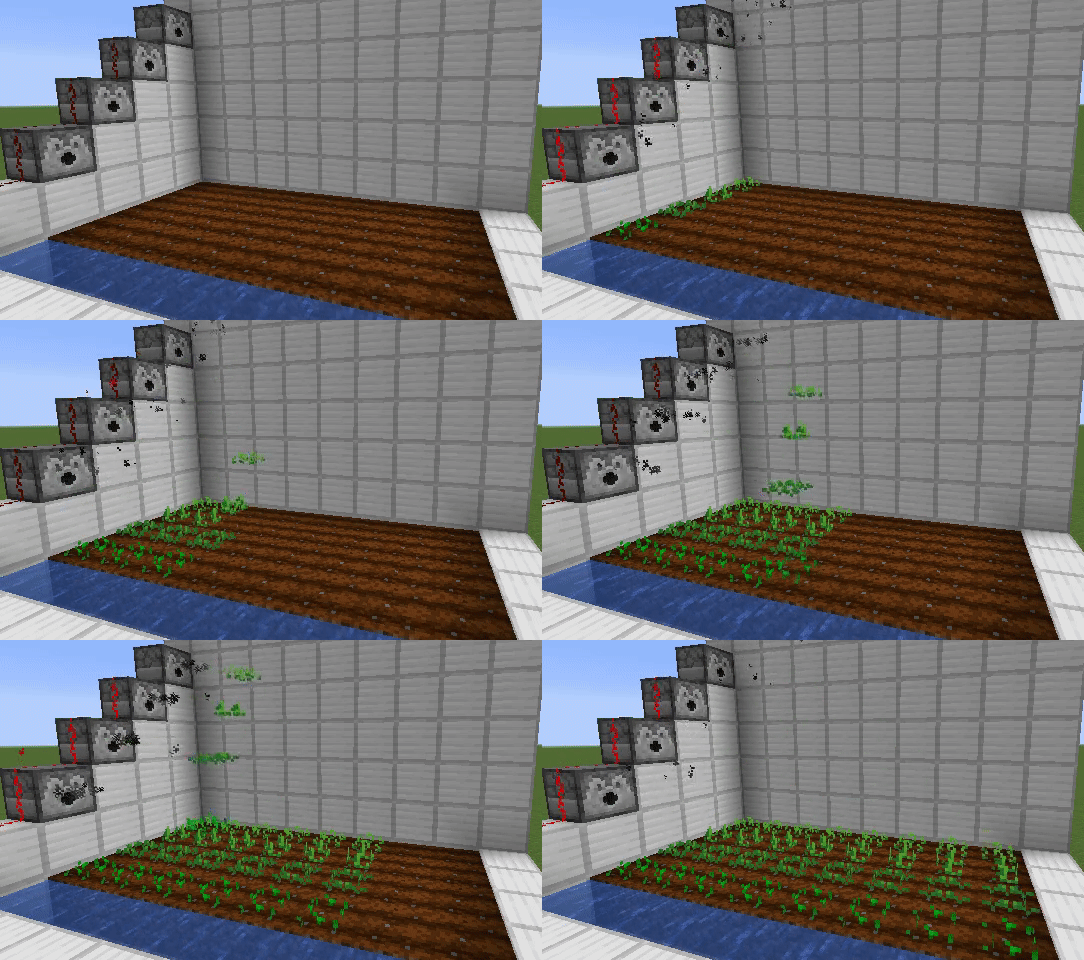
Supported seeds/crops by default
- Wheat seeds
- Carrot
- Potato
- Beetroot
- Nether wart
You can change which seeds/crops handled by dispensers (by editing config file)
How to use
1: Place a dispenser in front of your farmland.
2: Put seeds into the dispenser.
3: Activate it!
Restrictions
Horizontal distance between a dispenser to farmland must be within 1 to 8 blocks.
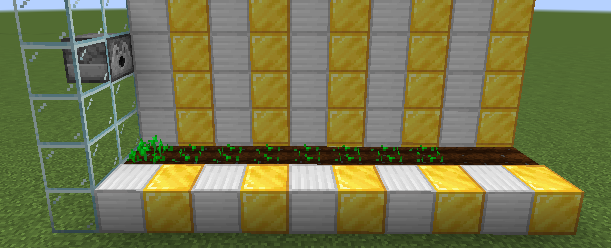
Vertical distance between a dispenser to farmland must be within 2 to 5 blocks.
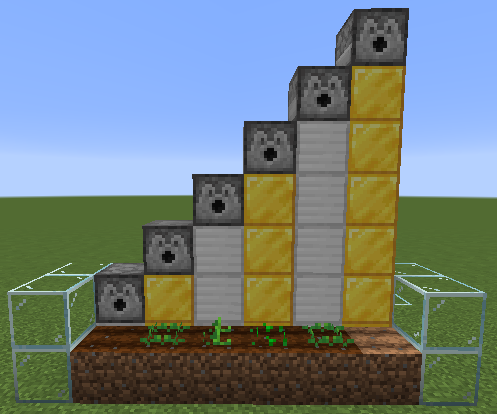
Tips
1: Period of pulses sent to a dispensers should be 8 or more redstone ticks.
If a dispenser is activated too quickly, dispenser will shoot seeds to the same farmland block... because until the falling seeds reach the farmlands, that is considered as "available" farmland.
Warning: Seeds that fallen on the "invalid" blocks (= farmland block that already have crops on it, or not suitable block for the seeds) won't drop items! They'll be lost!
2: This mod doesn't add any new blocks, items, enities....
So if you want to uninstall this mod, just remove the jar file. Actually, falling seeds entity is "Vanilla FallingBlock" entitiy customized by NBT tags.
Config options
SMART_BEHAVIOR (true/false, default is false)
If enabled, dispensers won't do the normal behavior if they could not find any farmlands so you don't have to manage the number of pulses sent to dispensers. (easy mode)
Progress
1.16.4: 75% BETA / Next version will be uploaded soon.
1.15.2: 75% BETA
1.14.4: 75% BETA
1.12.2: 25% not uploaded yet
How to install
1: Install forge
2: Put a jar file of this mod into the 'mods' folder.
3: Re-launch Minecraft.
FAQ
Can I add MOD seeds/crops?
Yes, just add the "Namespaced ID" of the item to config file and relaunch Minecraft... but I don't know if it works or not.
How to add seeds/crops?
1: Press F3+H in game. A system message will be sent to you that says "[Debug]: Advanced tooltips: shown".
2: Open your inventory
3: Hover the mouse over the item then the namespaced id will appear. Its format is modid:itemname, like minecraft:wheat_seeds.
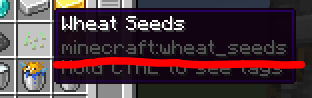
4: Append the namespaced id into DispenSeeds-SeedConfig.txt and save it.
5: Re-launch Minecraft.
It crashed after editing seed-config !!
Open the crash report and search Failure message.
If it says Could not find a block of 'somemod:someitem', that item doesn't exist or this mod couldn't find a block of that item.
Or if it says 'somemod:someitem' is not supported., that item is not supported by this mod because that item is not registered as a plant (not an instance of IPlantable).
Project description from CurseForge.
Pick your setup
DispenSeeds by Minecraft version and loader
Choose the version and loader you play, then open the matching release.
Minecraft version
1.16.3
1 loader buildMinecraft version
1.15.2
1 loader buildMinecraft version
1.14.4
1 loader buildCheck the dependencies, then try the file in a copied instance before changing a world you care about.
Recent files
DispenSeeds versions and loaders
DS 1.0.1 (MC1.14.4 Forge)
DispenSeeds-mc1.14.4-version-1.0.1.jar
6 Dec 2020
Client Source doesn’t say Server Source doesn’t say Dependencies No extras listed Listed on Release listing
Check the 1.14.4 setup 1.14.4 beta
DS 1.0.1 (MC1.15.2 Forge)
DispenSeeds-mc1.15.2-version-1.0.1.jar
6 Dec 2020
Client Source doesn’t say Server Source doesn’t say Dependencies No extras listed Listed on Release listing
Check the 1.15.2 setup 1.15.2 beta
DS 1.0.1 (MC1.16.3 Forge)
DispenSeeds-mc1.16.3-version-1.0.1.jar
5 Dec 2020
Client Source doesn’t say Server Source doesn’t say Dependencies No extras listed Listed on Release listing
Check the 1.16.3 setup 1.16.3 beta
DS 1.0.1 (MC1.16.4 Forge)
DispenSeeds-mc1.16.4-version-1.0.1.jar
5 Dec 2020
Client Source doesn’t say Server Source doesn’t say Dependencies No extras listed Listed on Release listing
Check the 1.16.4 setup 1.16.4 release
DS 1.0.0 (MC1.16.4 Forge)
DispenSeeds-mc1.16.4-version-1.0.0.jar
5 Dec 2020
Client Source doesn’t say Server Source doesn’t say Dependencies No extras listed Listed on Release listing
Check the 1.16.4 setup 1.16.4 release
DS 0.2.0 (MC1.14.4 Forge)
DispenSeeds-mc1.14.4-version-0.2.0.jar
1 Dec 2020
Client Source doesn’t say Server Source doesn’t say Dependencies No extras listed Listed on Release listing
Check the 1.14.4 setup 1.14.4 beta
DS 0.2.0 (MC1.15.2 Forge)
DispenSeeds-mc1.15.2-version-0.2.0.jar
28 Nov 2020
Client Source doesn’t say Server Source doesn’t say Dependencies No extras listed Listed on Release listing
Check the 1.15.2 setup 1.15.2 beta
DS 0.2.0 (MC1.16.3 Forge)
DispenSeeds-mc1.16.3-version-0.2.0.jar
28 Nov 2020
Client Source doesn’t say Server Source doesn’t say Dependencies No extras listed Listed on Release listing
Check the 1.16.3 setup 1.16.3 beta
DS 0.2.0 (MC1.16.4 Forge)
DispenSeeds-mc1.16.4-version-0.2.0.jar
28 Nov 2020
Client Source doesn’t say Server Source doesn’t say Dependencies No extras listed Listed on Release listing
Check the 1.16.4 setup 1.16.4 beta
DS 0.1.0 (MC1.16.3 Forge)
DispenSeeds-mc1.16.3-version-0.1.0.jar
25 Nov 2020
Client Source doesn’t say Server Source doesn’t say Dependencies No extras listed Listed on Release listing
Check the 1.16.3 setup 1.16.3 beta
DS 0.1.0 (MC1.16.4 Forge)
DispenSeeds-mc1.16.4-version-0.1.0.jar
22 Nov 2020
Client Source doesn’t say Server Source doesn’t say Dependencies No extras listed Listed on Release listing
Check the 1.16.4 setup 1.16.4 beta
Looking for an older file? The official CurseForge project page is in Resources.
 mod
CurseForge · Minecraft
Remote Bot Fetch
Fabric mod for fetching items from Carpet fake players and checking storage counts in Litematica’s Material List.
 mod
CurseForge · Minecraft
Create: Pocket Link
A brass tablet for Create: phone numbers, messages and photos, calls through Simple Voice Chat, and keyboard keys that drive Redstone Links.