Minecraft version
Back to mods 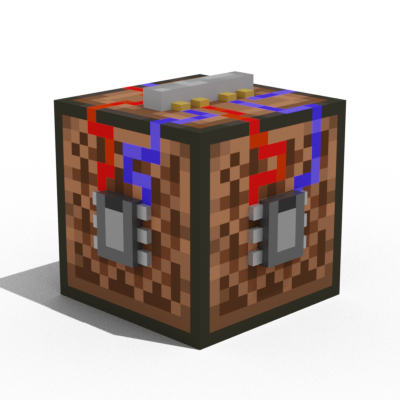
CurseForge · Minecraft mod
MusicBlock Mod
Programmable music jukeboxes and better noteblocks
Choose a version Pick your version below, then grab the matching file.
Quick answer
Which MusicBlock Mod release should I use?
Latest stable file Forge 1.16.4 [v1.0]
Game version 1.16.3, 1.16.4, 1.16.2
Loader Forge
MusicBlock Mod Forge 1.16.4 [v1.0] targets 1.16.3, 1.16.4, 1.16.2 with Forge. The project page does not say whether this file belongs on the client, dedicated server, or both. No extra mods listed for this file.
Where it goes
Is MusicBlock Mod required on the client, server, or both?
The project page does not say whether this file belongs on the client, dedicated server, or both.
Client Source doesn’t say
Dedicated server Source doesn’t say
Loader for this release Forge
Required install it here Optional supported, not mandatory Not supported do not install here Source doesn’t say do not assume
The source does not explicitly classify this release as client-only or server-only.
What else does MusicBlock Mod Forge 1.16.4 [v1.0] need?
Forge 1.16.4 [v1.0]. Change the file and its required mods may change too.
This file does not list any required mods. Do not add a library just because a different file uses it.
This file does not list any required or optional mods.
Before you install it
Add MusicBlock Mod without breaking your instance.
Built for MusicBlock Mod Forge 1.16.4 [v1.0]. Pick another file and the loader, install side or required mods may change.
- 01
Stick to this file
Use Forge 1.16.4 [v1.0]. It targets 1.16.3, 1.16.4, 1.16.2 with Forge; another release may have different loader, side or dependency requirements.
- 02
Bring the mods it needs
This file does not list any required mods. Do not add a library just because a different file uses it.
- 03
Put it on the correct side
The project page does not say whether this file belongs on the client, dedicated server, or both.
- 04
Pick the file you checked
Use the “Get this file” button beside Forge 1.16.4 [v1.0]. It opens that exact file at the source.
About this project
What does MusicBlock Mod add?
 MusicBlockMod
A Forge mod that adds programmable music blocks!
Minecraft version: 1.16.4, should work for other 1.16.
Content and Craftings
Music Processor
It is the base component of all the other musical blocks. It can be crafted by using 3 redstone and 6 iron ingots

Music Block
Used to record music.
Right-click it to start recording music in the area indicated by particles. Every sound that an Advanced Note Block makes will be recorded.
The maximum recording time is defined in the code (TODO: Make it configurable) as 12000 ticks, which is 10 minutes. After that the recording saves. You can also save it manually by right-clicking again.
To play the music again, all you need to do is to power it with redstone. Powering it when it is playing makes the music stop.
To record again, you have to double right-click the block.
When you break the block it will drop with it's music saved. You can rename it to change it's title.

Advanced Note Block
Works just like a normal Note Block, but with a few tweaks:
- displays the letter-note
- doesn't have annoying particles
- is registered by the Music Block

In crafting, you can make up to 8 Advanced Note Blocks using only one Processor

Credits
@Bajtix - code stuff
@Dragster2401 - the entirety of the resources folder: textures, models, Polish and English translation
Huge "thank you" to Forge forums members:
- diesieben07
- Beethoven92
Project description from CurseForge.
Pick your setup
MusicBlock Mod by Minecraft version and loader
Choose the version and loader you play, then open the matching release.
Minecraft version
1.16.3
1 loader buildMinecraft version
1.16.2
1 loader buildCheck the dependencies, then try the file in a copied instance before changing a world you care about.
Recent files
MusicBlock Mod versions and loaders
Forge 1.16.4 [v1.0]
musicblock-1.0.jar
30 Dec 2020
Client Source doesn’t say Server Source doesn’t say Dependencies No extras listed Listed on Release listing
Check the 1.16.4 · Forge setup 1.16.3Forge1.16.41.16.2 release
Looking for an older file? The official CurseForge project page is in Resources.
 mod
CurseForge · Minecraft
Create: Engine Engineer
Build real engines piece by piece: V8s, flat sixes, Wankels, twin-turbos. Tune them, hear them roar, and turn their power into Create rotation.
 mod
Modrinth · Minecraft
Useless Things
Mod that adds some pretty "useless" things.
 mod
Modrinth · Minecraft
Immersive Geology
An add-on for Immersive Engineering that implements many new ores and multi-block machines, the core of this mod is to implement real world ore processing in a fun way.