Minecraft version
Back to mods 
CurseForge · Minecraft mod
Damage Tint
Adds a red tint when the player takes damage
Choose a version Pick your version below, then grab the matching file.
Quick answer
Which Damage Tint release matches 26.2?
Best match for your filters Damage Tint 1.2.0 for NeoForge 26.2
Game version 26.2
Loader NeoForge
Damage Tint 1.2.0 for NeoForge 26.2 targets 26.2 with NeoForge. The project page does not say whether this file belongs on the client, dedicated server, or both. No extra mods listed for this file.
Where it goes
Is Damage Tint required on the client, server, or both?
The project page does not say whether this file belongs on the client, dedicated server, or both.
Client Source doesn’t say
Dedicated server Source doesn’t say
Loader for this release NeoForge
Required install it here Optional supported, not mandatory Not supported do not install here Source doesn’t say do not assume
The source does not explicitly classify this release as client-only or server-only.
What else does Damage Tint 1.2.0 for NeoForge 26.2 need?
Damage Tint 1.2.0 for NeoForge 26.2 on 26.2. Every mod below is checked against that same setup.
This file does not list any required mods. Do not add a library just because a different file uses it.
This file does not list any required or optional mods.
Before you install it
Add Damage Tint without breaking your instance.
Built for Damage Tint 1.2.0 for NeoForge 26.2 on 26.2. Pick another file and the loader, install side or required mods may change.
- 01
Stick to this file
Use Damage Tint 1.2.0 for NeoForge 26.2. It targets 26.2 with NeoForge; another release may have different loader, side or dependency requirements.
- 02
Bring the mods it needs
This file does not list any required mods. Do not add a library just because a different file uses it.
- 03
Put it on the correct side
The project page does not say whether this file belongs on the client, dedicated server, or both.
- 04
Pick the file you checked
Use the “Get this file” button beside Damage Tint 1.2.0 for NeoForge 26.2. It opens that exact file at the source.
About this project
What does Damage Tint add?
Damage Tint
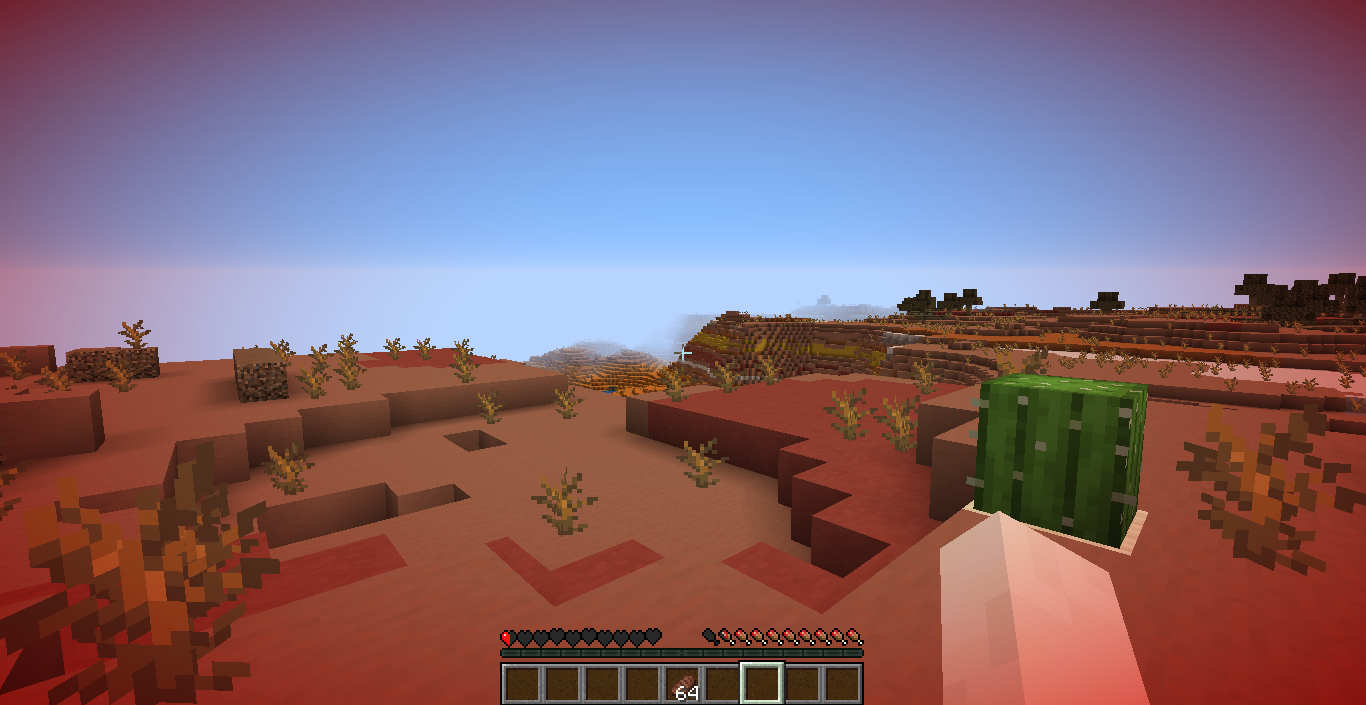





A client-side mod that adds a red vignette around the screen when your health gets low. The lower your health, the stronger the tint becomes.
Commands
/tint: Shows the current configuration./tint <health>:: Sets the health threshold in HP./tint dynamicShows whether Dynamic Mode is enabled./tint dynamic <true|false>: Enables or disables Dynamic Mode./tint reset: Resets all settings to their defaults.
Threshold
The threshold determines when the tint starts appearing.
Examples:
/tint 10: Tint starts at 10 HP (5 hearts)./tint 6: Tint starts at 6 HP (3 hearts).
Dynamic Mode
When enabled, the configured threshold is ignored and your current maximum health is used instead.
Examples:
- 20 max HP (10 hearts): Tint scales from 20 HP down to 0 HP.
- 40 max HP (20 hearts): Tint scales from 40 HP down to 0 HP.
This is useful with mods that increase or decrease your maximum health, as the effect automatically scales with your health pool.
Configuration
Settings are stored in .minecraft/config/damagetint.json. The configuration is global and applies to every world and server.
Project description from CurseForge.
Pick your setup
Damage Tint by Minecraft version and loader
Choose the version and loader you play, then open the matching release.
Minecraft version
1.17.1
2 loader buildsMinecraft version
1.17
1 loader buildMinecraft version
1.16.5
2 loader buildsMinecraft version
1.16.4
2 loader buildsMinecraft version
1.16.3
2 loader buildsMinecraft version
1.16.2
2 loader buildsMinecraft version
1.16.1
2 loader buildsMinecraft version
1.16
1 loader buildCheck the dependencies, then try the file in a copied instance before changing a world you care about.
Recent files
Damage Tint versions and loaders
Damage Tint 1.2.0 for NeoForge 26.2
damagetint-neoforge-1.2.0+mc26.2.jar
23 Jun 2026
Client Source doesn’t say Server Source doesn’t say Dependencies No extras listed Listed on Release listing
Check the 26.2 · NeoForge setup NeoForge26.2 release
Damage Tint 1.2.0 for Fabric 26.2
damagetint-fabric-1.2.0+mc26.2.jar
22 Jun 2026
Client Source doesn’t say Server Source doesn’t say Dependencies 2 required · 2 unchecked Listed on Release listing
Check the 26.2 · Fabric setup Fabric26.2 release
Looking for an older file? The official CurseForge project page is in Resources.
 mod
CurseForge + Modrinth · Minecraft
QDC CORE 4.5
5th Version of the QDC Quantum Dis-Assembly Craft mod. Focusing on QOL Usability and other Mods Compatibility.
 mod
CurseForge + Modrinth · Minecraft
Polydium
Well-rounded client-side optimization mod. Extremely compatible Vulkan backend for 1.21.11-26.1.2. By Polyfrost, best with OneClient.
 mod
CurseForge · Minecraft
CollectionMaster
Turn gathered resources into rewards through configurable item collections and milestones.