Minecraft version
Back to mods 
CurseForge · Minecraft mod
Automining
Keep mining while leaving the game.
Choose a version Pick your version below, then grab the matching file.
Quick answer
Which Automining release matches 1.20.3?
Best match for your filters automining-1.20.3-1.16.5.jar
Game version 1.20.3
Loader Forge
automining-1.20.3-1.16.5.jar targets 1.20.3 with Forge. The project page does not say whether this file belongs on the client, dedicated server, or both. No extra mods listed for this file.
Where it goes
Is Automining required on the client, server, or both?
The project page does not say whether this file belongs on the client, dedicated server, or both.
Client Source doesn’t say
Dedicated server Source doesn’t say
Loader for this release Forge
Required install it here Optional supported, not mandatory Not supported do not install here Source doesn’t say do not assume
The source does not explicitly classify this release as client-only or server-only.
What else does automining-1.20.3-1.16.5.jar need?
automining-1.20.3-1.16.5.jar on 1.20.3. Every mod below is checked against that same setup.
This file does not list any required mods. Do not add a library just because a different file uses it.
This file does not list any required or optional mods.
Before you install it
Add Automining without breaking your instance.
Built for automining-1.20.3-1.16.5.jar on 1.20.3. Pick another file and the loader, install side or required mods may change.
- 01
Stick to this file
Use automining-1.20.3-1.16.5.jar. It targets 1.20.3 with Forge; another release may have different loader, side or dependency requirements.
- 02
Bring the mods it needs
This file does not list any required mods. Do not add a library just because a different file uses it.
- 03
Put it on the correct side
The project page does not say whether this file belongs on the client, dedicated server, or both.
- 04
Pick the file you checked
Use the “Get this file” button beside automining-1.20.3-1.16.5.jar. It opens that exact file at the source.
About this project
What does Automining add?
If you need a server, check out our partner Kinetic Hosting:
For Questions, Issues and more, visit my discord (I will answer there much faster).
A port to fabric with Architectury is currently in test phase. If you have any problems, pls contact me via discord, so I can fix it.
Added compatibility with Break Protection to prevent selected blocks to be broken. Only works with the newest forge version and may not come to the Architectury versions
Simple client side Mod that allows you to leave the game while mining in Background. Keeps swapping tools of the same type in hotbar. Very useful for cobblestone generators or other blockstreams for example from a tree-farm
This mod may be considered as cheating or boting on some servers, so don't use it, if it is not allowed and don't blame me for use it against server rules!
Everything can be controlled via ingame menu. Check key bounds for it, default is n to activate Mining and o for the Ingame Config (was m and p in older versions). Sneaking while activating the mod allows automatic attacking.
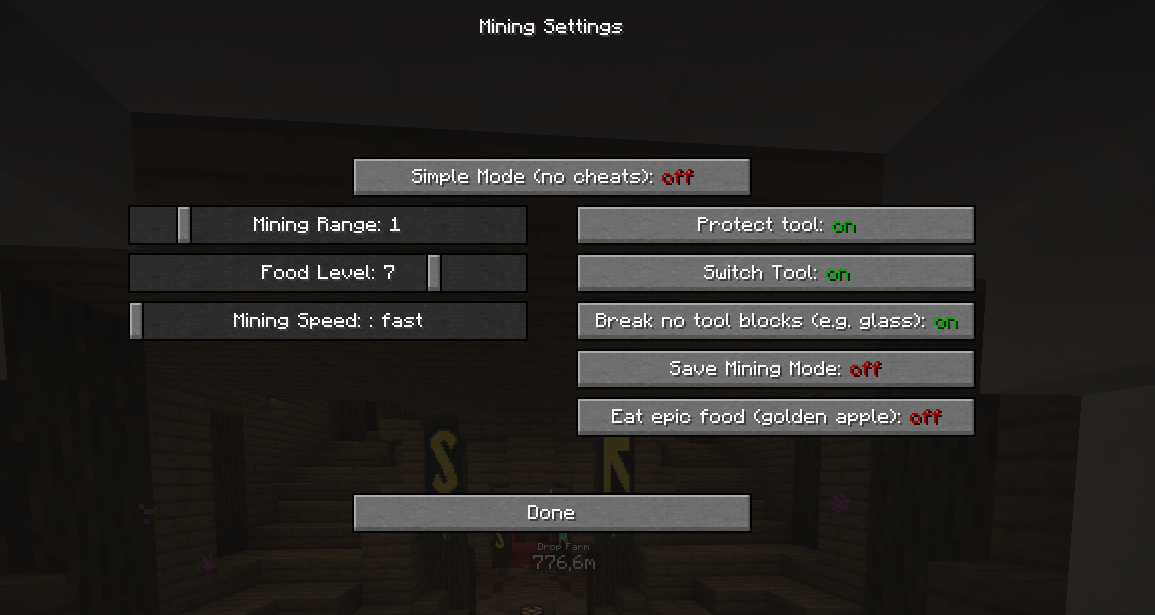
Meaning of all the settings:
Simple Mode: The mod just presses the mouse button, if there is a block or entity in attacking mode in front of you.
Scaling Settings:
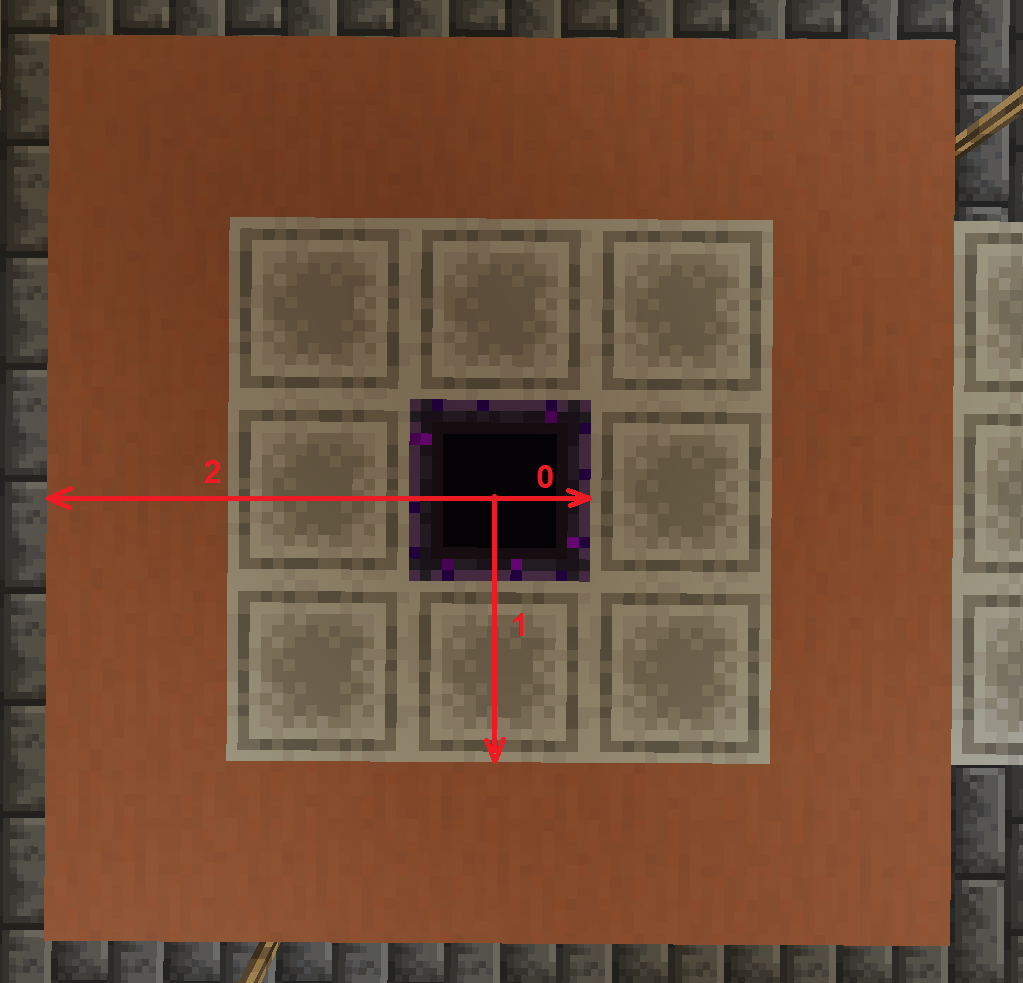
Mining Range: Increases the range of mining. Always centered on the block you are aiming at. (See picture)
Food Level: The amount of hunger bars that should be hold.
Mining speed: The speed of which blocks should be broken. Fast can cause some issues between client and server, so blocks may reappear.
Boolean Settings:
Protect tool: Protects your tool from breaking and stops using it at low durability. Higher mining range increases that minimum durability.
Switch Tool: Makes you switch the tool for the appropriate one. Turning that of, allows to only mine the appropriate material (pickaxe -> stone, shovel -> dirt etc.)
Break no tool blocks: Toggle weather blocks that don't have a tool should be broken or not. A simple example is glas or glowstone.
Save Mining Mode: Lock the position on the block you activated first time. You can look independently and as long as you are close enough, the blocks in the target area will be broken.
Eat epic food: Toggles weather gold apples and enchanted golden apples should be eaten or not.
If you have any Questions, feel free to ask in comments.
Feel free to check out my other mods:
- give me more mod (refills your current inventory slot if empty, helpful for building, also works only client side)
- moretooltips (shows the nbt-data of an item in the inventory)
- Client Builders Wand (Allows Building like you have a builders wand.)
German-translations is added too.
Eine kleine Mod, die es dir erlaubt, Minecraft in den Hintergrund zu stellen, z.B. über den Pause oder Inventar Screen und im Hintergrund weiter abzubauen. Die Modifikation wechselt automatisch zu Werkzeugen den selben Typs und besitz einen umschaltbaren Werkzeugschutz.
Zudem ist eine automatischer Hungerschutz eingebaut, der essen aus der Hotbar oder Offhand nutz, um ein gewisses Hungerlevel zu halten. Das Hungerlevel ist umschaltbar oder auch ganz abschaltbar.
Diese Modifikation kann bei einigen Servern als Cheaten oder Boten angesehen werden, also benutze sie nicht, wenn sie nicht erlaubt ist und beschuldige mich nicht, wenn du die Modifikation gegen die Serverregeln verwendest.
Fragen können gerne in den Kommentaren gestellt werden.
Project description from CurseForge.
Pick your setup
Automining by Minecraft version and loader
Choose the version and loader you play, then open the matching release.
Minecraft version
1.21.10
2 loader buildsMinecraft version
1.21.9
2 loader buildsMinecraft version
1.21.8
2 loader buildsMinecraft version
1.21.7
2 loader buildsMinecraft version
1.21.6
2 loader buildsMinecraft version
1.21.5
2 loader buildsMinecraft version
1.21.4
2 loader buildsMinecraft version
1.21.3
2 loader buildsMinecraft version
1.21.2
2 loader buildsMinecraft version
1.21.1
2 loader buildsMinecraft version
1.21
2 loader buildsShowing the newest 12 of 17 game versions. Older files are in the list below.
Check the dependencies, then try the file in a copied instance before changing a world you care about.
Recent files
Automining versions and loaders
automining-1.20.3-1.16.5.jar
23 Mar 2024
Client Source doesn’t say Server Source doesn’t say Dependencies No extras listed Listed on Release listing
Check the 1.20.3 · Forge setup 1.20.3Forge release
Looking for an older file? The official CurseForge project page is in Resources.
 mod
CurseForge + Modrinth · Minecraft
Underground Villages, Stoneholm (Fabric/Forge/NeoForge)
((✓ Forge, ✓ Neoforge and ✓ fabric ) Stoneholm is a Forge & Fabric mod adds underground villages to the world. Inspired by Strongholds and Villages.
 mod
CurseForge + Modrinth · Minecraft
EasyAuth
Authentication mod for Fabric servers
 mod
CurseForge · Minecraft
TONI's Magic: Wizardry
Become a wizard: 13 spells from tomes (Arcane Ray, meteor, blizzard...), an Inscription Table and spell hotkeys, good and dark wizards, the Ancient Mage, Dark Towers and the Arcane Bunker dungeon.