Minecraft version
Back to mods 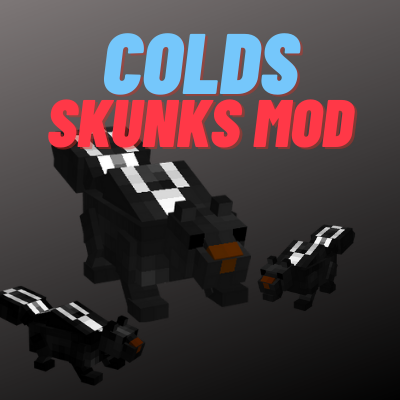
CurseForge · Minecraft mod
Colds: Skunks (FORGE)
Adds Skunks into Minecraft Complete with "STINK" Effect!!!
Choose a version Pick your version below, then grab the matching file.
Quick answer
Which Colds: Skunks (FORGE) release matches 1.16.4 Forge?
Best match for your filters ColdsSkunks(FORGE)1.16.4-1.0.4
Game version 1.16.5, 1.16.4
Loader Forge
Colds: Skunks (FORGE) ColdsSkunks(FORGE)1.16.4-1.0.4 targets 1.16.5, 1.16.4 with Forge. The project page does not say whether this file belongs on the client, dedicated server, or both. No extra mods listed for this file.
Where it goes
Is Colds: Skunks (FORGE) required on the client, server, or both?
The project page does not say whether this file belongs on the client, dedicated server, or both.
Client Source doesn’t say
Dedicated server Source doesn’t say
Loader for this release Forge
Required install it here Optional supported, not mandatory Not supported do not install here Source doesn’t say do not assume
The source does not explicitly classify this release as client-only or server-only.
What else does Colds: Skunks (FORGE) ColdsSkunks(FORGE)1.16.4-1.0.4 need?
ColdsSkunks(FORGE)1.16.4-1.0.4 on 1.16.4 Forge. Every mod below is checked against that same setup.
This file does not list any required mods. Do not add a library just because a different file uses it.
This file does not list any required or optional mods.
Before you install it
Add Colds: Skunks (FORGE) without breaking your instance.
Built for Colds: Skunks (FORGE) ColdsSkunks(FORGE)1.16.4-1.0.4 on 1.16.4 Forge. Pick another file and the loader, install side or required mods may change.
- 01
Stick to this file
Use ColdsSkunks(FORGE)1.16.4-1.0.4. It targets 1.16.5, 1.16.4 with Forge; another release may have different loader, side or dependency requirements.
- 02
Bring the mods it needs
This file does not list any required mods. Do not add a library just because a different file uses it.
- 03
Put it on the correct side
The project page does not say whether this file belongs on the client, dedicated server, or both.
- 04
Pick the file you checked
Use the “Get this file” button beside ColdsSkunks(FORGE)1.16.4-1.0.4. It opens that exact file at the source.
About this project
What does Colds: Skunks (FORGE) add?

Colds: Skunks Mod adds SKUNK!!!!
Skunks can Drop Leather and Stink Glands with a chance to also drop "Stink Potions". Bonus: Killing a skunk with an arrow has a chance to drop a Stink Arrow!
Getting close to a skunk risks you getting "Sprayed" with the Stinky Effect. (NOTE: They will not spray you in CREATIVE MODE)
Skunks will also "Panic" whenever a Wolf is nearby!
Entities with "Stinky" will repel MOST attackers. Skeletons however are immune to the Stink effect (No Noses), but they can lose this immunity in the Config File if you wish.
You'll be able to craft "Stink Arrows" by surrounding a "Lingering Potion of Stink" with 8 arrows in the crafting table.
Stink Potions can be brewed using the Stink Glands.

Currently, Skunks can spawn with 4 randomly generated Textures.
BONUS: By surrounding a MILK BUCKET with GLASS BOTTLES in the Crafting Table, you can now make 8 MILK BOTTLES!!! These have the same Curative Properties of a Milk Bucket, but they're stackable to 16!
New to 1.0.4
The Albino Skunk!

Help Support Me and My Mods by Becoming a Patron
and geta sneak peek at my up and coming mods!


Thanks you Juri TV for this great Showcase Video! Check out his other videos by CLICKING HERE!!!
Project description from CurseForge.
Pick your setup
Colds: Skunks (FORGE) by Minecraft version and loader
Choose the version and loader you play, then open the matching release.
Minecraft version
1.16.4
1 loader buildCheck the dependencies, then try the file in a copied instance before changing a world you care about.
Recent files
Colds: Skunks (FORGE) versions and loaders
ColdsSkunks(FORGE)1.16.4-1.0.4
ColdsSkunks(FORGE)1.16.4-1.0.4.jar
28 Feb 2021
Client Source doesn’t say Server Source doesn’t say Dependencies No extras listed Listed on Release listing
Check the 1.16.4 · Forge setup 1.16.5Forge1.16.4 release
ColdsSkunks(FORGE)1.16.4-1.0.3
ColdsSkunks(FORGE)1.16.4-1.0.3.jar
1 Feb 2021
Client Source doesn’t say Server Source doesn’t say Dependencies No extras listed Listed on Release listing
Check the 1.16.4 · Forge setup 1.16.5Forge1.16.4 release
ColdsSkunks(FORGE)1.16.4-1.0.2
ColdsSkunks(FORGE)1.16.4-1.0.2.jar
31 Jan 2021
Client Source doesn’t say Server Source doesn’t say Dependencies No extras listed Listed on Release listing
Check the 1.16.4 · Forge setup Forge1.16.4 release
ColdsSkunks(FORGE)1.16.4-1.0.1
ColdsSkunks(FORGE)1.16.4-1.0.1.jar
31 Jan 2021
Client Source doesn’t say Server Source doesn’t say Dependencies No extras listed Listed on Release listing
Check the 1.16.4 · Forge setup 1.16.5Forge1.16.4 release
ColdsSkunks(FORGE)1.16.4-1.0.0
ColdsSkunks(FORGE)1.16.4-1.0.0.jar
31 Jan 2021
Client Source doesn’t say Server Source doesn’t say Dependencies No extras listed Listed on Release listing
Check the 1.16.4 · Forge setup 1.16.5Forge1.16.4 release
Looking for an older file? The official CurseForge project page is in Resources.
 mod
CurseForge · Minecraft
Random Loot Mod
It's looting like you've never seen it before!
 mod
CurseForge · Minecraft
TONI's Magic: Wizardry
Become a wizard: 13 spells from tomes (Arcane Ray, meteor, blizzard...), an Inscription Table and spell hotkeys, good and dark wizards, the Ancient Mage, Dark Towers and the Arcane Bunker dungeon.
 mod
CurseForge · Minecraft
Koalas and eucalyptus
Not a big mod that will add a little variety to your Minecraft world, it adds koala, eucalyptus and some other things