Minecraft version
Back to mods 
CurseForge · Minecraft mod
BTETerraRenderer
Map renderer for BuildTheEarth project.
Choose a version Pick your version below, then grab the matching file.
Quick answer
Which BTETerraRenderer release matches 1.18.2 Forge?
Best match for your filters v1.03.4 (Forge 1.18.2)
Game version 1.18.2
Loader Forge
BTETerraRenderer v1.03.4 (Forge 1.18.2) targets 1.18.2 with Forge. The project page does not say whether this file belongs on the client, dedicated server, or both. No extra mods listed for this file.
Where it goes
Is BTETerraRenderer required on the client, server, or both?
The project page does not say whether this file belongs on the client, dedicated server, or both.
Client Source doesn’t say
Dedicated server Source doesn’t say
Loader for this release Forge
Required install it here Optional supported, not mandatory Not supported do not install here Source doesn’t say do not assume
The source does not explicitly classify this release as client-only or server-only.
What else does BTETerraRenderer v1.03.4 (Forge 1.18.2) need?
v1.03.4 (Forge 1.18.2) on 1.18.2 Forge. Every mod below is checked against that same setup.
This file does not list any required mods. Do not add a library just because a different file uses it.
This file does not list any required or optional mods.
Before you install it
Add BTETerraRenderer without breaking your instance.
Built for BTETerraRenderer v1.03.4 (Forge 1.18.2) on 1.18.2 Forge. Pick another file and the loader, install side or required mods may change.
- 01
Stick to this file
Use v1.03.4 (Forge 1.18.2). It targets 1.18.2 with Forge; another release may have different loader, side or dependency requirements.
- 02
Bring the mods it needs
This file does not list any required mods. Do not add a library just because a different file uses it.
- 03
Put it on the correct side
The project page does not say whether this file belongs on the client, dedicated server, or both.
- 04
Pick the file you checked
Use the “Get this file” button beside v1.03.4 (Forge 1.18.2). It opens that exact file at the source.
About this project
What does BTETerraRenderer add?
BTETerraRenderer



A map hologram rendering tool for the BuildTheEarth project.
Use this mod to easily map accurate road details and building tops.
Logo by vicrobex
Supported maps
- Global
- (And many others)
You can add other map services by adding/editing configuration files.
Visit the wiki page for more information.
How to use
- Download the latest version of the mod
- Put the mod in the
modsfolder- Open Minecraft Launcher and go to the
Installationstab - Find the installation profile, hover your mouse on it, and click the folder icon
- The
modsfolder is there
- Open Minecraft Launcher and go to the
- Run Minecraft
Controls
| Key | Description |
|---|---|
`(Backtick) |
Opens render settings UI |
R |
Toggles map rendering |
Y |
Moves map up along the Y-axis by 0.5 blocks |
I |
Moves map down along the Y-axis by 0.5 blocks |
Screenshots

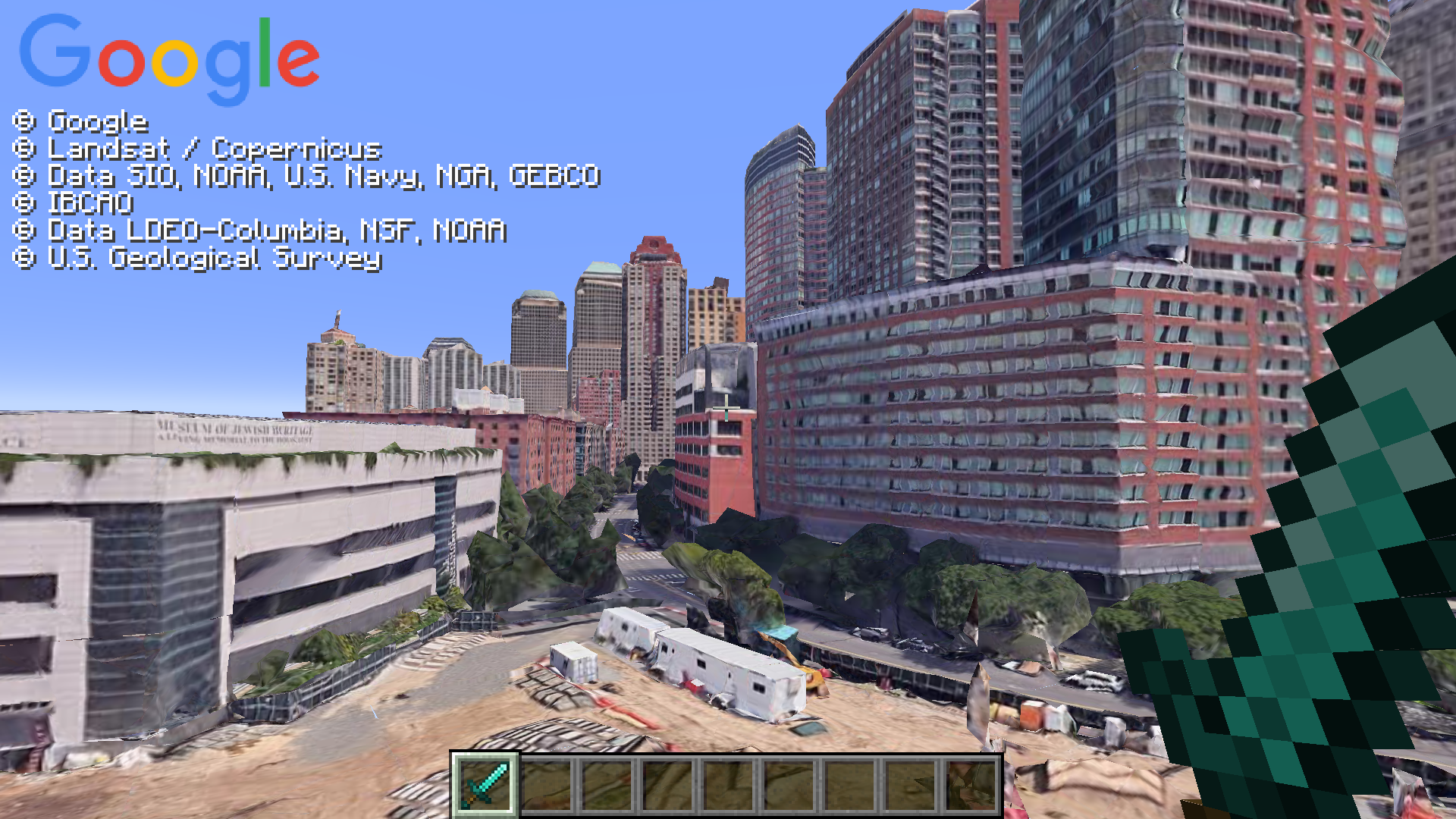
Visit this wiki page for more information on how to add Google Earth as a map source.
Project description from CurseForge.
Pick your setup
BTETerraRenderer by Minecraft version and loader
Choose the version and loader you play, then open the matching release.
Minecraft version
1.21.1
1 loader buildMinecraft version
1.21
1 loader buildMinecraft version
1.20.6
1 loader buildMinecraft version
1.20.4
1 loader buildMinecraft version
1.20.2
1 loader buildMinecraft version
1.20.1
1 loader buildMinecraft version
1.19.4
1 loader buildMinecraft version
1.18.2
2 loader buildsMinecraft version
1.12.2
2 loader buildsCheck the dependencies, then try the file in a copied instance before changing a world you care about.
Recent files
BTETerraRenderer versions and loaders
v1.03.4 (Forge 1.18.2)
bteterrarenderer-1.03.4-forge1.18.2.jar
5 Feb 2025
Client Source doesn’t say Server Source doesn’t say Dependencies No extras listed Listed on Release listing
Check the 1.18.2 · Forge setup 1.18.2Forge release
v1.03.3 (Forge 1.18.2)
bteterrarenderer-1.03.3-forge1.18.2.jar
26 Jan 2025
Client Source doesn’t say Server Source doesn’t say Dependencies No extras listed Listed on Release listing
Check the 1.18.2 · Forge setup 1.18.2Forge release
v1.03.2 (Forge 1.18.2)
bteterrarenderer-1.03.2-forge1.18.2.jar
8 Jan 2024
Client Source doesn’t say Server Source doesn’t say Dependencies No extras listed Listed on Release listing
Check the 1.18.2 · Forge setup 1.18.2Forge release
v1.03.1 (Forge 1.18.2)
bteterrarenderer-1.03.1-forge1.18.2.jar
17 Dec 2023
Client Source doesn’t say Server Source doesn’t say Dependencies No extras listed Listed on Release listing
Check the 1.18.2 · Forge setup 1.18.2Forge release
v1.03 (Forge 1.18.2)
bteterrarenderer-1.03-forge1.18.2.jar
23 Nov 2023
Client Source doesn’t say Server Source doesn’t say Dependencies No extras listed Listed on Release listing
Check the 1.18.2 · Forge setup 1.18.2Forge release
v1.03b (Forge 1.18.2)
bteterrarenderer-1.03-beta-1.18.2.jar
21 Sept 2023
Client Source doesn’t say Server Source doesn’t say Dependencies No extras listed Listed on Release listing
Check the 1.18.2 · Forge setup 1.18.2Forge beta
Looking for an older file? The official CurseForge project page is in Resources.
 mod
Modrinth · Minecraft
Hearthwood
Build with timber beams, palisades, braces, patterned frames and log piles in the wood types available in your game. Light them with braziers, chandeliers, sconces and candelabras.
 mod
Modrinth · Minecraft
ConfigGuard
Automatic snapshots of your config folder with a line-by-line diff and one-click restore. Undo any config change, on the client or on a server.
 mod
CurseForge · Minecraft
Ecliptic Seasons
A living seasonal world with changing landscapes, weather, crops, and 24 solar terms—even beyond the horizon.