Minecraft version
Back to mods 
CurseForge · Minecraft mod
Mining Dimensions [FABRIC]
Provides a several extra dimensions for gathering resources & exploring
Choose a version Pick your version below, then grab the matching file.
Quick answer
Which Mining Dimensions [FABRIC] release matches Fabric?
Best match for your filters MiningDimensions_Fabric-1.21.1-1.8.3.jar
Game version 1.21.1
Loader Fabric
Mining Dimensions [FABRIC] MiningDimensions_Fabric-1.21.1-1.8.3.jar targets 1.21.1 with Fabric. The project page does not say whether this file belongs on the client, dedicated server, or both. No extra mods listed for this file.
Where it goes
Is Mining Dimensions [FABRIC] required on the client, server, or both?
The project page does not say whether this file belongs on the client, dedicated server, or both.
Client Source doesn’t say
Dedicated server Source doesn’t say
Loader for this release Fabric
Required install it here Optional supported, not mandatory Not supported do not install here Source doesn’t say do not assume
The source does not explicitly classify this release as client-only or server-only.
What else does Mining Dimensions [FABRIC] MiningDimensions_Fabric-1.21.1-1.8.3.jar need?
MiningDimensions_Fabric-1.21.1-1.8.3.jar on Fabric. Every mod below is checked against that same setup.
This file does not list any required mods. Do not add a library just because a different file uses it.
This file does not list any required or optional mods.
Before you install it
Add Mining Dimensions [FABRIC] without breaking your instance.
Built for Mining Dimensions [FABRIC] MiningDimensions_Fabric-1.21.1-1.8.3.jar on Fabric. Pick another file and the loader, install side or required mods may change.
- 01
Stick to this file
Use MiningDimensions_Fabric-1.21.1-1.8.3.jar. It targets 1.21.1 with Fabric; another release may have different loader, side or dependency requirements.
- 02
Bring the mods it needs
This file does not list any required mods. Do not add a library just because a different file uses it.
- 03
Put it on the correct side
The project page does not say whether this file belongs on the client, dedicated server, or both.
- 04
Pick the file you checked
Use the “Get this file” button beside MiningDimensions_Fabric-1.21.1-1.8.3.jar. It opens that exact file at the source.
About this project
What does Mining Dimensions [FABRIC] add?
Provides (6) extra dimensions for resource gathering

NOTE: As of v1.3.0, the portals are made with the corresponding portal blocks and lit with the new Portal Lighter

Provides five (6) extra dimensions for resource gathering and exploration
Sleeping in a bed in the dimensions will lead to explosions!
Mining Dim: A dimensions with two biomes (desert and plains) and is always noon; same ores and structures as Overworld. Climbing Dim: A dimension with two biomes (badlands and wind-swept hills) and is always noon; same ores and structures as Overworld Hunting Dim: A dimension with just plains, always dark, and full of juiced up, armored mobs; only vanilla ores; seriously, the mobs are tough and you will likely die! Caving Dim: A safe haven dimension of Mushroom biome caves; same ores as Overworld; only spawns bats and the occasional spider spawner in mineshafts. Nethering Dim: A vanilla-only Nether dimension, helpful for finding vanilla resources that are difficult to find when the regular Nether is filled with modded biomes. NOTE: Some features from the Better Nether mod "leak" into this dimensions, mostly structures. Sky Dim (1.21+): A daytime void dim.
Getting to/from Mining Dims:
1.) Traditional standing portals (pre 1.21)
- built with each color of portal blocks
- Lit with the Portal Lighter (diamond-n-steel)
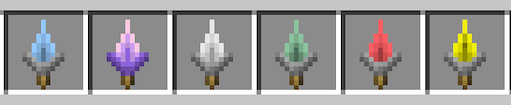
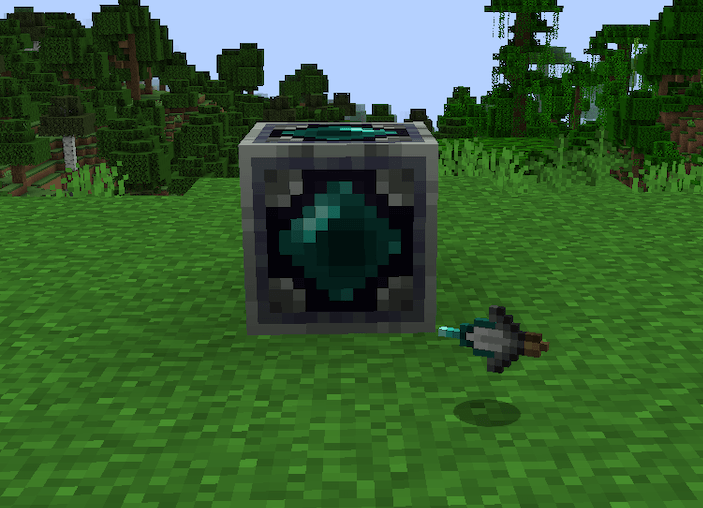
2.) Portable Teleporters
- There a six (6) Portable Teleporters, one for each dimension, that teleports the player back-and-forth between Overworld and these dims. The Sky Dim teleport places an oak plank under the player's feet to avoid falling to death.
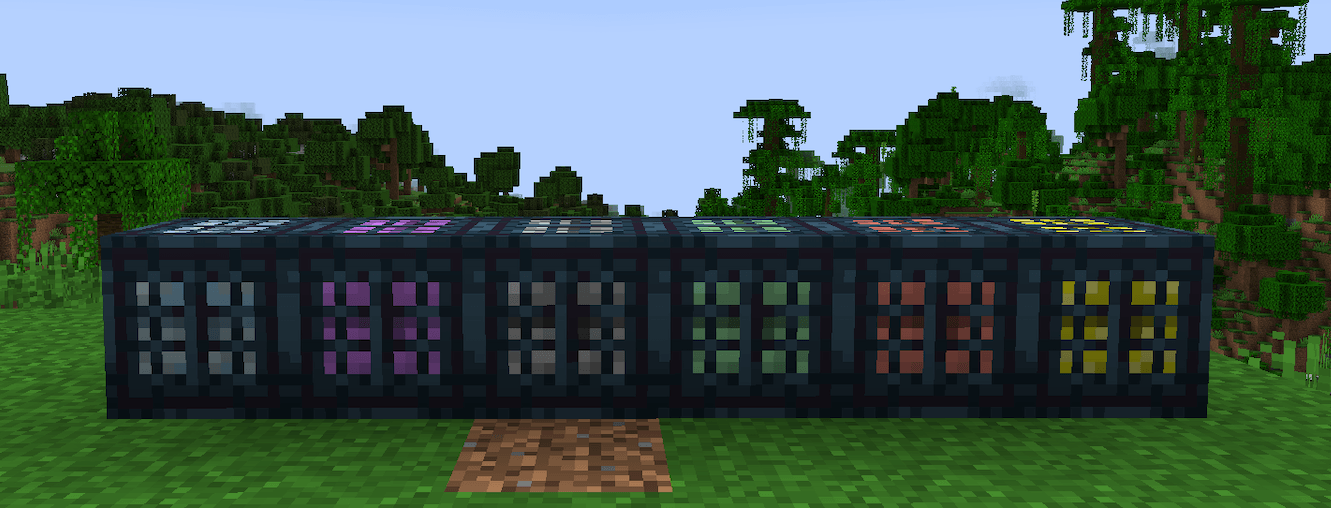
3.) Portal Block Method (1.21+)
- The player can right-click on a single placed Portal Block to teleport to the corresponding dimensions
- If a Portal Block exists in the dest dimension in a 3x3 chunk area (48x48 blocks) as the source block clicked, the player will be teleported on top of it in the dest dimension
- If a Portal Block is NOT found in the dest chunk, a new block will be placed under the player's feet
- It may be helpful to turn on chunk border display (F3+G) before placing a portal block to insure you are somewhat centered within the chunk
- For greater flexibility, there is a config option to expand the search range to 5x5 chunks (80x80 block) area.
4.) Teleport Pad Method (1.21+)
- Teleport Pads provide a precise, one-way teleport method from any location/dimension to any other location/dimension.
- A Spatial Capture Tool is used to capture the dimension and block position of the teleport dest.
- Right-clicking a Teleport Pad with a Spatial Capture Tool will transfer the location info to the pad
- Once set, the player can simply right-click the Teleport Pad to travel
 **NOTE:** If you are using the Gobber (1.16.5) mod for Fabric, you don't this one, since the dimensions are included in that mod.
Other Tidbits: - Recipe to smelt netherite gear into netherite scrap, useful with the Hunting Dim
- Returning enchantment - enchant a Portable Teleporter with Returning then sneak + right-click to return to last bed slept in. You must sleep in a bed first.

Project description from CurseForge.
Pick your setup
Mining Dimensions [FABRIC] by Minecraft version and loader
Choose the version and loader you play, then open the matching release.
Minecraft version
1.21
1 loader buildMinecraft version
1.20.6
1 loader buildMinecraft version
1.20.5-Snapshot
1 loader buildMinecraft version
1.20.5
1 loader buildMinecraft version
1.20.4
1 loader buildMinecraft version
1.20.1
1 loader buildMinecraft version
1.19.3
1 loader buildMinecraft version
1.19.2
1 loader buildMinecraft version
1.19.1
1 loader buildMinecraft version
1.19
1 loader buildMinecraft version
1.18.2
1 loader buildShowing the newest 12 of 17 game versions. Older files are in the list below.
Check the dependencies, then try the file in a copied instance before changing a world you care about.
Recent files
Mining Dimensions [FABRIC] versions and loaders
MiningDimensions_Fabric-1.21.1-1.8.3.jar
13 Aug 2024
Client Source doesn’t say Server Source doesn’t say Dependencies No extras listed Listed on Release listing
Check the 1.21.1 · Fabric setup Fabric1.21.1 release
MiningDimensions_Fabric-1.21.1-1.8.2.jar
10 Aug 2024
Client Source doesn’t say Server Source doesn’t say Dependencies No extras listed Listed on Release listing
Check the 1.21.1 · Fabric setup Fabric1.21.1 release
MiningDimensions_Fabric-1.21-1.8.1.jar
2 Aug 2024
Client Source doesn’t say Server Source doesn’t say Dependencies No extras listed Listed on Release listing
Check the 1.21 · Fabric setup 1.21Fabric release
MiningDimensions_Fabric-1.21-1.8.0.jar
30 Jul 2024
Client Source doesn’t say Server Source doesn’t say Dependencies No extras listed Listed on Release listing
Check the 1.21 · Fabric setup 1.21Fabric release
MiningDimensions_Fabric-1.21-1.7.13.jar
25 Jul 2024
Client Source doesn’t say Server Source doesn’t say Dependencies No extras listed Listed on Release listing
Check the 1.21 · Fabric setup 1.21Fabric release
MiningDimensions_Fabric-1.21-1.7.12.jar
22 Jul 2024
Client Source doesn’t say Server Source doesn’t say Dependencies No extras listed Listed on Release listing
Check the 1.21 · Fabric setup 1.21Fabric release
MiningDimensions_Fabric-1.21-1.7.11.jar
20 Jul 2024
Client Source doesn’t say Server Source doesn’t say Dependencies No extras listed Listed on Release listing
Check the 1.21 · Fabric setup 1.21Fabric release
MiningDimensions_Fabric-1.21-1.7.10.jar
19 Jul 2024
Client Source doesn’t say Server Source doesn’t say Dependencies No extras listed Listed on Release listing
Check the 1.21 · Fabric setup 1.21Fabric release
MiningDimensions_Fabric-1.21-1.7.9.jar
12 Jul 2024
Client Source doesn’t say Server Source doesn’t say Dependencies No extras listed Listed on Release listing
Check the 1.21 · Fabric setup 1.21Fabric release
MiningDimensions_Fabric-1.21-1.7.7.jar
13 Jun 2024
Client Source doesn’t say Server Source doesn’t say Dependencies No extras listed Listed on Release listing
Check the 1.21 · Fabric setup 1.21Fabric release
MiningDimensions_Fabric-1.20.6-1.6.31.jar
9 May 2024
Client Source doesn’t say Server Source doesn’t say Dependencies No extras listed Listed on Release listing
Check the 1.20.6 · Fabric setup Fabric1.20.6 release
MiningDimensions_Fabric-1.20.5-1.6.28.jar
9 May 2024
Client Source doesn’t say Server Source doesn’t say Dependencies No extras listed Listed on Release listing
Check the 1.20.5 · Fabric setup 1.20.5Fabric release
Looking for an older file? The official CurseForge project page is in Resources.
 mod
CurseForge · Minecraft
VeinMiner Mod
Mine the whole vein on mining a single ore/block. Make the tedious mining experience to something satisfying and fun!
 mod
CurseForge · Minecraft
VeinMiner Hotkey
Veinminer Addon - Use a hotkey to veinmine with a dynamic crosshair & block highlighting & shape selector
 mod
CurseForge · Minecraft
VeinMiner Enchantment
Veinminer Addon - Adds veinminer enchantment to enchanting tables & trades. Only tools with the enchantment can veinmine