Minecraft version
Back to mods 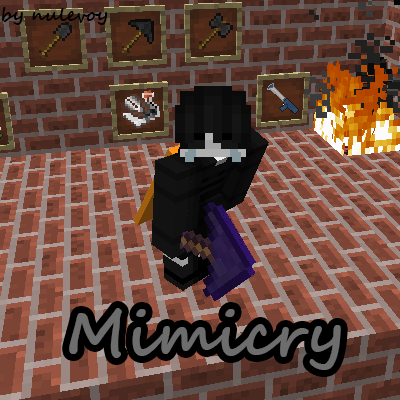
CurseForge · Minecraft mod
Mimicry mod
1.7.10 mod for minecraft for resourse
Choose a version Pick your version below, then grab the matching file.
Quick answer
Which Mimicry mod release should I use?
Latest stable file Mimicry 10.0 release.jar
Game version 1.7.10
Loader Forge
Mimicry mod Mimicry 10.0 release.jar targets 1.7.10 with Forge. The project page does not say whether this file belongs on the client, dedicated server, or both. No extra mods listed for this file.
Where it goes
Is Mimicry mod required on the client, server, or both?
The project page does not say whether this file belongs on the client, dedicated server, or both.
Client Source doesn’t say
Dedicated server Source doesn’t say
Loader for this release Forge
Required install it here Optional supported, not mandatory Not supported do not install here Source doesn’t say do not assume
The source does not explicitly classify this release as client-only or server-only.
What else does Mimicry mod Mimicry 10.0 release.jar need?
Mimicry 10.0 release.jar. Change the file and its required mods may change too.
This file does not list any required mods. Do not add a library just because a different file uses it.
This file does not list any required or optional mods.
Before you install it
Add Mimicry mod without breaking your instance.
Built for Mimicry mod Mimicry 10.0 release.jar. Pick another file and the loader, install side or required mods may change.
- 01
Stick to this file
Use Mimicry 10.0 release.jar. It targets 1.7.10 with Forge; another release may have different loader, side or dependency requirements.
- 02
Bring the mods it needs
This file does not list any required mods. Do not add a library just because a different file uses it.
- 03
Put it on the correct side
The project page does not say whether this file belongs on the client, dedicated server, or both.
- 04
Pick the file you checked
Use the “Get this file” button beside Mimicry 10.0 release.jar. It opens that exact file at the source.
About this project
What does Mimicry mod add?
Mimicry
Please,comment this mode and use WIKI || Пожалуйста,комментируйте и используйте ВИКИ
"You stopped living in the old world ...
Now he has changed, but what has changed in him no one can understand ...
Now there are creatures in the world posing as others ... "
Unknown dust fell on this world and began to turn into other substances (rebuilds its structure) ... some call it divine dust, and some just - a shadow ...
But this is not the main problem, creatures appeared in the world who learned to use this dust for their own purposes - they disguise themselves as other creatures ...
There are now 3 new mobs in the world - mimicrid. New tools and weapons. New types of armor and a new type of resource extraction.
Mod translated into Russian
minecraft version 1.7.10
new sounds\
"Ты перестал жить в старом мире...
Теперь он изменился,но что в нем поменялось никто не может понять...
Теперь в мире есть существа выдающие себя за других..."
Неизвестная пыль опустилась на этот мир и стала превращаться в другие вещества(перестраивает свою структуру)... некоторые зовут её божественной пылью,а некоторые просто - тенью...
Но это не главная проблема,в мире появились существа,которые научились использовать эту пыль в своих целях - они маскируются под других существ...
В мире теперь есть 3 новых моба - мимикриды.Новые инструменты и оружие.Новые виды брони и новый вид добычи ресурсов.
Мод переведен на русский
версия майнкрафт 1.7.10
новые звуки


Project description from CurseForge.
Pick your setup
Mimicry mod by Minecraft version and loader
Choose the version and loader you play, then open the matching release.
Check the dependencies, then try the file in a copied instance before changing a world you care about.
Recent files
Mimicry mod versions and loaders
Mimicry 11.0 beta.jar
21 Feb 2021
Client Source doesn’t say Server Source doesn’t say Dependencies No extras listed Listed on Release listing
Check the 1.7.10 · Forge setup Forge1.7.10 beta
Mimicry 10.0 release.jar
20 Feb 2021
Client Source doesn’t say Server Source doesn’t say Dependencies No extras listed Listed on Release listing
Check the 1.7.10 · Forge setup Forge1.7.10 release
Mimicry 9.0.jar
20 Feb 2021
Client Source doesn’t say Server Source doesn’t say Dependencies No extras listed Listed on Release listing
Check the 1.7.10 · Forge setup Forge1.7.10 beta
Mimicry 8.0.jar
19 Feb 2021
Client Source doesn’t say Server Source doesn’t say Dependencies No extras listed Listed on Release listing
Check the 1.7.10 · Forge setup Forge1.7.10 beta
Mimicry 7.0.jar
17 Feb 2021
Client Source doesn’t say Server Source doesn’t say Dependencies No extras listed Listed on Release listing
Check the 1.7.10 · Forge setup Forge1.7.10 beta
Mimicry 6.0.jar
15 Feb 2021
Client Source doesn’t say Server Source doesn’t say Dependencies No extras listed Listed on Release listing
Check the 1.7.10 · Forge setup Forge1.7.10 beta
Mimicry 5.0.jar
11 Feb 2021
Client Source doesn’t say Server Source doesn’t say Dependencies No extras listed Listed on Release listing
Check the 1.7.10 · Forge setup Forge1.7.10 beta
Looking for an older file? The official CurseForge project page is in Resources.
 mod
CurseForge + Modrinth · Minecraft
PlayerRevive
Revive your friends.
 mod
CurseForge · Minecraft
My Base
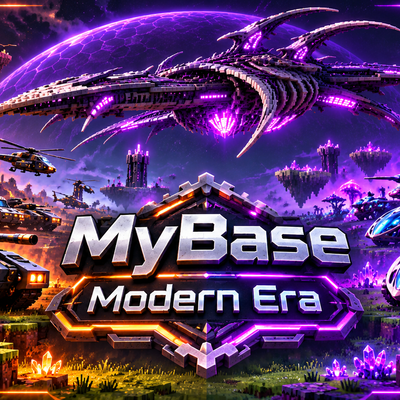
This mod adds the option for colonies, overhauls and modifies the entire Minecraft world, and introduces features such as recruiting soldiers, having colonists, and more.
 mod
Modrinth · Minecraft
Mob Capture & Ally MOD 敵味方MOD
Anyone is free to use this content to create and distribute videos. どなたでも自由に動画化・配信にご利用いただけます本MODは、実況者であるなぎすたんす様の敵味方クラフトシリーズにインスパイアされて制作いたしました※なぎすたんす様ご本人より、お名前の掲載およびインスパイア表記の許可をいただいております