Minecraft version
Back to mods 
CurseForge · Minecraft mod
Remove Potions Icons
Hide or move the potion effect icons from the top right of the screen
Choose a version Pick your version below, then grab the matching file.
Quick answer
Which Remove Potions Icons release should I use?
Latest stable file RemovePotionIcons-neoforge-26.3-2.0.0.jar
Game version 26.3
Loader NeoForge
Remove Potions Icons RemovePotionIcons-neoforge-26.3-2.0.0.jar targets 26.3 with NeoForge. The project page does not say whether this file belongs on the client, dedicated server, or both. No extra mods listed for this file.
Where it goes
Is Remove Potions Icons required on the client, server, or both?
The project page does not say whether this file belongs on the client, dedicated server, or both.
Client Source doesn’t say
Dedicated server Source doesn’t say
Loader for this release NeoForge
Required install it here Optional supported, not mandatory Not supported do not install here Source doesn’t say do not assume
The source does not explicitly classify this release as client-only or server-only.
What else does Remove Potions Icons RemovePotionIcons-neoforge-26.3-2.0.0.jar need?
RemovePotionIcons-neoforge-26.3-2.0.0.jar. Change the file and its required mods may change too.
This file does not list any required mods. Do not add a library just because a different file uses it.
This file does not list any required or optional mods.
Before you install it
Add Remove Potions Icons without breaking your instance.
Built for Remove Potions Icons RemovePotionIcons-neoforge-26.3-2.0.0.jar. Pick another file and the loader, install side or required mods may change.
- 01
Stick to this file
Use RemovePotionIcons-neoforge-26.3-2.0.0.jar. It targets 26.3 with NeoForge; another release may have different loader, side or dependency requirements.
- 02
Bring the mods it needs
This file does not list any required mods. Do not add a library just because a different file uses it.
- 03
Put it on the correct side
The project page does not say whether this file belongs on the client, dedicated server, or both.
- 04
Pick the file you checked
Use the “Get this file” button beside RemovePotionIcons-neoforge-26.3-2.0.0.jar. It opens that exact file at the source.
About this project
What does Remove Potions Icons add?
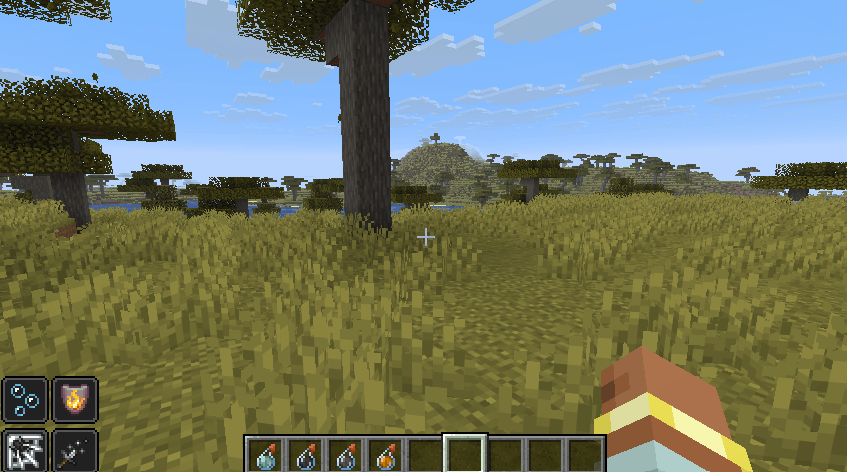
Remove Potion Icons removes the potion effect icons from the top right of the screen. You can still see all your effects in the player inventory.
Version 2.0.0 is a full rework: now for Fabric, NeoForge and Forge, fully configurable (hide all the icons, only some of them, or move them wherever you like) and client-side only. By default it still hides all the icons, like before.
BEFORE

AFTER

Features
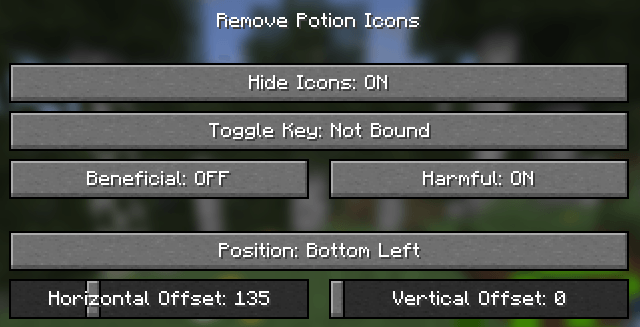
- Hide all the effect icons (default), only the beneficial ones or only the harmful ones
- Move the icons that are still shown to any corner of the screen, with a custom offset
- A key to show/hide the icons on the fly (unbound by default: set it in Controls > Key Binds > Remove Potion Icons or in the mod config screen)
- In-game config screen from the mod list (on Fabric with Mod Menu), or edit
config/rpi.toml - Client-side only: it works on any server, even if the server doesn't have the mod
- Available for Fabric, NeoForge and Forge

FAQ
What about the old versions (1.16.x)? They are Forge only and only hide the icons, without config.
BisectHosting offers quick, simple and high quality server hosting with over a dozen locations available across the world, ensuring low latency. After your purchase, the server is already configured and ready to use. With their 24/7 support and fast-response time, no issues shall stand in your way!
Use the promo code BLACKWOLF to get a 25% discount off your first month when buying any of their gaming servers.
Feel free to use this mod on your modpack
Project description from CurseForge.
Pick your setup
Remove Potions Icons by Minecraft version and loader
Choose the version and loader you play, then open the matching release.
Minecraft version
1.16.5
1 loader buildMinecraft version
1.16.4
1 loader buildCheck the dependencies, then try the file in a copied instance before changing a world you care about.
Recent files
Remove Potions Icons versions and loaders
RemovePotionIcons-neoforge-26.3-2.0.0.jar
16 Nov 2026
Client Source doesn’t say Server Source doesn’t say Dependencies No extras listed Listed on Release listing
Check the 26.3 · NeoForge setup NeoForge26.3 release
RemovePotionIcons-forge-26.3-2.0.0.jar
16 Nov 2026
Client Source doesn’t say Server Source doesn’t say Dependencies No extras listed Listed on Release listing
Check the 26.3 · Forge setup Forge26.3 release
RemovePotionIcons-fabric-26.3-2.0.0.jar
16 Nov 2026
Client Source doesn’t say Server Source doesn’t say Dependencies No extras listed Listed on Release listing
Check the 26.3 · Fabric setup Fabric26.3 release
RemovePotionsIcons-1.16.5-1.1.0
RemovePotionsIcons-1.16.5-1.1.0.jar
22 Feb 2021
Client Source doesn’t say Server Source doesn’t say Dependencies No extras listed Listed on Release listing
Check the 1.16.5 · Forge setup 1.16.5Forge release
RemovePotionsIcons-1.16.4-1.0.0
RemovePotionsIcons-1.16.4-1.0.0.jar
22 Feb 2021
Client Source doesn’t say Server Source doesn’t say Dependencies No extras listed Listed on Release listing
Check the 1.16.4 · Forge setup Forge1.16.4 release
Looking for an older file? The official CurseForge project page is in Resources.
 mod
CurseForge + Modrinth · Minecraft
Modulation
A growing collection of quality-of-life tweaks, bug fixes, and cross-mod integrations for modpack creators!
 mod
CurseForge + Modrinth · Minecraft
Reliable Advancements
In-game advancement editing and improvements to the advancement screen!
 mod
CurseForge + Modrinth · Minecraft
Villager In A Bucket
Pick up a villager in a bucket!