Kotlin for Forge Needed by bpm-1.18.2-0.4.1-beta.jar
requiredMatching file found Matched file: Kotlin for Forge 3.12.0
CurseForge · Minecraft mod
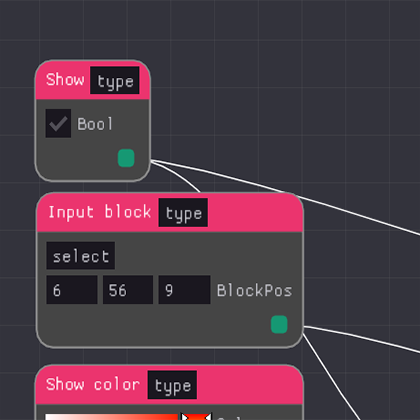
a node graph based imgui, all around quantum automation thingy.. yeah we're still trying to figure it out too (rewrite in progress)
Quick answer
bpm-1.18.2-0.4.1-beta.jar targets 1.18.1, 1.18.2, 1.18 with Forge. The project page does not say whether this file belongs on the client, dedicated server, or both. All 1 required mods have matching files.
Where it goes
The project page does not say whether this file belongs on the client, dedicated server, or both.
The source does not explicitly classify this release as client-only or server-only.
bpm-1.18.2-0.4.1-beta.jar. Change the file and its required mods may change too.
Install Kotlin for Forge first. We found matching files for this game-version and loader setup.
We only count dependency files that match this setup. A file for another loader does not fill the gap.
Before you install it
Built for bpm-1.18.2-0.4.1-beta.jar. Pick another file and the loader, install side or required mods may change.
Use bpm-1.18.2-0.4.1-beta.jar. It targets 1.18.1, 1.18.2, 1.18 with Forge; another release may have different loader, side or dependency requirements.
Install Kotlin for Forge first. We found matching files for this game-version and loader setup.
The project page does not say whether this file belongs on the client, dedicated server, or both.
Use the “Get this file” button beside bpm-1.18.2-0.4.1-beta.jar. It opens that exact file at the source.
About this project
Bpm, formerly known as blueprints, is an all in one automation solution for Minecraft, it runs using forge, fabric support may be coming soon. It supports GUI based node programming so anyone can create powerful automated tasks without any prior programming knowledge. In a matter of seconds automate transfers between containers independent of each other, create mob grinder, and so much more! This mod is in a very early stage and will have many more bug fixes and features to come!
Multi-function support (Create multiple functions in a single block that run independently of each other!) All in one automation system (From containers, to mobs, and beyond this is the ultimate tool for any task automation in game) GUI based programming! (Create automated functions through GUI based node programming.) How's it work: Craft a 'singularity' block and jump right into developing your automates systems by opening it up and selecting all the options that suit your needs!
Blueprints uses a node based system. You can use link nodes to specify a real in world link to either an inventory of items, fluids, or energy (more to come maybe). You can extract items at a specified rate using a ticking node, and you can filter the items extracted. There's a buffer node for storing near infinite items, it displays it's current inventory in the node gui, and can have it's buffer inserted into/extracted from, they can also be filtered. There's a node called the "hopper node" which as it's name suggests, allows you to select a location in world and pick up the items (can be filtered). This can be inserted into a link node (real world inventory), stored in a buffer, or kept inside the internal hopper buffer. There's also a player breaker node that also you to set the item in the fake player's hand and break a block at the selected location, this is useful for things like ores that require a pickaxe of a certain tier. Finally (for now) there's a user node, which as it's name suggests allows you to right click. The user node also has an internal buffer allowing you to push items into it, meaning you could say automate a wheat farm by inserting wheat into one user node, bone meal into another then just setting the tick speed.
If you have questions, suggestions, you want to help, or you just wanna say hi to me, feel free to join the discord link here.
Project description from CurseForge.
Pick your setup
Choose the version and loader you play, then open the matching release.
Check the dependencies, then try the file in a copied instance before changing a world you care about.
Recent files
14 Apr 2022
7 Apr 2022
26 Mar 2021
25 Mar 2021
24 Mar 2021
23 Mar 2021
23 Mar 2021
23 Mar 2021
Looking for an older file? The official CurseForge project page is in Resources.
 mod
modAdd things be more convenience, compatibility for Ad Astra!
 mod
modShare adjacent machine transfer faces over a Point and Relay network for items, fluids, gas and energy
 mod
modThis mod adds some extended function of MTR4,like ANTE.