LibX Needed by MineMention-1.20.1-3.0.1.jar
requiredMatching file found Matched file: LibX-1.20.1-5.0.12.jar

CurseForge · Minecraft mod
A mention mod for the minecraft chat.
Quick answer
MineMention-1.20.1-3.0.1.jar targets 1.20.1 with Forge. The project page does not say whether this file belongs on the client, dedicated server, or both. All 2 required mods have matching files.
Where it goes
The project page does not say whether this file belongs on the client, dedicated server, or both.
The source does not explicitly classify this release as client-only or server-only.
MineMention-1.20.1-3.0.1.jar. Change the file and its required mods may change too.
Install LibX, LibX first. We found matching files for this game-version and loader setup.
We only count dependency files that match this setup. A file for another loader does not fill the gap.
Before you install it
Built for MineMention-1.20.1-3.0.1.jar. Pick another file and the loader, install side or required mods may change.
Use MineMention-1.20.1-3.0.1.jar. It targets 1.20.1 with Forge; another release may have different loader, side or dependency requirements.
Install LibX, LibX first. We found matching files for this game-version and loader setup.
The project page does not say whether this file belongs on the client, dedicated server, or both.
Use the “Get this file” button beside MineMention-1.20.1-3.0.1.jar. It opens that exact file at the source.
About this project
MineMention
MineMention is a mention mod for the chat so you can specify who should get your messages better.
MineMention allows you to mention people or groups in chat. Whenever your message contains at least one mention, it will not be displayed to all users but only to the ones you mentioned. But you can mention multiple people.

whenever you type an @ you'll get autocompletion for your mentions:
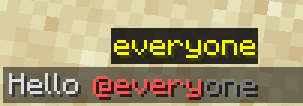
MineMention has four builtin Groups you can mention but other mods can easily add more:
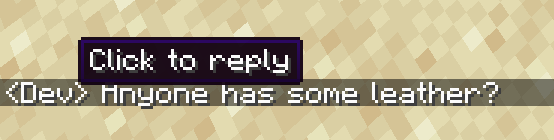
You can also click on mentions or the sender name of a message in the chat to write a reply:
Now you might think: when I write private messages with another payer I don't want to type @PlayerName all the time.
Luckily you can run the command /d PlayerName to change your default mentions (those are applied if you don't provide a mention explicitly)
To change the default mentions run /d with a list of mentions as arguments that should be your new default mentions (but without the preceding @ character)
Run /d without arguments to reset it to @everyone
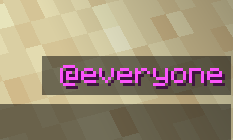
You can also see your current default mentions right over your chat:
Whenever multiple mods register the same special mention (seems to happen a lot with @team), none of them will be available by default. You can however change that in the config. There's a map called mentions where you can specify what special mention should be what. The key is always the name of the special mention and the value is an id of what the mentions does. You can rediret all mentions except @everyone. If you redirect a mention to minemention:none, you can remove it.
Example:
{ "mentions": { "here": "minemention:none", "near": "minemention:none", "close": "minemention:near" }}
This would remove @here and rename @near to @close.
The ids of the builtin mentions are minemention:everyone, minemention:here, minemention:near, minemention:ftb and minemention:none.
Project description from CurseForge.
Pick your setup
Choose the version and loader you play, then open the matching release.
Check the dependencies, then try the file in a copied instance before changing a world you care about.
Recent files
28 Jun 2023
16 Jun 2023
23 Apr 2023
7 Mar 2023
28 Jul 2022
12 Jul 2022
16 Jun 2022
6 May 2022
6 Mar 2022
21 Dec 2021
15 Oct 2021
9 Sept 2021
Looking for an older file? The official CurseForge project page is in Resources.
 mod
modFast PvP quickcast on middle click: instantly use Ender Pearl, Wind Charge, or place End Crystal and return to your previous hotbar slot.
 mod
modAdd music function for Simple Voice Chat mod
 mod
modAdds QOL Features to trapping adds cart, armor stand, windcharge, snow golem and arrow counters More features will be added in the future