Minecraft version
Back to mods 
CurseForge · Minecraft mod
UtilitiX
Nice to have items, blocks, and other features.
Choose a version Pick your version below, then grab the matching file.
Quick answer
Which UtilitiX release matches 1.18 Forge?
beta file 1.18-0.3.1
Game version 1.18
Loader Forge
UtilitiX 1.18-0.3.1 targets 1.18 with Forge. Installation on the client is optional. Installation on the dedicated server is optional. No extra mods listed for this file.
Where it goes
Is UtilitiX required on the client, server, or both?
Installation on the client is optional. Installation on the dedicated server is optional.
Client Optional
Dedicated server Optional
Loader for this release Forge
Required install it here Optional supported, not mandatory Not supported do not install here Source doesn’t say do not assume
The source marks this as usable on both the client and server.
What else does UtilitiX 1.18-0.3.1 need?
1.18-0.3.1 on 1.18 Forge. Every mod below is checked against that same setup.
This file does not list any required mods. Do not add a library just because a different file uses it.
This file does not list any required or optional mods.
Before you install it
Add UtilitiX without breaking your instance.
Built for UtilitiX 1.18-0.3.1 on 1.18 Forge. Pick another file and the loader, install side or required mods may change.
- 01
Stick to this file
Use 1.18-0.3.1. It targets 1.18 with Forge; another release may have different loader, side or dependency requirements.
- 02
Bring the mods it needs
This file does not list any required mods. Do not add a library just because a different file uses it.
- 03
Put it on the correct side
Installation on the client is optional. Installation on the dedicated server is optional.
- 04
Pick the file you checked
Use the “Get this file” button beside 1.18-0.3.1. It opens that exact file at the source.
About this project
What does UtilitiX add?
 A Minecraft mod which adds various things. Some useful things, other not so useful things.
 There is no main category the mod fits in. It adds e.g. redstone things, combat things, and nice to have things.
A list with the features is available in the Readme on GitHub.
This mod is not completely done yet. There are some things which will be added in future. Once version 1.0.0 is released, all planned features are included.
Here you can see an image of the current creative tab of the mod, which includes all the items of the latest version.
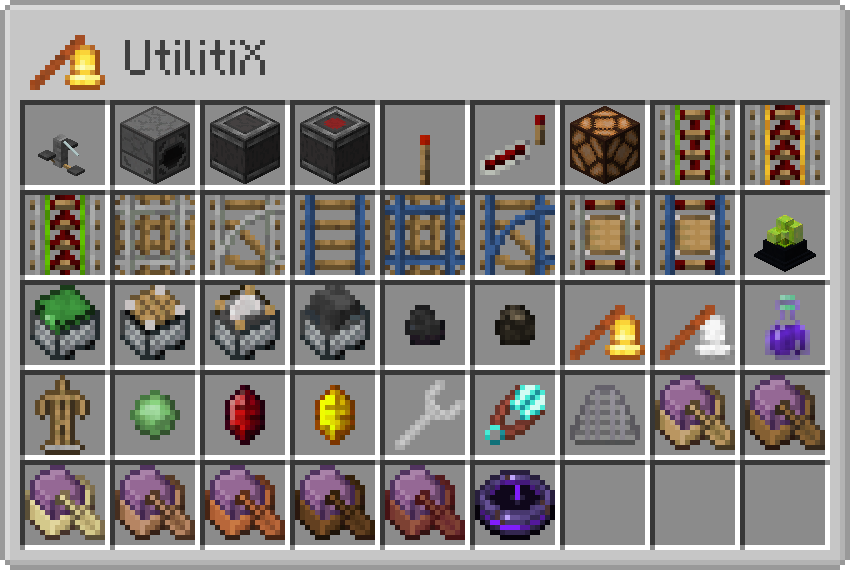
If there is any recipe missing, it is intended because the item is unfinished or can be obtained in any other way.
Here you can find some YouTube Shorts which show a few things:
Press here to view the whole playlist.
 #Werbung #Ad
Project description from CurseForge.
Pick your setup
UtilitiX by Minecraft version and loader
Choose the version and loader you play, then open the matching release.
Minecraft version
1.21.1
1 loader buildMinecraft version
1.20.1
2 loader buildsMinecraft version
1.19.2
1 loader buildMinecraft version
1.19.1
1 loader buildMinecraft version
1.19
1 loader buildMinecraft version
1.18.2
1 loader buildMinecraft version
1.18.1
1 loader buildMinecraft version
1.18
1 loader buildMinecraft version
1.17.1
1 loader buildMinecraft version
1.16.5
1 loader buildMinecraft version
1.16.4
1 loader buildShowing the newest 12 of 13 game versions. Older files are in the list below.
Check the dependencies, then try the file in a copied instance before changing a world you care about.
Recent files
UtilitiX versions and loaders
1.18-0.3.1
UtilitiX-1.18-0.3.1.jar
8 Dec 2021
Client Optional Server Optional Dependencies No extras listed Listed on Release listing
Check the 1.18 · Forge setup 1.18Forge beta
1.18-0.3.0
UtilitiX-1.18-0.3.0.jar
4 Dec 2021
Client Optional Server Optional Dependencies No extras listed Listed on Release listing
Check the 1.18 · Forge setup 1.18Forge beta
Looking for an older file? The official CurseForge project page is in Resources.
 mod
Modrinth · Minecraft
TslatEntityStatus
View entity health and other statuses. Make smacking things fun again!
 mod
Modrinth · Minecraft
Enderman, Leave My Blocks!
Prevents Endermen from picking up blocks.
 mod
Modrinth · Minecraft
MC-Sync
Two-way chat between your Minecraft server and a Discord channel, plus server status, whitelist and alerts. No open port needed. Companion plugin for the Minecraft Sync Discord bot.