LibX Needed by UtilitiX 1.19-0.5.4
requiredMatching file found Matched file: 1.19-4.0.7

CurseForge · Minecraft mod
Nice to have items, blocks, and other features.
Quick answer
UtilitiX 1.19-0.5.4 targets 1.19 with Forge. Installation on the client is optional. Installation on the dedicated server is optional. All 1 required mods have matching files.
Where it goes
Installation on the client is optional. Installation on the dedicated server is optional.
The source marks this as usable on both the client and server.
1.19-0.5.4 on 1.19. Every mod below is checked against that same setup.
Install LibX first. We found matching files for this game-version and loader setup.
We only count dependency files that match this setup. A file for another loader does not fill the gap.
Before you install it
Built for UtilitiX 1.19-0.5.4 on 1.19. Pick another file and the loader, install side or required mods may change.
Use 1.19-0.5.4. It targets 1.19 with Forge; another release may have different loader, side or dependency requirements.
Install LibX first. We found matching files for this game-version and loader setup.
Installation on the client is optional. Installation on the dedicated server is optional.
Use the “Get this file” button beside 1.19-0.5.4. It opens that exact file at the source.
About this project
 A Minecraft mod which adds various things. Some useful things, other not so useful things.
 There is no main category the mod fits in. It adds e.g. redstone things, combat things, and nice to have things.
A list with the features is available in the Readme on GitHub.
This mod is not completely done yet. There are some things which will be added in future. Once version 1.0.0 is released, all planned features are included.
Here you can see an image of the current creative tab of the mod, which includes all the items of the latest version.
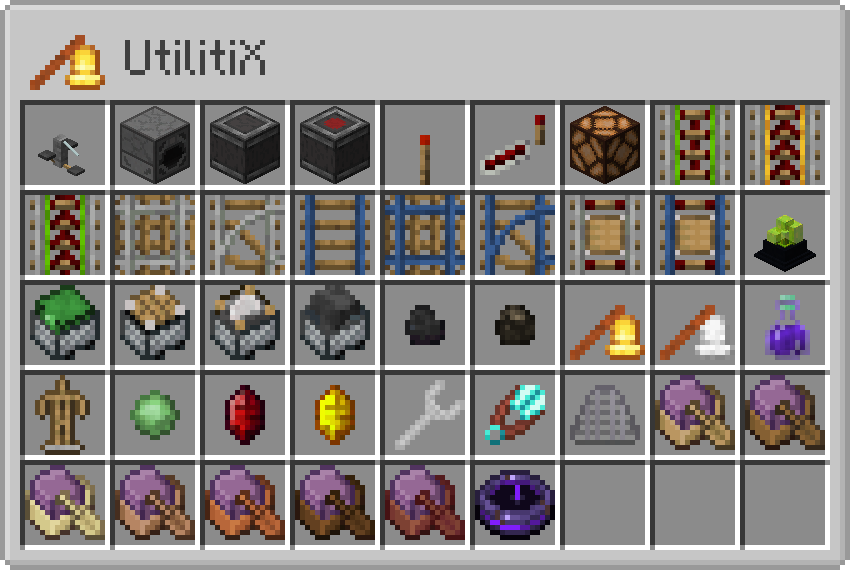
If there is any recipe missing, it is intended because the item is unfinished or can be obtained in any other way.
Here you can find some YouTube Shorts which show a few things:
Press here to view the whole playlist.
 #Werbung #Ad
Project description from CurseForge.
Pick your setup
Choose the version and loader you play, then open the matching release.
Showing the newest 12 of 13 game versions. Older files are in the list below.
Check the dependencies, then try the file in a copied instance before changing a world you care about.
Recent files
UtilitiX-1.19-0.5.4.jar
29 Jul 2022
UtilitiX-1.19-0.5.3.jar
17 Jul 2022
UtilitiX-1.19-0.5.2.jar
13 Jul 2022
UtilitiX-1.19-0.5.1.jar
11 Jul 2022
UtilitiX-1.19-0.5.0.jar
20 Jun 2022
Looking for an older file? The official CurseForge project page is in Resources.