Cupboard Needed by connectivity-fabric-26.1-7.6.jar
requiredMatching file found Matched file: cupboard-fabric-26.2-3.9.jar
CurseForge · Minecraft mod
Fix Login timeouts, Packet sizes errors, Payloads errors, ghostblocks and more.
Quick answer
connectivity-fabric-26.1-7.6.jar targets 26.1, 26.1.1, 26.1.2 with Fabric. The project page does not say whether this file belongs on the client, dedicated server, or both. All 1 required mods have matching files.
Where it goes
The project page does not say whether this file belongs on the client, dedicated server, or both.
The source does not explicitly classify this release as client-only or server-only.
connectivity-fabric-26.1-7.6.jar. Change the file and its required mods may change too.
Install Cupboard first. We found matching files for this game-version and loader setup.
We only count dependency files that match this setup. A file for another loader does not fill the gap.
Before you install it
Built for connectivity-fabric-26.1-7.6.jar. Pick another file and the loader, install side or required mods may change.
Use connectivity-fabric-26.1-7.6.jar. It targets 26.1, 26.1.1, 26.1.2 with Fabric; another release may have different loader, side or dependency requirements.
Install Cupboard first. We found matching files for this game-version and loader setup.
The project page does not say whether this file belongs on the client, dedicated server, or both.
Use the “Get this file” button beside connectivity-fabric-26.1-7.6.jar. It opens that exact file at the source.
About this project
 Lightweight mod which solves several connection problems like Login-Timeouts, DecoderException, Packet size limits, Ghostblock issues, Payload too large and more. It also offers commands to analyze network traffic and a bunch of debugging utilities, advanced error logging, packet logging etc.
Requires Cupboard dependency to be installed in newer versions
The mod is not required on both sides, but offers useful functionality for both sides.
Randompatches (in)compatibility:
Set this in the randompatches.toml config file so random patches does not crash when started alongside connectivity:
mixin_blacklist = ["ServerPlayNetHandlerKeepAlive"]
Connectivity has some overlap with randompatches and happens to apply first, which makes random patches crash.
Timeoutout/XL packets mod is incompatible/not needed alongside this

If you enjoy this mod consider supporting the development, any support is greatly appreciated.
The development is an unpaid free-time activity, so any support helps being able to spend more time on it.
You can support me on Patreon or just spreading the word around.

Network stats and Commands:
Commands for network stats show the traffic rate aswell as which packet is causing it. kb is short for kilobyte
Statistics are refreshed once per minute and save a history of up to 5 minutes. All commands have an optional minute count you can give it to display(1-5, 5 is default when no argument is given)
Normally most traffic is caused by chunk packets, modded packets should rarely exceed those.
Client side command to show outgoing traffic: /connectivity packetsClient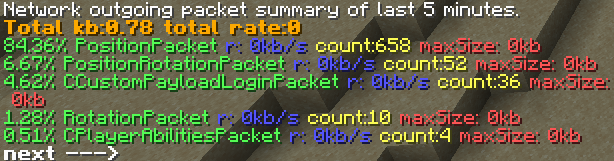
Server commands:
List traffic rate of all players: /connectivity packetsAllPlayers
List packets by type send to a specific player(example is player Dev): /connectivity packetsPlayer Dev

List all packets sent out by the server by packet type. /connectivity packetsSummary

Print the largest packet of a type to the latest.log, e.g. the packet called MovePacket: /connectivity printpacket MovePacket
Project description from CurseForge.
Pick your setup
Choose the version and loader you play, then open the matching release.
Check the dependencies, then try the file in a copied instance before changing a world you care about.
Recent files
3 Apr 2026
3 Apr 2026
9 Mar 2026
9 Mar 2026
22 Dec 2025
22 Dec 2025
22 Dec 2025
22 Dec 2025
22 Dec 2025
22 Dec 2025
22 Dec 2025
21 Dec 2025
Looking for an older file? The official CurseForge project page is in Resources.
 mod
modBrowse biome mob spawns, ore distribution, and related biome block information directly in JEI.
 mod
modA damage testing tool for mod developers - spawn configurable tester entities to track and analyze damage output in real-time.
 mod
modA Create addon that adds a bunch of features to make Create trains more realistic.