Minecraft version
Back to mods 
CurseForge · Minecraft mod
Hidden Names
Set rules for hiding your nameplate, or customize your nameplate!
Choose a version Pick your version below, then grab the matching file.
Quick answer
Which Hidden Names release should I use?
Latest stable file hiddennames-1.20.1-1.0.6.jar
Game version 1.20.2, 1.20.5, 1.20.3
Loader Forge
Hidden Names hiddennames-1.20.1-1.0.6.jar targets 1.20.2, 1.20.5, 1.20.3 with Forge. The project page does not say whether this file belongs on the client, dedicated server, or both. No extra mods listed for this file.
Where it goes
Is Hidden Names required on the client, server, or both?
The project page does not say whether this file belongs on the client, dedicated server, or both.
Client Source doesn’t say
Dedicated server Source doesn’t say
Loader for this release Forge
Required install it here Optional supported, not mandatory Not supported do not install here Source doesn’t say do not assume
The source does not explicitly classify this release as client-only or server-only.
What else does Hidden Names hiddennames-1.20.1-1.0.6.jar need?
hiddennames-1.20.1-1.0.6.jar. Change the file and its required mods may change too.
This file does not list any required mods. Do not add a library just because a different file uses it.
This file does not list any required or optional mods.
Before you install it
Add Hidden Names without breaking your instance.
Built for Hidden Names hiddennames-1.20.1-1.0.6.jar. Pick another file and the loader, install side or required mods may change.
- 01
Stick to this file
Use hiddennames-1.20.1-1.0.6.jar. It targets 1.20.2, 1.20.5, 1.20.3 with Forge; another release may have different loader, side or dependency requirements.
- 02
Bring the mods it needs
This file does not list any required mods. Do not add a library just because a different file uses it.
- 03
Put it on the correct side
The project page does not say whether this file belongs on the client, dedicated server, or both.
- 04
Pick the file you checked
Use the “Get this file” button beside hiddennames-1.20.1-1.0.6.jar. It opens that exact file at the source.
About this project
What does Hidden Names add?
Hide and customize other player's names with commands
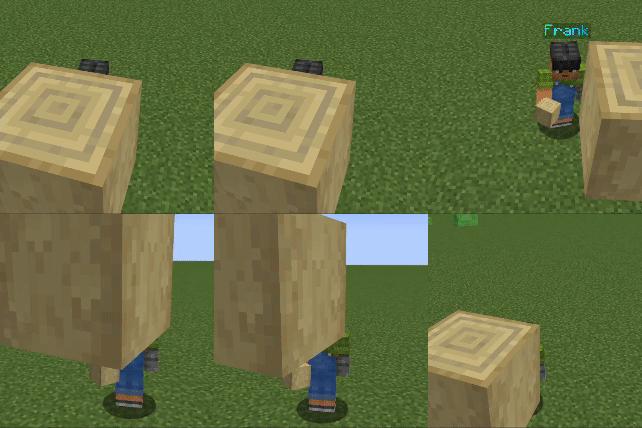
Commands
/hiddennames nameplateVisible [player(s)] [true/false]
/hiddennames defaultVisible [true/false]
/hiddennames blocksHideName [true/false] Blocks in the way hide the nameplate
/hiddennames setName [player(s)] [colour] [animation] ["name"] The name argument has to be in quotes
/hiddennames setName [player(s)] name ["name"]
/hiddennames setName [player(s)] colour [colour]
/hiddennames setName [player(s)] animation [animation]
/hiddennames setName [player(s)] reset
All commands require op level 2 or more to execute.
Support Me
- Join my Discord Server
Project description from CurseForge.
Pick your setup
Hidden Names by Minecraft version and loader
Choose the version and loader you play, then open the matching release.
Minecraft version
1.21.3
1 loader buildMinecraft version
1.21.2
1 loader buildMinecraft version
1.21.1
2 loader buildsMinecraft version
1.21
2 loader buildsMinecraft version
1.20.6
1 loader buildMinecraft version
1.20.5
1 loader buildMinecraft version
1.20.4
2 loader buildsMinecraft version
1.20.3
1 loader buildMinecraft version
1.20.2
1 loader buildMinecraft version
1.20.1
1 loader buildMinecraft version
1.19.4
1 loader buildShowing the newest 12 of 18 game versions. Older files are in the list below.
Check the dependencies, then try the file in a copied instance before changing a world you care about.
Recent files
Hidden Names versions and loaders
hiddennames-1.20.1-1.0.6.jar
11 Mar 2025
Client Source doesn’t say Server Source doesn’t say Dependencies No extras listed Listed on Release listing
Check the 1.20.6 · Forge setup 1.20.21.20.51.20.31.20.1 release
1.21.0-1.0.6
hiddennames-1.21.0-1.0.6.jar
11 Mar 2025
Client Source doesn’t say Server Source doesn’t say Dependencies No extras listed Listed on Release listing
Check the 1.21.4 · NeoForge setup 1.211.21.4NeoForge1.21.3 release
1.21.0-1.0.5
hiddennames-1.21.0-1.0.5.jar
19 Feb 2025
Client Optional Server Optional Dependencies No extras listed Listed on Release listing
Check the 1.21.4 · NeoForge setup 1.211.21.11.21.21.21.3 release
HiddenNames-1.21-f1.0.2.jar
13 Jan 2025
Client Source doesn’t say Server Source doesn’t say Dependencies No extras listed Listed on Release listing
Check the 1.21.1 · Fabric setup Fabric1.21.1 release
hiddennames-1.20.1-1.0.5.jar
18 Aug 2024
Client Source doesn’t say Server Source doesn’t say Dependencies No extras listed Listed on Release listing
Check the 1.20.1 · Forge setup 1.20.1Forge release
hiddennames-1.21.0-1.0.5.jar
18 Aug 2024
Client Source doesn’t say Server Source doesn’t say Dependencies No extras listed Listed on Release listing
Check the 1.21.1 · NeoForge setup 1.21NeoForge1.21.1 release
HiddenNames-1.21-f1.0.1.jar
18 Aug 2024
Client Source doesn’t say Server Source doesn’t say Dependencies 1 required · 1 unchecked Listed on Release listing
Check the 1.21.1 · Fabric setup 1.21Fabric1.21.1 release
hiddennames-1.21.0-1.0.4.jar
15 Aug 2024
Client Source doesn’t say Server Source doesn’t say Dependencies No extras listed Listed on Release listing
Check the 1.21.1 · NeoForge setup 1.21NeoForge1.21.1 release
HiddenNames-1.21-f1.0.0.jar
15 Aug 2024
Client Source doesn’t say Server Source doesn’t say Dependencies 1 required · 1 unchecked Listed on Release listing
Check the 1.21.1 · Fabric setup Fabric1.21.1 release
hiddennames-1.20.1-1.0.4.jar
15 Aug 2024
Client Source doesn’t say Server Source doesn’t say Dependencies No extras listed Listed on Release listing
Check the 1.20.1 · Forge setup 1.20.1Forge release
hiddennames-1.21.0-1.0.3.jar
15 Aug 2024
Client Source doesn’t say Server Source doesn’t say Dependencies No extras listed Listed on Release listing
Check the 1.21.1 · NeoForge setup 1.21NeoForge1.21.1 release
hiddennames-1.18.2-1.0.5.jar
5 Aug 2024
Client Source doesn’t say Server Source doesn’t say Dependencies No extras listed Listed on Release listing
Check the 1.18.2 · Forge setup 1.18.2Forge release
Looking for an older file? The official CurseForge project page is in Resources.
 mod
CurseForge + Modrinth · Minecraft
Better Gold Expansion
This mod adds more content for Minecraft gold ingots. It features various building blocks including doors, lanterns and fences, alongside a brand‑new sturdygold material with its full set of tools and building blocks.
 mod
CurseForge · Minecraft
LRS Emoji
62 emoji and character decoration blocks in four creative tabs, by MertcanLRS and Kaan.
 mod
CurseForge · Minecraft
Economy (Elementary RPG)
A lightweight RPG economy with physical coins, a persistent wallet, player payments, and fully configurable rewards