Cloth Config API (Fabric/Forge/NeoForge) Optional for MCLangSplit 2.2.0
optionalNo matching file
CurseForge · Minecraft mod
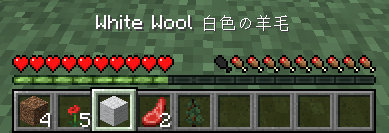
This mod injects a configurable second language into all text strings in the game. This could be useful for learning a second language without having to keep switching between languages. This mod has been designed to be purely client-side.
Quick answer
MCLangSplit 2.2.0 targets 1.20 with Fabric. It must be installed on the client. Do not install it on the dedicated server. 1 required mod needs a matching file.
Where it goes
It must be installed on the client. Do not install it on the dedicated server.
This file is marked client-only.
2.2.0 on 1.20 Fabric. Every mod below is checked against that same setup.
Install Fabric API first, but 1 required mod has no matching file for this setup. Do not mix loader builds to force a match.
We only count dependency files that match this setup. A file for another loader does not fill the gap.
Before you install it
Built for MCLangSplit 2.2.0 on 1.20 Fabric. Pick another file and the loader, install side or required mods may change.
Use 2.2.0. It targets 1.20 with Fabric; another release may have different loader, side or dependency requirements.
Install Fabric API first, but 1 required mod has no matching file for this setup. Do not mix loader builds to force a match.
It must be installed on the client. Do not install it on the dedicated server.
Use the “Get this file” button beside 2.2.0. It opens that exact file at the source.
About this project
If you're looking for the Fabric version of this mod, use the link below:
https://www.curseforge.com/minecraft/mc-mods/mclangsplit-fabric
This mod injects a configurable second language into all text strings in the game. This could be useful for learning a second language without having to keep switching between languages. This mod has been designed to be purely client-side.
There is a hotkey for cycling though the configured language modes (default R):
Original -> Alternate -> Both
As of v2.x of this mod, configuration will now be done in JSON instead of TOML.
{ "language": "ja_jp", "ignoreKeys": ["menu.*"], "includeKeys": ["menu.singleplayer"], "ignoreTooltips": false, "mode": "BOTH"}Included alongside this change is support for Cloth Config.
Check out the Wiki for more information:
https://github.com/AntMCDev/MCLangSplit/wiki/Configuration

Author's Note:
This project is licensed under the MIT license - meaning that you can freely make changes and distribute the source code etc, however if you do so please link back to this project. Also, check out my skyblock mod if you're interested:
Project description from CurseForge.
Pick your setup
Choose the version and loader you play, then open the matching release.
Check the dependencies, then try the file in a copied instance before changing a world you care about.
Recent files
mclangsplit-fabric-2.2.0.jar
11 Jun 2023
Looking for an older file? The official CurseForge project page is in Resources.
 mod
300 craftable TNTs, from harmless mini TNTs to nukes, black holes, a TNT x100,000 and THE ABSOLUTE CORRUPTION OF ALL EXISTENCE (power -∞). Build your own at the Workbench and see every TNT in 3D in the guide book.
 mod
Minecraft Fabric mod which allows you to join EVERY Minecraft server version (Classic, Alpha, Beta, Release, April Fools)
 mod
Dogfight in 30+ flyable jets, WWII warbirds and helicopters, then take warships and submarines to sea. F-22, F-35, Spitfire, Apache, a sailing Nimitz carrier, air refuelling and a campaign. (Formerly known as Fighter Jets Overhaul)