Silent Lib (silentlib) Needed by iconify-1.16.5-0.1.1.jar
requiredMatching file found Matched file: silent-lib-1.16.3-4.9.6.jar

CurseForge · Minecraft mod
Adds additional tooltip information to items marked by icons
Quick answer
iconify-1.16.5-0.1.1.jar targets 1.16.3, 1.16.5, 1.16.4 with Forge. The project page does not say whether this file belongs on the client, dedicated server, or both. All 1 required mods have matching files.
Where it goes
The project page does not say whether this file belongs on the client, dedicated server, or both.
The source does not explicitly classify this release as client-only or server-only.
iconify-1.16.5-0.1.1.jar on 1.16.4 Forge. Every mod below is checked against that same setup.
Install Silent Lib (silentlib) first. We found matching files for this game-version and loader setup.
We only count dependency files that match this setup. A file for another loader does not fill the gap.
Before you install it
Built for iconify-1.16.5-0.1.1.jar on 1.16.4 Forge. Pick another file and the loader, install side or required mods may change.
Use iconify-1.16.5-0.1.1.jar. It targets 1.16.3, 1.16.5, 1.16.4 with Forge; another release may have different loader, side or dependency requirements.
Install Silent Lib (silentlib) first. We found matching files for this game-version and loader setup.
The project page does not say whether this file belongs on the client, dedicated server, or both.
Use the “Get this file” button beside iconify-1.16.5-0.1.1.jar. It opens that exact file at the source.
About this project
Iconify has one goal: make comparing items easier. It does so by adding additional information to the items' tooltips, but labels them with icons instead of text. For example, an items durability (max uses) is marked with a diamond, and the value is displayed after that.
Iconify replaces Equipment Tooltips. The name was changed because the mod is much more versatile now.
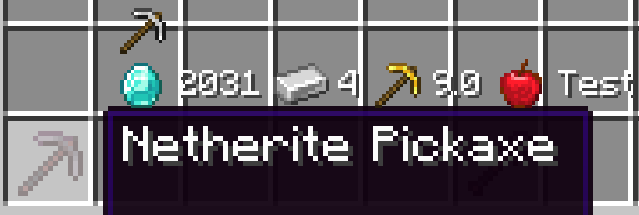 Screenshot of an early version (0.1.0)
New icons can be added with data packs. Likewise, mods can also add new icons and even new text functions, which allow custom information to be displayed next to the icon.
At the time of writing (before initial release), the API is very unstable. Expect major code changes in the future. Because of this, I will omit most information about it for now. The wiki on GitHub will contain more information once the API is more stable.
Icons check for items that match certain conditions and display themselves when their conditions match. Icons also have a texture and text function associated with them.
Text functions create text based on the item. For example, the food text function will show the hunger and saturation restored by food items. Icons will display the text produced next to their image.
Project description from CurseForge.
Pick your setup
Choose the version and loader you play, then open the matching release.
Check the dependencies, then try the file in a copied instance before changing a world you care about.
Recent files
5 Aug 2021
Looking for an older file? The official CurseForge project page is in Resources.
 mod
A Minecraft Mod for Custom LAN servers Setting
 mod
RFTools Storage addon
 mod
Stop rerolling villagers. Press Pick trade and select any 2 trades its profession can offer (max-level enchanted books included). Fast trade and saves time.